





What are practical tips for managing screen time & promoting healthy game play?
Navigating the Digital Playground: A Parent’s Guide
In an increasingly digital world, managing children’s screen time and ensuring their gaming experiences are positive and balanced has become a top priority for many parents. It’s not about banning screens entirely, but rather about fostering healthy habits that allow children to enjoy digital entertainment while also thriving in other aspects of life. This guide offers practical, actionable tips to help you strike that crucial balance.
Establishing Healthy Boundaries and Expectations
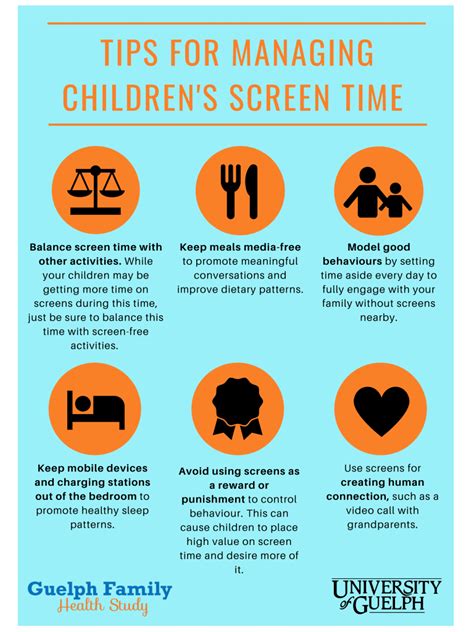
The first step towards effective screen time management is setting clear, consistent rules. Discuss as a family what constitutes appropriate screen time, including daily limits, acceptable content, and specific times or days when screens are off-limits. Consider implementing a “tech curfew” before bedtime to promote better sleep.
A family media plan can be incredibly helpful. Websites like the American Academy of Pediatrics offer templates to guide you in creating a personalized plan that outlines rules for all family members, including parents. Remember, consistency is key; children thrive on predictability.
Beyond setting limits, actively participate in your child’s digital world. Play games with them, watch videos together, and engage in conversations about what they’re seeing and doing online. This not only builds connection but also gives you insight into their digital experiences.

Promoting Balanced Activities and Interests
While screens offer entertainment, it’s vital to encourage a rich array of offline activities. Dedicate time each day for physical play outdoors, creative projects, reading books, or engaging in hobbies. These activities are crucial for physical development, social skills, and imaginative thinking.
Designate screen-free times and zones within your home. For example, mealtimes can be screen-free zones, promoting family conversation. Similarly, bedrooms might be designated as screen-free at night to ensure adequate rest. Prioritizing sleep, physical activity, and homework before screen time sends a clear message about what’s most important.

Understanding Game Content and Context
Not all games are created equal. Take the time to research games before your child plays them. Utilize rating systems like ESRB (Entertainment Software Rating Board) in North America or PEGI (Pan European Game Information) in Europe, which provide age recommendations and content descriptors. These ratings can help you make informed decisions about whether a game is appropriate for your child.
Beyond ratings, play a game yourself or watch your child play. This direct experience allows you to understand the gameplay, themes, and potential social interactions. Discussing game experiences with your child—what they liked, what was challenging, or how they felt—can also foster critical thinking and help them process their digital experiences.

Leading by Example and Modeling Healthy Habits
Children are keen observers, and they often mirror their parents’ behavior. If you spend excessive time glued to your phone or constantly checking emails during family time, your children are likely to adopt similar habits. Model the behavior you wish to see.
Be mindful of your own screen usage, especially when interacting with your children. Put your phone away during conversations, at mealtimes, and when engaging in family activities. Being present and giving your full attention shows respect and strengthens family bonds, teaching children the value of real-world interactions over digital distractions.

Utilizing Parental Controls and Monitoring Tools
Most devices, operating systems, and gaming consoles offer built-in parental controls. Take the time to explore and set these up. They can restrict access to certain apps, filter inappropriate content, manage purchase options, and enforce time limits. These tools provide an extra layer of protection and help reinforce the rules you’ve established.
Consider using third-party monitoring apps if you feel it’s necessary, but always ensure transparency with your children about their use. The goal isn’t covert surveillance, but rather a shared understanding of safety and responsibility in the digital space. Regularly review and adjust these settings as your children grow and their needs evolve.

Conclusion
Managing screen time and promoting healthy game play is an ongoing journey that requires communication, consistency, and flexibility. By setting clear boundaries, encouraging diverse interests, understanding content, leading by example, and leveraging available tools, parents can guide their children toward a balanced and positive relationship with technology. The ultimate aim is to equip children with the skills to navigate the digital world responsibly, ensuring screens enhance rather than detract from their overall well-being.

