





Best Nintendo Switch MicroSD? Maximize digital game storage & save data.

Why Your Nintendo Switch Needs a MicroSD Card
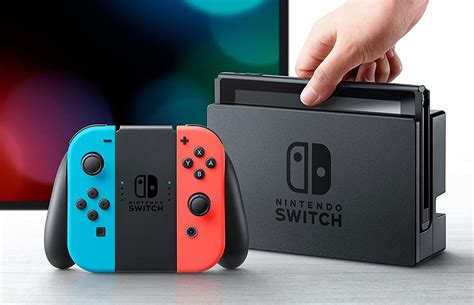
The Nintendo Switch, a phenomenal console for gaming on the go or at home, comes with a rather modest 32GB (original and Lite models) or 64GB (OLED model) of internal storage. While this might seem sufficient for a few games, modern titles, especially digital downloads, can quickly consume this space. Games like The Legend of Zelda: Tears of the Kingdom or Pokémon Scarlet and Violet can take up significant chunks, leaving you constantly deleting and re-downloading titles.
A microSD card acts as an essential expansion, allowing you to store a vast library of digital games, DLC, and software updates without worrying about running out of space. While save data is primarily stored on the console itself and backed up to the cloud (with a Nintendo Switch Online subscription), game files, screenshots, and video captures directly benefit from external storage.
Understanding MicroSD Card Types and Speed Ratings
Not all microSD cards are created equal, and choosing the right one is vital for optimal Switch performance. You’ll encounter several key terms:
- SDHC vs. SDXC: SDHC (Secure Digital High Capacity) cards range from 4GB to 32GB. SDXC (Secure Digital eXtended Capacity) cards range from 64GB to 2TB. Given the size of modern games, an SDXC card is highly recommended. The Switch supports SDXC.
- Speed Class: Indicated by a number inside a ‘C’ (e.g., C10 for Class 10, meaning at least 10MB/s write speed). While the Switch supports C10, newer, faster standards are better.
- UHS Speed Class: Indicated by a number inside a ‘U’ (U1 for 10MB/s, U3 for 30MB/s). U3 is generally preferred for the Switch.
- Video Speed Class: Indicated by ‘V’ followed by a number (V10, V30, V60, V90). V30 offers a sustained write speed of 30MB/s, which is excellent for gaming.
For the Nintendo Switch, the most crucial factor is read speed, as this impacts game loading times. Nintendo officially recommends using a microSD card with a transfer speed between 60MB/s and 95MB/s. Look for cards with a UHS-I (Ultra High Speed Phase I) rating, specifically U3 or V30, for the best balance of speed and value.
What to Look For: Key Specifications for Switch MicroSD Cards
When selecting a microSD card for your Switch, prioritize these specifications:
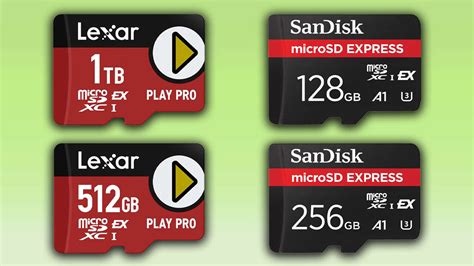
- Capacity: Aim for at least 128GB, but 256GB or 512GB offers much more breathing room. If you primarily download digital games, 1TB might be a worthwhile investment. Remember, games only get bigger.
- Speed: Look for UHS-I (U3 or V30) cards. This ensures faster game loading times and smoother performance. While UHS-II cards exist, the Switch does not support their full speed benefits, making them an unnecessary expense.
- Brand Reputation: Stick to reputable brands known for reliability and performance. SanDisk, Samsung, and Lexar are consistently top performers in this category.
Top MicroSD Card Recommendations for Nintendo Switch
Based on performance, reliability, and value, here are some of the best microSD cards for your Nintendo Switch:
- SanDisk Extreme / Extreme PRO: Often considered the gold standard, these cards offer excellent read/write speeds, ensuring quick loading times. They come in various capacities and are highly reliable.
- SanDisk Ultra: A more budget-friendly option that still delivers solid performance for the Switch. Its read speeds are well within Nintendo’s recommendations.
- Samsung EVO Plus / EVO Select: Samsung’s offerings are consistently strong competitors, providing great value with robust performance and reliability. The EVO Select is often Amazon’s exclusive version of the EVO Plus.
- Lexar PLAY: Designed specifically for gaming and media, Lexar PLAY cards offer competitive speeds and large capacities at attractive price points.
While Nintendo offers officially licensed microSD cards, these are often rebranded versions of existing cards (like SanDisk’s) and typically carry a premium price for the branding. You can often get the same or better performance from a non-licensed card for less money.

Installation and Management Tips
Installing a microSD card is straightforward: simply open the kickstand on the back of your Switch and insert the card into the slot until it clicks. The Switch will recognize it automatically. If you’re upgrading, you can transfer your data from an old card to a new one using a computer, but remember that game saves are separate.
Always purchase your microSD cards from reputable retailers to avoid counterfeit products, which can lead to data loss and performance issues. While a larger initial investment, a high-quality, high-capacity microSD card will save you headaches and enhance your Nintendo Switch gaming experience for years to come.
Conclusion: Optimize Your Switch Experience
Investing in a quality microSD card is perhaps the most essential upgrade for any Nintendo Switch owner, particularly those who embrace digital gaming. By choosing a reputable brand with ample capacity and appropriate speed (UHS-I U3/V30), you’ll ensure fast loading times, abundant storage for your ever-growing game library, and a seamless gaming experience. Don’t let limited storage hold you back – unlock your Switch’s full potential with the right microSD card.


