





Nintendo Switch storage full? What’s the best SD card for more games?

The Nintendo Switch, an incredibly versatile console, offers a fantastic library of games, both physical and digital. However, its built-in storage of 32GB (or 64GB for the OLED model) fills up surprisingly quickly, especially with large digital titles and essential game updates. If you’re constantly deleting games to make space for new ones, it’s time to consider expanding your storage. The good news? It’s incredibly easy to do with a microSD card.
Understanding Your Switch’s Storage Needs
Before diving into purchasing an SD card, it’s helpful to understand why your Switch’s internal storage is so limited. A portion of the console’s internal memory is reserved for the operating system, leaving even less for your games. Digital game downloads, save data, screenshots, and video clips all compete for this precious space. Many modern Switch games can easily exceed 5-10GB, with some like The Legend of Zelda: Tears of the Kingdom or Pokémon Scarlet/Violet requiring over 15GB each. Physical game cartridges still require updates and save data to be stored internally, so even a physical game library can quickly eat into your available space.
What Type of SD Card Does the Nintendo Switch Use?
The Nintendo Switch exclusively uses microSD cards. Specifically, it supports three types:
- microSD (2GB max): Older and rarely used today.
- microSDHC (4GB – 32GB): Still viable for smaller libraries, but fills up fast.
- microSDXC (64GB – 2TB): The most common and recommended type for Switch storage expansion due to its high capacity.
It’s crucial to look for cards with a high-speed rating. The Switch supports UHS-I (Ultra High Speed Phase I) cards with read speeds up to 104 MB/s. While faster UHS-II cards exist, the Switch does not utilize their full speed, so a UHS-I card is perfectly sufficient and more cost-effective.
Key Factors When Choosing an SD Card
When selecting the best microSD card for your Switch, consider these crucial factors:
Capacity: How Much Do You Really Need?
- 64GB/128GB: Good for light users or those with mostly physical game collections. Will fill up quickly if you download many digital titles.
- 256GB/400GB: A popular sweet spot for most gamers, offering a good balance of capacity and price. You can store a substantial digital library here.
- 512GB/1TB: Ideal for avid digital collectors or those who want to future-proof their storage for years to come. While more expensive, these offer peace of mind.
It’s generally recommended to buy a card with more capacity than you think you need, as game sizes tend to grow, and you won’t want to upgrade again soon.
Speed: Don’t Compromise on Performance
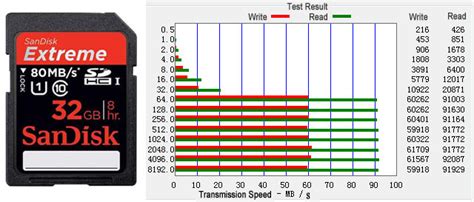
Look for cards with a ‘Class 10’ rating and UHS Speed Class 1 (U1) or 3 (U3). Many modern cards also feature an ‘A1’ or ‘A2’ app performance rating, which indicates good random read/write speeds that benefit game loading times. A good microSD card should have read speeds of at least 90-100 MB/s. While UHS-II cards offer theoretical speeds up to 312 MB/s, the Switch’s slot is limited to UHS-I speeds, so investing in a UHS-II card won’t provide a performance boost on the console.
Brand Reliability: Stick with Reputable Manufacturers
Always purchase from well-known brands like SanDisk, Samsung, Lexar, or Kingston. These brands are known for their reliability, durability, and consistent performance. Counterfeit or generic cards may be cheaper but often offer vastly inferior speeds, less actual capacity, and higher failure rates.
Top Recommended MicroSD Cards for Nintendo Switch
While many excellent microSD cards are available, some consistently stand out for Switch users:
SanDisk MicroSDXC for Nintendo Switch (Officially Licensed)
These cards are officially licensed by Nintendo and come in various capacities (64GB, 128GB, 256GB, 512GB, 1TB) with distinct Zelda or Mario designs. They offer read speeds of up to 100 MB/s and write speeds up to 90 MB/s, ensuring smooth gameplay and quick transfers. Their official licensing often comes with a slightly higher price tag, but guarantees compatibility and performance.
SanDisk Extreme / Ultra MicroSDXC
These non-licensed SanDisk cards are often a more cost-effective choice than their official counterparts while offering similar or even better performance. The SanDisk Extreme series provides excellent read/write speeds, often exceeding 100 MB/s read, making them ideal for rapid game loading. The Ultra series is a slightly more budget-friendly option that still performs exceptionally well for the Switch.
Samsung EVO Select / EVO Plus MicroSDXC
Samsung’s EVO line is another highly regarded option. The EVO Select and EVO Plus cards offer reliable performance, good capacities, and competitive pricing. They are known for their strong durability and come with impressive read and write speeds that are more than sufficient for the Nintendo Switch.

Installing and Managing Games on Your New SD Card
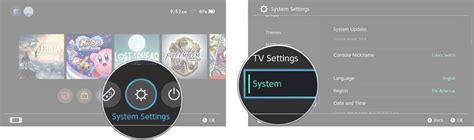
Installing a microSD card is straightforward: simply open the kickstand on the back of your Switch (or the flap on the bottom for the original model), insert the card until it clicks, and close it. The Switch will format the card automatically if it’s new. Once installed, new game downloads will automatically save to the microSD card as long as there’s space. You can also manually move existing games from your internal storage to the SD card via System Settings > Data Management.
Conclusion
Don’t let limited storage hinder your Nintendo Switch gaming experience. Investing in a high-quality, high-capacity microSDXC card is one of the best upgrades you can make for your console. Whether you choose an officially licensed card or a top-tier alternative from SanDisk or Samsung, prioritize capacity, reliable speed, and a reputable brand. With expanded storage, you’ll have instant access to your entire digital library and never have to make the tough decision of which game to delete again.



