





What parental controls help manage screen time and ensure age-appropriate games?
Navigating the Digital Playground: Why Parental Controls Are Crucial
In today’s digitally saturated world, children are growing up with unprecedented access to screens and online content. While technology offers immense educational and entertainment benefits, it also presents challenges, including excessive screen time and exposure to inappropriate games or content. Parental controls are not about restricting freedom entirely, but about creating a safe, balanced, and age-appropriate digital environment for your children to thrive.
Key Features for Effective Screen Time Management
One of the primary concerns for parents is regulating how much time their children spend in front of screens. Effective parental controls offer robust features to help manage this:
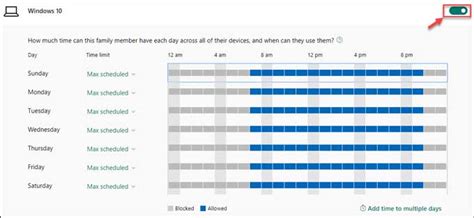
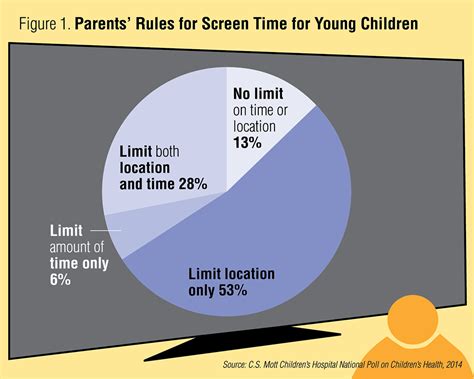
- Time Limits: Set daily or weekly limits on overall screen usage, ensuring children don’t spend excessive hours online.
- Schedules and Downtime: Define specific periods when devices can be used (e.g., after homework, before dinner) and designate ‘downtime’ during school hours or bedtime.
- App-Specific Limits: Control time spent on individual apps or categories of apps, prioritizing educational tools over endless gaming or social media scrolling.
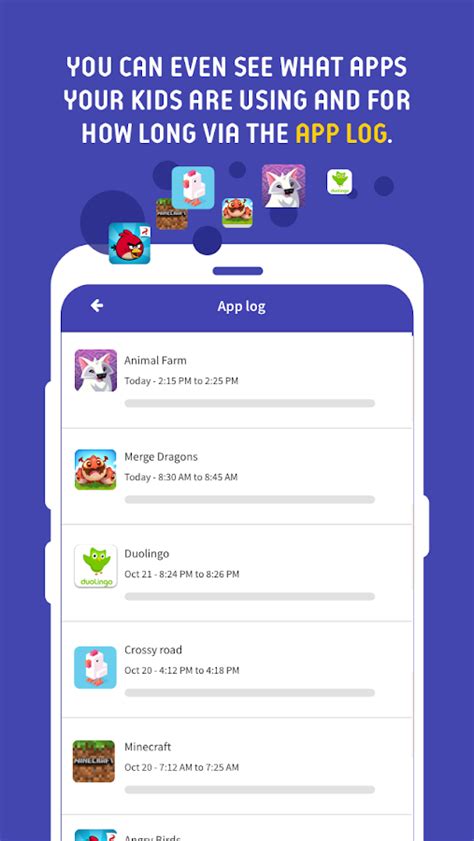
- Remote Management: Many platforms allow parents to adjust settings and monitor usage from their own devices, even when not physically present.
Ensuring Age-Appropriate Content and Games
Beyond screen time, protecting children from content that is unsuitable for their age is paramount. Parental controls provide several mechanisms for content filtering:
Content Filtering and Website Blocking
Most parental control solutions allow you to block specific websites, categories of websites (e.g., gambling, violence, adult content), or enable ‘safe search’ filters on search engines. This ensures that accidental clicks or deliberate searches don’t lead to inappropriate material.
App and Game Age Restrictions
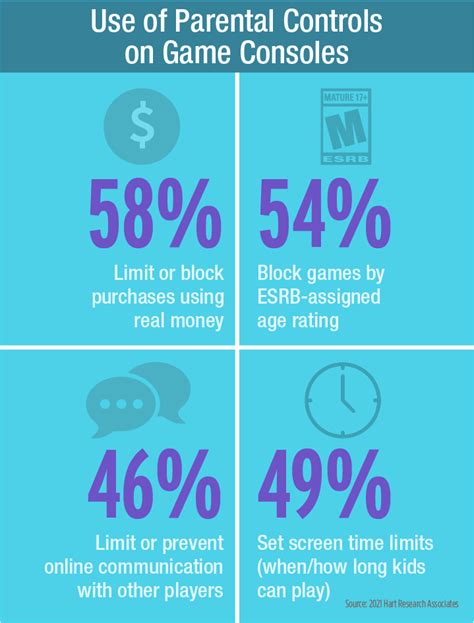
Operating systems (iOS, Android, Windows, macOS) and gaming consoles (PlayStation, Xbox, Nintendo Switch) have built-in features to enforce age ratings (like ESRB, PEGI, or IARC). You can prevent children from downloading or purchasing apps and games that exceed a specified age rating. This extends to in-app purchases, which can often be disabled or require parental approval.

Managing In-Game Interactions and Purchases
Modern games, especially online multiplayer titles, often include chat features, voice communication, and microtransactions. Parental controls allow you to:
- Disable or Restrict Chat: Limit who your child can communicate with, or disable in-game chat altogether.
- Control Multiplayer Access: Set restrictions on joining online multiplayer games or specific servers.
- Manage In-App Purchases: Require passwords or parental approval for all purchases made within games, preventing unexpected bills.

Popular Platforms and Tools for Parents
There’s a wide array of tools available, often built into the devices themselves:
- Operating System Controls: Apple’s Screen Time (iOS/macOS), Google Family Link (Android/ChromeOS), and Microsoft Family Safety (Windows/Xbox) offer comprehensive controls across devices.
- Gaming Consoles: PlayStation, Xbox, and Nintendo Switch all have robust parental control settings accessible directly on the console or via companion apps.
- Third-Party Apps: Solutions like Qustodio, Bark, and Net Nanny provide cross-platform management, often with advanced features like social media monitoring (with consent) and web filtering across home networks.
- Router-Based Controls: Some home routers offer built-in parental controls to filter content and manage internet access for all connected devices on the network.
Beyond the Tech: The Importance of Communication and Trust
While technological tools are invaluable, they are most effective when coupled with open communication and clear family rules. Discuss digital safety, screen time expectations, and the reasons behind parental controls with your children. Lead by example, and engage with their digital world to understand their interests and challenges. Parental controls are a tool to support your parenting, not a replacement for active engagement and trust-building.
Conclusion
Parental controls empower you to create a secure and balanced digital environment for your children. By understanding and utilizing features for screen time management, content filtering, and game-specific restrictions, you can guide them towards healthy tech habits. Remember, the goal is not to eliminate screens but to foster responsible digital citizenship, allowing children to safely explore, learn, and play in the vast digital landscape.

