





What are the best methods to safely back up Nintendo Switch game save data?
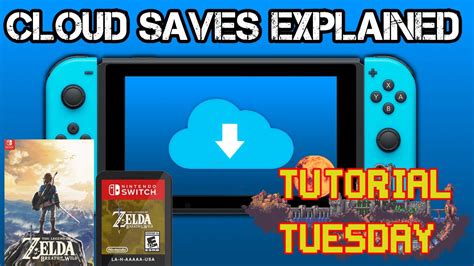
Losing progress in your favorite Nintendo Switch games can be a heartbreaking experience. Hours of gameplay, rare items, and carefully cultivated achievements can vanish in an instant due to console malfunction, loss, or theft. Fortunately, Nintendo offers methods to protect your precious game save data. Understanding these methods is crucial for any Switch owner to safeguard their digital adventures.
The Primary Method: Nintendo Switch Online Cloud Backups
For most Nintendo Switch games, the most reliable and often only method to back up your save data is through a Nintendo Switch Online (NSO) subscription. This service includes a feature called Save Data Cloud, which automatically uploads your game saves to Nintendo’s servers.
When you have an active NSO membership, your Switch will regularly upload save data for compatible games as long as your console is connected to the internet. If your console is ever damaged or replaced, you can download your save data to a new console, picking up right where you left off.
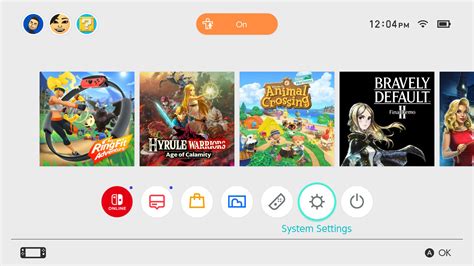
How to Confirm and Manage Save Data Cloud
To ensure your saves are being backed up, or to manage them manually, follow these steps:
- From the HOME Menu, select System Settings.
- Scroll down and select Data Management.
- Select Save Data Cloud.
- Here you can see a list of games, their backup status, and when they were last backed up. You can also turn Save Data Cloud on or off for individual titles or manually upload/download data.
It’s always a good idea to periodically check this section, especially after prolonged offline play or before a system transfer, to ensure all your important progress is secured.
Important Exceptions and Limitations
While Save Data Cloud is incredibly convenient, it’s not universal. Some games, primarily those with highly competitive online components or where local data manipulation could create an unfair advantage, do not support cloud backups. Notable examples include:
- Splatoon 2 (and certain aspects of Splatoon 3)
- Pokémon Sword and Shield
- Pokémon Scarlet and Violet
- Animal Crossing: New Horizons (though it has its own island backup service, separate from NSO cloud saves, requiring Nintendo to restore it if the console is lost/damaged).
For these games, save data is stored exclusively on the console’s internal memory and cannot be backed up to the cloud. This means if your console is lost, stolen, or completely breaks, that save data will likely be irrecoverable. Always be aware of which games fall into this category and exercise extra caution.

Why Local Backups Aren’t a Standard Option for Save Data
Unlike many other consoles or PCs, the Nintendo Switch does not allow users to copy game save data to an external SD card or USB drive. Save data is always stored on the console’s internal memory. While game data (the actual game files for digital titles) can be moved to an SD card to free up internal space, this does not include the critical save files themselves.
This design choice is primarily for security and anti-cheat measures, preventing easy save file manipulation. Consequently, the reliance on Nintendo Switch Online’s Save Data Cloud becomes paramount for comprehensive data protection for most titles.
Best Practices for Protecting Your Save Data
Given the limitations and available tools, here are some best practices to ensure your game saves are as secure as possible:
- Maintain an Active NSO Membership: This is the single most effective way to protect most of your game saves. Consider an annual plan for uninterrupted coverage.
- Regularly Connect to the Internet: Ensure your Switch has consistent internet access for cloud saves to automatically upload in the background.
- Verify Cloud Save Status: Periodically check the “Save Data Cloud” section in System Settings to confirm backups are occurring, especially for your most cherished games, or after playing offline for an extended period.
- Be Aware of Exceptions: Know which games don’t support cloud saves and take extra care with your console when playing them. For Animal Crossing: New Horizons, ensure you’ve enabled the Island Backup Service within the game itself if you wish to use that specific recovery feature.
- Consider a System Transfer: If you’re upgrading to a new Switch console, perform a full system transfer to move all your user data, including saves (even those not supported by cloud saves), to the new device. This requires both consoles to be present and functional.
Conclusion
While the Nintendo Switch’s save data backup options are primarily tied to the Nintendo Switch Online service, it remains an effective and essential tool for safeguarding your progress across a vast library of games. Understanding how Save Data Cloud works, knowing its exceptions, and adopting these best practices will help ensure that your hours of gaming adventure are never lost. Invest in an NSO membership and get into the habit of checking your cloud save status to protect your digital memories and peace of mind.


