





Switch storage full: Best microSD for more games?
Is Your Nintendo Switch Storage Always Full? You’re Not Alone!
It’s a common dilemma for Nintendo Switch owners: you’re excited to download a new game, only to be greeted by the dreaded ‘not enough storage’ message. With many digital titles easily exceeding 10-20GB, and the base Switch offering a modest 32GB (or 64GB for the OLED model) of internal storage, it fills up remarkably fast. Thankfully, expanding your Switch’s memory is incredibly simple with a microSD card, opening up a world of new gaming possibilities.
But with so many options on the market, how do you choose the right one? This guide will walk you through the essential factors and recommend the best microSD cards to ensure you never have to delete a favorite game again.
Understanding Switch Storage Needs
Before diving into recommendations, it’s helpful to understand what your Switch needs from a microSD card. The console supports UHS-I microSD cards, which are standard for most modern devices. While there are faster UHS-II cards available, the Switch cannot fully utilize their increased speeds, meaning you’d be paying extra for performance you won’t experience.
Key factors to consider are:
- Capacity: How many games do you plan to store?
- Speed: How quickly will games load and save?
- Reliability: Is the card durable and from a reputable brand?
Capacity: How Much Space Do You Really Need?
This is arguably the most crucial decision. Game sizes vary wildly, from small indie titles to massive AAA releases. Consider your gaming habits:
- 128GB: A good entry-level option if you mostly buy physical games and download only a few digital titles or smaller indies. It can hold 5-10 large games.
- 256GB: The sweet spot for many gamers. It offers a substantial upgrade, allowing for a healthy mix of digital and physical games without constant management. Expect to store 10-20 large games.
- 512GB: For serious digital collectors. If you frequently download new releases, subscribe to Nintendo Switch Online Expansion Pack games, or simply hate deleting anything, 512GB provides ample room for dozens of games.
- 1TB: The ultimate solution for the most avid digital-only gamers. This massive capacity ensures you won’t run out of space for the foreseeable future, even with a huge library.
Remember, it’s always better to slightly overestimate your needs than to quickly run out of space again.

Speed: What A1/A2 and UHS-I Mean for Your Games
While the Switch doesn’t benefit from the absolute fastest cards, speed still matters for loading times. Look for cards with:
- UHS Speed Class 1 (U1) or Class 3 (U3): U3 offers faster minimum write speeds, which can slightly improve performance. Both are compatible and generally fast enough for the Switch.
- Video Speed Class V10 or V30: Similar to U1/U3, indicating minimum sequential write speeds. V30 is better.
- Application Performance Class A1 or A2: These ratings are important! They indicate a card’s ability to handle random read/write operations efficiently, which is crucial for applications (like games) that access many small files. An A1 or A2 rating will provide a smoother gaming experience. The Switch is optimized for A1 cards, but A2 cards also work well and offer similar performance in the console.
In essence, aim for a UHS-I card with at least an A1 rating and a U1/V10 speed class. U3/V30 is a bonus but not strictly necessary for optimal Switch performance.
Top Recommended MicroSD Cards for Nintendo Switch
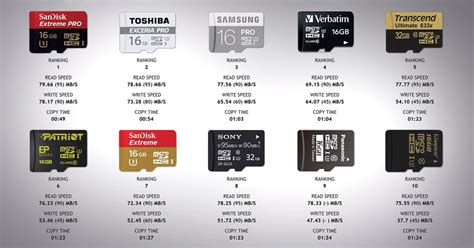
Based on performance, reliability, and value, here are some of the best microSD cards for your Nintendo Switch:
1. SanDisk microSDXC for Nintendo Switch
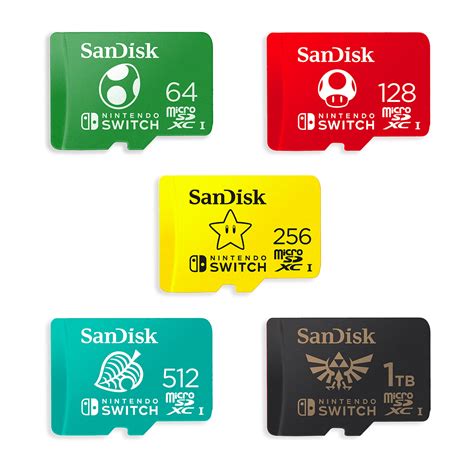
SanDisk offers officially licensed Nintendo Switch microSD cards, making them an obvious and excellent choice. They come in various capacities (64GB to 1TB) and feature iconic Nintendo branding. These cards are specifically tested and optimized for the Switch, guaranteeing compatibility and reliable performance (UHS-I, U3, A1 rated).
2. SanDisk Extreme/Ultra microSDXC
If you prefer non-branded cards, SanDisk’s standard Extreme and Ultra lines are fantastic. The Extreme line generally offers slightly higher read/write speeds, but both provide excellent value and performance for the Switch. Look for models with A1 or A2 ratings (UHS-I, U1 or U3). They are widely available and often go on sale.
3. Samsung EVO Select/Plus microSDXC
Samsung’s EVO Select and EVO Plus lines are highly regarded for their reliability and consistent performance. They are often competitively priced and come with excellent read/write speeds, making them a solid alternative to SanDisk. Ensure you pick a UHS-I card with an A1 rating.
Installation and Management Tips
Installing a microSD card is straightforward: simply insert it into the slot beneath the kickstand on the back of your Switch. The console will automatically format it. Any new digital games you download will automatically save to the microSD card if there’s space. You can also manually move games between the internal storage and the microSD card via System Settings > Data Management.

Never Worry About Full Storage Again!
Upgrading your Nintendo Switch’s storage with a high-quality microSD card is one of the best investments you can make as a gamer. By choosing the right capacity and a reputable brand with appropriate speed ratings, you’ll unlock a world of games without the frustration of constant storage management. So go ahead, expand your library, and dive into countless new adventures on your Nintendo Switch!


