





Switch storage full? Best microSD for all your big & small digital games.
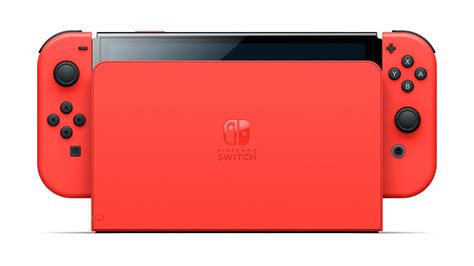
The Nintendo Switch, with its incredible portability and ever-growing library of games, has undoubtedly become a staple for many gamers. However, one common frustration almost every Switch owner eventually faces is the dreaded “storage full” message. Whether you prefer digital downloads or supplement your physical collection with eShop exclusives, the console’s meager 32GB (or 64GB for the OLED model) internal storage fills up surprisingly fast. This is where a reliable microSD card becomes not just a convenience, but an absolute necessity to keep your gaming adventures uninterrupted.
Why Your Nintendo Switch Needs a microSD Card
Unlike some other consoles, the Switch relies heavily on external storage for digital games. Many modern titles, even indie darlings, can take up several gigabytes. Blockbusters like The Legend of Zelda: Tears of the Kingdom or Pokémon Scarlet and Violet can demand well over 10GB each. Without extra storage, you’ll quickly find yourself deleting games to make room for new ones – a tedious and frustrating process. A high-capacity microSD card allows you to keep dozens, if not hundreds, of games readily accessible, ensuring you’re always ready to play whatever you’re in the mood for.

Choosing the Best MicroSD Card for Your Switch
Not all microSD cards are created equal, and selecting the right one involves considering a few crucial factors. The good news is that the Switch is relatively forgiving, but opting for a quality card will ensure faster load times and smoother performance.
Capacity: How Much Space Do You Really Need?
This is often the first consideration. MicroSD cards for the Switch range from 64GB all the way up to 1TB (and beyond, though 1TB is currently the practical maximum most users consider). Here’s a rough guide:
- 128GB: Good for casual gamers with a mix of physical and a few digital titles.
- 256GB: A solid sweet spot for most users, allowing for a healthy digital library without breaking the bank.
- 512GB: Ideal for avid digital collectors or those who want to future-proof their storage for years to come.
- 1TB: The ultimate choice for serious digital hoovers, offering virtually unlimited space for the current Switch library.
Remember, it’s always better to slightly overestimate your needs, as games only get larger over time.
Speed Matters: Understanding UHS-I and A-Ratings
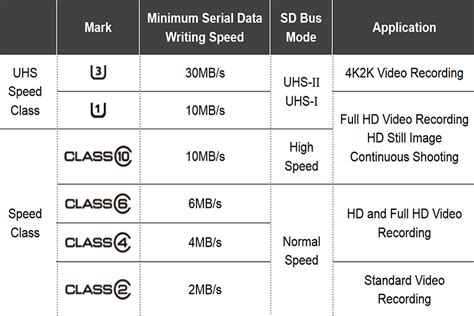
While the Nintendo Switch doesn’t support the absolute fastest microSD card speeds, opting for a card that meets or exceeds its requirements can still impact game loading times. Look for cards with:
- UHS-I (Ultra High Speed Phase I): The Switch supports UHS-I cards up to 104MB/s. Most modern cards meet this standard.
- Speed Class 10 (C10): Indicates a minimum write speed of 10MB/s, which is standard for gaming.
- Application Performance Class A1 or A2: These ratings are important for applications (like games). A1 provides a minimum random read of 1,500 IOPS and write of 500 IOPS. A2 offers even higher random performance (4,000 IOPS read, 2,000 IOPS write) and is generally recommended if you can find one at a good price, though the Switch might not fully utilize the A2 benefits.
Focus on cards from reputable brands to ensure consistent performance and reliability.
Reliable Brands to Consider
When it comes to storage, brand reliability is key to avoiding data corruption and ensuring longevity. Top brands commonly recommended for the Nintendo Switch include:
- SanDisk
- Samsung
- Kingston
- Lexar
- PNY
Many of these brands offer “Nintendo-licensed” microSD cards, which are essentially standard, high-quality cards with Nintendo branding. While they often carry a slight premium, they guarantee compatibility and reliability.
Installation and Managing Your Games
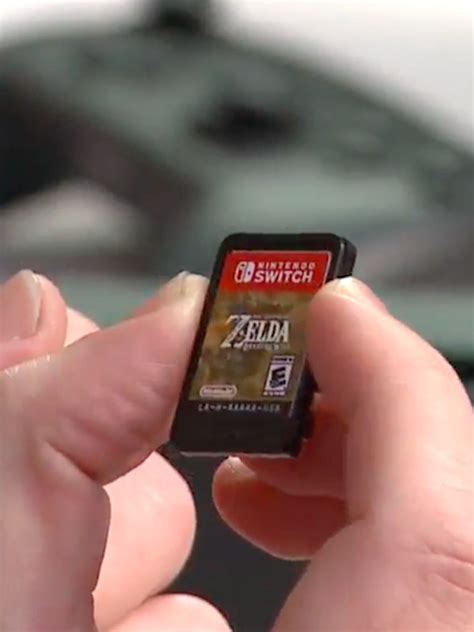
Installing a microSD card in your Switch is incredibly simple. Just open the kickstand on the back of the console and slide the card into the slot. The console will recognize it automatically. If you’re upgrading from a smaller card, you can transfer your data using a PC or by redownloading games from the eShop onto the new card.
To move games between internal storage and your microSD card, navigate to System Settings > Data Management. You can archive software (which deletes the game data but keeps the save file) or delete software entirely. When redownloading, the Switch will prioritize the microSD card if enough space is available. Save data is always stored on the console’s internal memory and cannot be moved to a microSD card.

Conclusion: Unlock Your Switch’s Full Potential
Don’t let limited storage dictate your gaming choices. Investing in a quality microSD card is perhaps the most essential upgrade for any Nintendo Switch owner, transforming your console from a digital game hoarder’s nightmare into a boundless library. With the right card, you can download all your favorite titles, discover new ones, and keep your gaming sessions free from frustrating storage alerts. Pick a capacity that suits your needs, prioritize speed and brand reliability, and get ready to enjoy your Switch to its absolute fullest.



