





Strategies to manage in-game purchases and avoid surprise costs?
Navigating the World of In-Game Purchases
In the vibrant, ever-evolving world of digital entertainment, video games often come with more than just the initial price tag. In-game purchases, ranging from cosmetic upgrades to powerful in-game advantages and loot boxes, have become a ubiquitous feature, presenting both exciting opportunities for players and potential financial pitfalls for unsuspecting parents. For many families, the line between harmless fun and unexpected expenses can blur, leading to frustration and budget strain. This article aims to equip parents with practical strategies to manage these digital transactions effectively, ensuring their children enjoy gaming responsibly without racking up surprise costs.
Understanding the In-Game Economy
Before implementing controls, it’s crucial to understand what you’re up against. In-game purchases come in various forms:
- Cosmetics: Skins, outfits, emotes, and other visual enhancements that don’t affect gameplay.
- Loot Boxes/Gacha Mechanics: Random item generators that often tempt players with the chance of rare rewards, akin to gambling.
- Power-Ups/Boosts: Items that offer a temporary or permanent advantage in gameplay, like extra lives, faster progression, or stronger weapons.
- Subscriptions/Battle Passes: Recurring payments for access to exclusive content, challenges, or rewards over a period.
- Virtual Currency: Many games use their own currency (e.g., V-bucks, Robux, Gems) which must be purchased with real money.
These purchases are often designed to be enticing and easy to make, sometimes using dark patterns that encourage spending, making parental vigilance all the more important.
Implement Robust Parental Controls
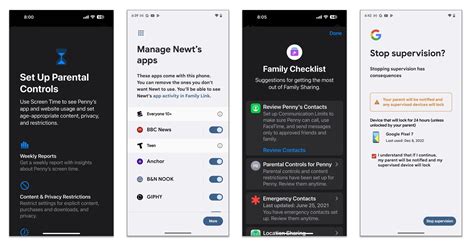
The first line of defense against unwanted spending is to utilize the built-in parental controls available on most gaming platforms, consoles, and mobile devices. These tools allow you to restrict purchases, set spending limits, and even disable in-app purchases entirely.
Platform-Specific Settings:
- Consoles (PlayStation, Xbox, Nintendo Switch): Access account settings to require a password for every purchase, set a monthly spending limit, or disable payments.
- Mobile Devices (iOS, Android): Use screen time settings or Google Play/App Store settings to restrict in-app purchases, require a password, or enable “Ask to Buy” features.
- PC Gaming (Steam, Epic Games Store): Configure family sharing options and purchase authorization settings.
Always ensure that your payment information is not directly linked or saved to your child’s account without requiring a password for each transaction. Even better, consider using gift cards for digital storefronts if you want to allow limited spending.

Foster Open Communication and Set Clear Boundaries
Technical controls are important, but they work best when combined with open dialogue. Talk to your children about the value of real money and how it translates to virtual items. Many younger children don’t fully grasp that clicking a button in a game corresponds to actual money leaving a bank account.
Key Discussion Points:
- Explain that in-game purchases cost real money.
- Set clear rules: “No purchases without asking first,” or “You have a budget of X amount per month.”
- Discuss the psychology behind in-game purchases – how they are designed to be tempting.
- Help them understand that some games are “pay-to-win” and that constant spending isn’t always necessary for enjoyment.
Involving children in the decision-making process, within your set boundaries, can also empower them to make responsible choices.

Establish a Gaming Budget or Allowance
A highly effective strategy is to introduce a specific budget for gaming-related expenses. This could be a weekly or monthly allowance that your child can use for in-game items, new games, or subscriptions. This approach teaches them financial literacy, budgeting, and the concept of delayed gratification.
- Provide a physical or digital gift card for their allowance.
- Let them manage their own spending within that budget.
- Discuss choices: “Do you want that new skin now, or save up for a bigger item next month?”
This method gives children a sense of autonomy while keeping overall spending within your comfort zone, transforming a potential problem into a valuable learning opportunity.
Regular Monitoring and Review
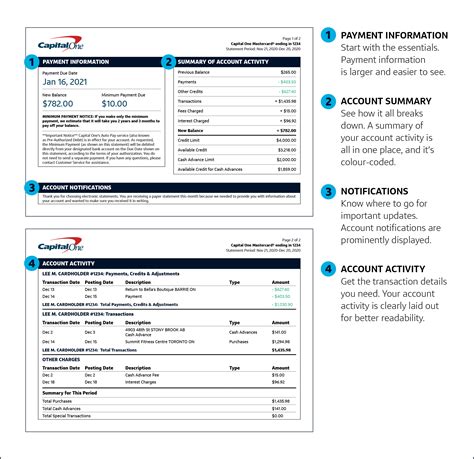
Even with the best controls and communication, regular checks are vital. Periodically review your bank statements and the purchase history on gaming platforms. This helps you identify any unauthorized transactions quickly and understand your child’s spending habits.
- Check email receipts for digital purchases.
- Log into platform accounts to view transaction logs.
- Be aware of “free-to-play” games that heavily rely on in-game purchases for revenue.
If you discover unauthorized purchases, address them calmly and use it as another teaching moment. Most platforms offer refund policies for accidental or unauthorized transactions, so don’t hesitate to reach out to customer support if necessary.

Conclusion: Empowering Responsible Digital Citizens
Managing in-game purchases effectively requires a multi-faceted approach combining robust technical controls with open communication and financial education. By understanding the digital economy, leveraging parental settings, discussing money matters with your children, establishing budgets, and monitoring activity, you can foster a responsible gaming environment. These strategies not only protect your finances but also teach your children invaluable lessons about managing money in an increasingly digital world, empowering them to become savvy and responsible digital citizens.

