How to use your game guide to find age-appropriate games & balance kid screen time?
Navigating the Digital Playground: Your Guide to Smarter Gaming
In today’s digital age, video games are a ubiquitous part of childhood. While they offer entertainment and cognitive benefits, parents often grapple with two main concerns: ensuring games are age-appropriate and managing screen time. Fortunately, readily available game guides and rating systems are powerful tools to help you navigate this landscape effectively. This article will equip you with the knowledge to make informed choices and foster healthy digital habits for your children.
Understanding Game Rating Systems
The first step in finding age-appropriate games is understanding the various rating systems designed to provide a clear indication of content. These systems evaluate games based on factors like violence, language, suggestive themes, and drug references, assigning an age recommendation and specific content descriptors.
Key Rating Systems to Know:
- ESRB (Entertainment Software Rating Board): Predominant in North America, with ratings like E (Everyone), E10+ (Everyone 10+), T (Teen), M (Mature), and AO (Adults Only). Each rating comes with content descriptors (e.g., “Fantasy Violence,” “Mild Language”).
- PEGI (Pan European Game Information): Used across Europe, with age ratings (3, 7, 12, 16, 18) and content descriptors (e.g., “Violence,” “Bad Language,” “Drugs”).
- CERO (Computer Entertainment Rating Organization): Japan’s rating system, similar in concept with age categories and content icons.
By familiarizing yourself with these systems, you can quickly assess if a game’s content aligns with your child’s developmental stage and your family’s values. Always look beyond just the age rating; the content descriptors offer crucial details about what to expect within the game.
Practical Steps to Find Age-Appropriate Games
Beyond checking the rating labels, there are several practical ways to use your game guide (or online resources) to make the best choices:
- Check the Official Website: Most rating organizations have websites where you can search for a game and get detailed information, often including a summary of why it received a particular rating.
- Read Reviews from Reputable Sources: Websites like Common Sense Media offer in-depth reviews that focus on educational value, positive messages, and potential red flags for children of different ages. They often provide parent and kid reviews, too.
- Watch Gameplay Videos: A quick search on platforms like YouTube for a game’s gameplay trailer or walkthrough can give you a visual understanding of the content, mechanics, and overall tone.
- Talk to Other Parents: Word-of-mouth recommendations and experiences from other parents can be invaluable.
- Play Together (When Possible): The best way to know if a game is right for your child is to experience it with them. This also creates a shared experience and opens lines of communication.

Balancing Kid Screen Time: A Holistic Approach
Once you’ve ensured the games are suitable, the next challenge is managing screen time. Balance isn’t about eliminating screens entirely but integrating them healthily into your child’s life. Here’s how to achieve it:
1. Establish Clear Rules and Expectations
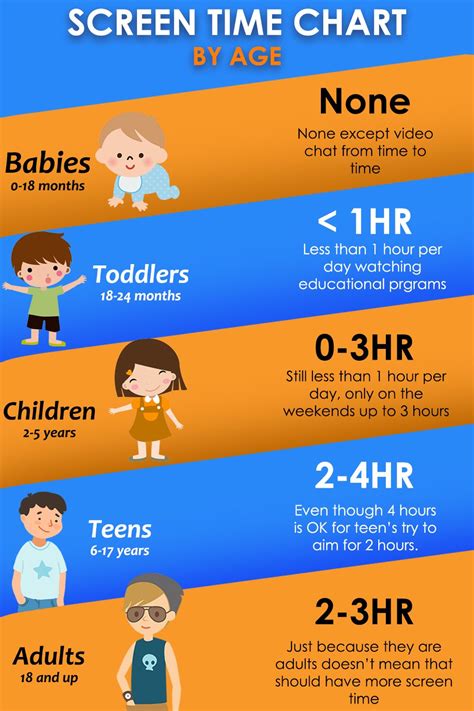
- Set Time Limits: Work with your child to establish reasonable daily or weekly screen time limits. For younger children, 1-2 hours of quality screen time is often recommended.
- Designate Screen-Free Times/Zones: Implement rules like no screens during meals, homework, or in bedrooms after a certain hour.
- Discuss Content: Talk about what they are playing, why they like it, and what they learn. This fosters critical thinking and engagement.

2. Prioritize Other Activities
Ensure screen time doesn’t displace essential activities. Encourage and provide opportunities for:
- Physical Activity: Outdoor play, sports, bike riding.
- Creative Play: Drawing, building, imaginative games.
- Reading: Books, magazines, storytelling.
- Social Interaction: Playdates, family time, community activities.
- Sleep: Adequate rest is crucial for development.
3. Utilize Parental Controls and Monitoring Tools
Most gaming consoles, mobile devices, and operating systems offer robust parental control features. These can help you:
- Set time limits.
- Block specific content or apps.
- Control in-app purchases.
- Monitor activity (with your child’s knowledge, where appropriate for older kids).
![How to Use Samsung Parental Controls [Main Methods]](/images/aHR0cHM6Ly90czQubW0uYmluZy5uZXQvdGg/aWQ9T0lQLi1jRVZuZHZMcTQ4UEhkV3BhTG1XNEFIYUVLJnBpZD0xNS4x.webp)
4. Model Healthy Screen Habits
Children learn by watching their parents. Demonstrate responsible screen use yourself:
- Put your phone away during family time.
- Take breaks from your own devices.
- Engage in non-screen hobbies.
Conclusion
Empowering yourself with knowledge about game guides and ratings is the first step toward creating a safe and enriching digital environment for your children. Combined with thoughtful screen time management strategies, you can help your kids enjoy the benefits of gaming while fostering a balanced lifestyle. Remember, the goal is not just to limit screen time, but to ensure that the time spent online is meaningful, age-appropriate, and contributes positively to their growth and well-being.