How to set up late fee auto-apply in Cozy?
Streamline Your Rent Collection with Cozy’s Auto-Apply Late Fees
As a landlord, ensuring timely rent payments is crucial for your financial stability. Dealing with late payments can be time-consuming and awkward, often requiring manual calculations and consistent follow-ups. Fortunately, Cozy (now part of Apartments.com) offers a robust feature to automate late fee application, taking the hassle out of enforcing your lease terms. Setting this up correctly not only saves you time but also ensures consistency and fairness across your properties. Let’s walk through how to configure this essential tool.
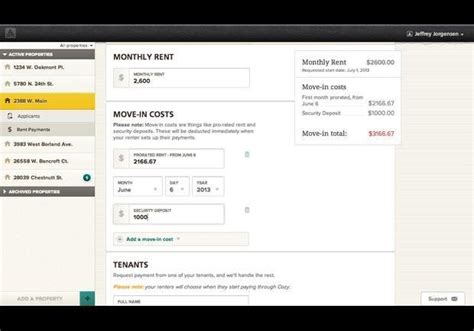
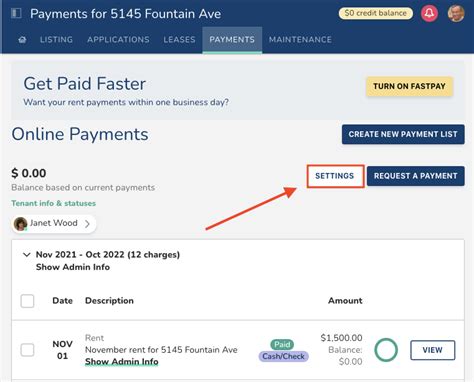
Step 1: Navigate to Your Property’s Settings
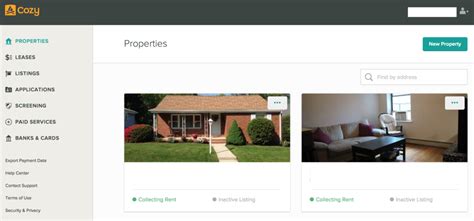
To begin, you’ll need to log into your Cozy account and access the specific property for which you want to set up late fees. Once logged in:
- From your main dashboard, select the property in question.
- Look for the ‘Property Settings’ or ‘Lease Details’ section, typically found in the left-hand navigation or as a tab at the top of the property’s page.
- Within these settings, you should find an option related to ‘Rent Collection’, ‘Fees’, or ‘Late Fees’. Click on this to proceed.
Step 2: Define Your Late Fee Policy
This is where you’ll specify the exact terms of your late fee. Cozy provides flexibility to match various lease agreements:
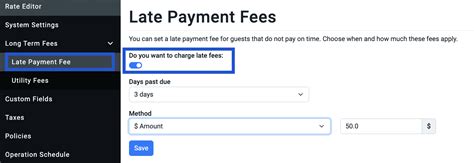
- Grace Period: Determine how many days after the rent due date a tenant has before a late fee is applied. Common grace periods are 3 or 5 days.
- Fee Type: Choose between a flat fee (e.g., $50) or a daily fee (e.g., $5 per day). Some jurisdictions also allow a percentage of rent. Ensure your chosen method complies with local landlord-tenant laws.
- Amount: Enter the specific dollar amount for your flat fee or the daily fee amount.
- Maximum Fee (Optional): If your local laws dictate a maximum late fee or you wish to cap it, you can often set a maximum amount here.
Carefully review these settings to ensure they align with your lease agreement and local regulations. Transparency is key, so make sure these terms are clearly outlined in your tenant’s lease.
Step 3: Enable Auto-Apply for Late Fees
Once your late fee policy is defined, the next crucial step is to enable the auto-apply feature. This is typically a simple toggle or checkbox labeled something like “Automatically apply late fees” or “Enable auto-charge for late fees.”
- Locate this option within the late fee settings.
- Toggle it to the ‘On’ position or check the box.
- Cozy will then automatically calculate and add the specified late fee to a tenant’s outstanding balance if payment isn’t received within the defined grace period.
This automation removes the need for manual tracking and intervention, ensuring that your policy is consistently enforced without you having to lift a finger each month.

Step 4: Review and Save Your Changes
Before leaving the settings page, always double-check all the parameters you’ve entered. Confirm the grace period, fee type, amount, and that the auto-apply feature is indeed activated. Once satisfied, click the ‘Save Changes’ or ‘Update’ button to apply your new settings. It’s also a good practice to communicate any changes to your tenants, even if it’s just a reminder of the existing policy, to foster good landlord-tenant relations.
Benefits of Automating Late Fees in Cozy
Implementing this feature offers several advantages:
- Time-Saving: Eliminate manual tracking and calculations.
- Consistency: Apply fees uniformly across all tenants and months.
- Reduced Friction: The system enforces the policy, not you, which can reduce awkward conversations.
- Improved Cash Flow: Encourages timely payments and provides compensation for late ones.
- Clarity for Tenants: Tenants know exactly when and how much a late fee will be, reducing surprises.
By leveraging Cozy’s auto-apply late fee feature, you can significantly streamline your rent collection process, encourage prompt payments, and free up valuable time to focus on other aspects of managing your rental properties. Set it up once, and let Cozy do the heavy lifting for you.