





How to pick age-appropriate games & understand game ratings like ESRB/PEGI?
In today’s digital age, video games are a ubiquitous part of many children’s lives. While they can offer entertainment, educational value, and social interaction, the sheer volume and variety of games can make choosing the right ones a daunting task for parents. Ensuring your child plays games that are age-appropriate is vital for their development, emotional well-being, and overall safety. This guide will demystify game rating systems like ESRB and PEGI, empowering you to make confident decisions for your family.
The Importance of Game Ratings
Game rating systems are designed to provide parents with objective information about the content of video games. Think of them like movie ratings; they indicate the recommended age for players and highlight specific content that might be present, such as violence, language, or suggestive themes. Relying on these ratings is the first, crucial step in selecting appropriate games.

Decoding the ESRB System (North America)
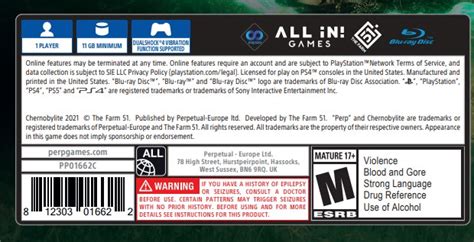
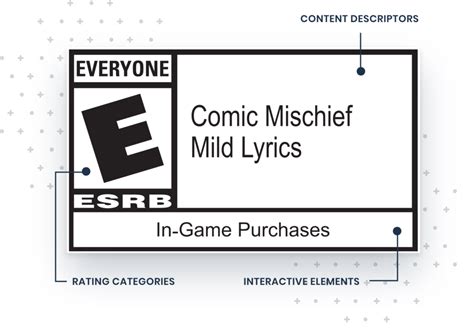
The Entertainment Software Rating Board (ESRB) is the self-regulatory organization that assigns ratings for video games and apps in the United States and Canada. ESRB ratings consist of two parts: an Age Rating Category and Content Descriptors.
ESRB Age Rating Categories:
- E (Everyone): Content is generally suitable for all ages. May contain minimal cartoon, fantasy or mild violence and/or infrequent use of mild language.
- E10+ (Everyone 10+): Content is generally suitable for ages 10 and up. May contain more animated violence, mild language, or suggestive themes.
- T (Teen): Content is generally suitable for ages 13 and up. May contain violence, suggestive themes, crude humor, minimal blood, simulated gambling, and/or infrequent use of strong language.
- M (Mature 17+): Content is generally suitable for ages 17 and up. May contain intense violence, blood and gore, sexual content, and/or strong language.
- AO (Adults Only 18+): Content suitable only for adults. May include prolonged scenes of intense violence, graphic sexual content, and/or gambling with real currency.
ESRB Content Descriptors:
These brief phrases explain *why* a game received its rating. Examples include Blood, Fantasy Violence, Language, Sexual Themes, Use of Alcohol, In-Game Purchases, and more. Always check these descriptors to get a deeper understanding of the content.
Navigating the PEGI System (Europe)
The Pan European Game Information (PEGI) system is used in 38 countries across Europe and is similar in principle to ESRB but with its own distinct categories and descriptors.
PEGI Age Rating Categories:
- PEGI 3: Suitable for all age groups. Very mild violence in a cartoon context may be acceptable.
- PEGI 7: Games that would normally be rated PEGI 3 but contain some non-realistic violence or scary scenes.
- PEGI 12: Games that show violence in a fantasy context or non-realistic violence towards human-like characters, sexual innuendo, or mild bad language.
- PEGI 16: Games where the depiction of violence or sexual activity is more realistic. Bad language, illegal drugs, and promotion of gambling may also be present.
- PEGI 18: Adult classification. The most common content is graphic violence, strong sexual content, or glorification of illegal drugs.
PEGI Content Descriptors:
PEGI uses eight content descriptors: Violence, Bad Language, Fear, Sex, Drugs, Gambling, Discrimination, and In-Game Purchases. These icons appear alongside the age rating and provide quick visual cues about the game’s specific content.

Beyond the Ratings: Personal Considerations
While ratings are an excellent starting point, they are not the only factor. Every child is different, and what one 10-year-old can handle, another might find disturbing. Consider these additional points:
- Child’s Maturity: Does your child get easily scared? Are they sensitive to certain types of content?
- Game Genre: Is it a puzzle game, a sports simulation, or a competitive shooter? Different genres appeal to different interests and can have varying levels of interaction and intensity.
- Watch Gameplay: Look up gameplay videos on YouTube or Twitch. Seeing the game in action can give you a much better sense of its content and pace than just reading descriptions.
- Read Reviews: Check out reviews from other parents or reputable gaming sites that offer family-focused perspectives.
- Play Together: If possible, play the game with your child or observe them playing. This allows you to understand the context and discuss any challenging content as it arises.

Practical Tips for Parents
Making informed choices is an ongoing process. Here are some practical tips to help you manage your child’s gaming experience:
- Discuss Expectations: Talk to your children about why certain games are off-limits or why you prefer them to play specific types of games.
- Set Time Limits: Implement healthy screen time limits to ensure a balanced lifestyle.
- Utilize Parental Controls: Most gaming consoles, PCs, and mobile devices offer robust parental control settings that allow you to restrict access by rating, manage playtime, and even limit in-game purchases. Learn how to use them effectively.
- Stay Engaged: Show interest in the games your children play. Ask them about their experiences, who they play with (if it’s an online game), and what they enjoy about it.
- Encourage Variety: Suggest a mix of game types, including educational games, creative builders, and co-operative games that foster teamwork.
Conclusion
Understanding game rating systems like ESRB and PEGI is an indispensable tool for parents navigating the vast world of video games. By combining this knowledge with a keen awareness of your child’s individual needs and preferences, you can ensure their gaming experiences are not only fun but also safe, appropriate, and enriching. Informed choices lead to a positive and healthy relationship with digital entertainment for the entire family.

