





How to optimize console storage for digital & physical games (Switch & others)?

Introduction: The Ever-Growing Challenge of Console Storage
As game file sizes continue to balloon, managing your console’s storage has become a perpetual battle for many gamers. Whether you’re a proud owner of a Nintendo Switch, PlayStation, Xbox, or a mix of all, running out of space is a common frustration that can interrupt your gaming experience. This guide will walk you through effective strategies to optimize your console’s storage, catering to both digital and physical game libraries.
Understanding Your Storage Needs: Digital vs. Physical
Before diving into solutions, it’s crucial to understand how digital and physical games consume space. For digital titles, the entire game file, including patches and DLC, resides on your console’s internal or external storage. Physical games, while requiring a disc, still demand significant storage space for installation data, updates, and any downloaded content. The disc merely acts as a license key, with the bulk of the game data residing on your system.
Nintendo Switch: Expanding On-the-Go
The Nintendo Switch, with its modest internal storage (32GB or 64GB on OLED models), is particularly susceptible to storage woes. While its portability is a major plus, it necessitates smart storage management.
MicroSD Cards: The Essential Expansion
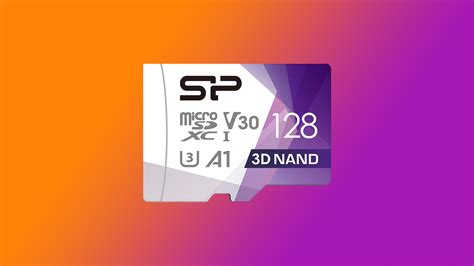
For Switch owners, a high-capacity microSD card is virtually a necessity. These small cards are the primary method for expanding your storage for digital games and game data. Look for cards with fast read/write speeds (UHS-I, Speed Class 3, or A1/A2 rating) to ensure smooth gameplay and loading times. You can transfer downloaded games from your console’s internal memory to the microSD card and vice-versa.
Archiving vs. Deleting Games
The Switch offers two main options for removing games: ‘Archive’ and ‘Delete’. Archiving removes the main game data but keeps your save data, game icon, and any DLC. This is ideal if you plan to re-download the game later, as your progress will be intact. Deleting removes everything, including save data, so be cautious. Always ensure your save data is backed up via Nintendo Switch Online’s cloud save feature before deleting.
PlayStation & Xbox: Beefing Up Beyond Internal
Modern PlayStation (PS4/PS5) and Xbox (Xbox One/Series X|S) consoles come with larger internal drives, but even 500GB, 1TB, or 2TB can quickly fill up. These consoles typically offer more robust external storage solutions.
External Hard Drives and SSDs
Both PlayStation and Xbox consoles support external USB hard drives or SSDs for game storage. For PS4 and Xbox One/Series X|S (backward compatible games), standard external HDDs offer a cost-effective way to add terabytes of storage. For PS5 and Xbox Series X|S native games, the requirements are stricter:
- PS5: Supports external USB drives for PS4 games. For PS5 games, you’ll need an M.2 NVMe SSD installed internally in the dedicated expansion slot or to transfer PS5 games to an external USB drive for storage, but not play directly from it.
- Xbox Series X|S: Supports external USB drives for Xbox One, Xbox 360, and original Xbox games. For Series X|S optimized games, you need the proprietary Seagate Storage Expansion Card, which replicates the internal SSD speed.
Consider an external SSD for faster loading times on compatible games, especially for PS4 or Xbox One titles played on newer consoles.

Physical Games: Not So ‘Physical’ on Storage?
Even if you prefer physical discs, modern games install a significant amount of data to your console’s internal storage, plus patches and DLC. The disc primarily serves as a DRM check. Deleting a game installed from disc frees up space, but you’ll have to reinstall it from the disc (and download all patches again) if you want to play it later. Always ensure your save data is backed up to the cloud (PlayStation Plus or Xbox Game Pass Ultimate) before deleting.

General Best Practices for All Consoles
Prioritize and Prune Your Library
Regularly review your installed games. Be honest with yourself: are you really going to play that game you finished six months ago again soon? Uninstall games you’re not actively playing to free up space for new titles. Remember that most digital purchases and physical installations can be re-downloaded or reinstalled later.
Leverage Cloud Saves
Always utilize cloud save features offered by your console’s subscription services (Nintendo Switch Online, PlayStation Plus, Xbox Game Pass Ultimate). This ensures your precious game progress is safe, even if you delete a game or experience a hardware failure.
Manage Media & Screenshots
Screenshots and video clips can surprisingly consume a lot of space over time, especially if you record at high resolutions or frequently. Periodically transfer these media files to a USB drive or upload them to cloud services (like YouTube for videos, or personal cloud storage for images) to clear up console space.
Keep System Software Updated
Console manufacturers often release system updates that can sometimes optimize how storage is used or fix bugs that might impact storage management. Keeping your system up-to-date is a good general practice.
Conclusion: A Tidy Console is a Happy Console
Optimizing your console storage isn’t a one-time task but an ongoing process. By understanding your console’s specific storage options, making strategic choices about external drives, and regularly pruning your game library, you can ensure you always have enough space for the next big title and minimize frustrating interruptions to your gaming fun. A little proactive management goes a long way in maintaining a smooth and enjoyable gaming experience.


