





How to implement parental controls for healthy screen time & game content?

Understanding the Need for Parental Controls
In today’s digitally driven world, screens are an inescapable part of our children’s lives. From educational apps to online games, digital engagement offers numerous benefits but also presents unique challenges. As parents, our primary goal is to ensure our children navigate this environment safely and healthily. Parental controls are not about restricting freedom entirely; they are about setting boundaries, protecting innocence, and fostering responsible digital citizenship. They provide a crucial layer of defense against inappropriate content, excessive screen use, and online predators, allowing children to explore the digital world within a safe framework.
The Digital Dilemma
Children are exposed to a vast ocean of information and entertainment, much of which is not designed for their age group. Unfiltered access can lead to encounters with violent games, explicit content, cyberbullying, or even online scams. Moreover, unchecked screen time can impact physical health, academic performance, and social development. Understanding these risks is the first step toward effective intervention.
Benefits of Proactive Management
Implementing parental controls offers peace of mind. It empowers parents to guide their children’s digital experiences, helping them develop healthy habits from an early age. These controls can help manage the types of content accessed, limit exposure to advertising, and prevent accidental in-app purchases. Ultimately, it’s about striking a balance between exploration and protection.

Setting Healthy Screen Time Limits
One of the most common concerns for parents is the amount of time children spend in front of screens. Excessive screen time can displace other important activities like physical play, reading, and face-to-face social interaction. Establishing clear, consistent screen time limits is fundamental to promoting a balanced lifestyle.
Device-Specific Controls
Most modern devices – smartphones, tablets, gaming consoles, and smart TVs – come with built-in parental control features. These allow you to:
- Set daily or weekly time limits for device usage.
- Schedule downtime during homework, meal times, or bedtime.
- Monitor usage patterns to understand what apps or games are consuming the most time.
Familiarize yourself with the settings on each device your child uses. Apple’s Screen Time, Google’s Family Link, and console-specific settings (PlayStation, Xbox, Nintendo) are excellent starting points.
Scheduling and Routines
Beyond technical limits, integrate screen time into a broader family schedule. Designate ‘no-screen’ zones or times, such as bedrooms at night or during family meals. Encourage alternative activities by providing access to books, art supplies, board games, and opportunities for outdoor play. Consistency is key, and involving children in the creation of these rules can increase their adherence.

Filtering Inappropriate Game and App Content
Beyond just time, the *type* of content your child accesses is equally important. Games and apps are rated for age appropriateness, but these ratings are not always foolproof, and what’s acceptable for one child might not be for another.
Age Ratings and Content Descriptors
Educate yourself on industry standard ratings like ESRB (Entertainment Software Rating Board) in North America, PEGI (Pan European Game Information) in Europe, or IARC (International Age Rating Coalition). These ratings indicate age suitability and often include content descriptors for violence, language, sexual themes, etc. Use these as a guide, but always consider your child’s individual maturity level.
Platform-Specific Settings
Most gaming consoles and app stores offer robust content filtering options:
- Consoles: Allow you to restrict games by age rating, block specific titles, or disable online multiplayer functions.
- App Stores (iOS/Android): Enable you to prevent downloads of apps above a certain age rating and even require passwords for all purchases or free downloads.
- Browsers: Utilize safe search features and consider browser extensions or family-friendly browsers that pre-filter content.

Monitoring, Communication, and Flexibility
Parental controls are tools, but they work best when combined with open communication and active parenting. Technology alone cannot solve all digital challenges.
Regular Check-ins
Periodically review the content your child is consuming and the apps they are using. Ask them about their favorite games, what they like to do online, and if they’ve encountered anything that made them uncomfortable. This keeps you informed and opens lines of communication.
Open Dialogue
Discuss the ‘why’ behind parental controls. Explain that these measures are in place to keep them safe, not to punish them. Encourage them to come to you if they see anything online that worries them. Foster an environment where they feel comfortable sharing their digital experiences.
Adapting as They Grow
Parental controls should evolve with your child. As they mature and demonstrate responsible behavior, gradually ease restrictions while maintaining oversight. This shows trust and teaches them self-regulation, preparing them for greater independence.

Tools and Resources for Parents
A variety of tools can assist in managing your child’s digital life effectively.
Operating System Built-in Controls
- Apple Screen Time: Manage app usage, content restrictions, and privacy settings across all Apple devices.
- Google Family Link: For Android devices, set digital ground rules, approve app downloads, and locate devices.
- Windows Family Safety: For PCs, filter websites, manage screen time, and get activity reports.
Third-Party Apps and Routers
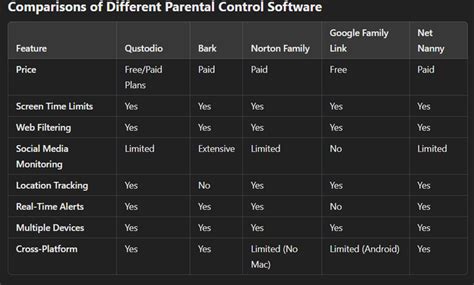
Consider dedicated parental control apps like Qustodio, Bark, or OurPact for more comprehensive features across multiple devices and platforms. Many home routers also offer network-level parental controls, allowing you to filter content and set internet access schedules for all connected devices.
Conclusion: A Balanced Approach to Digital Parenting
Implementing parental controls for healthy screen time and game content is an ongoing process that requires vigilance, communication, and flexibility. By leveraging available tools, understanding content ratings, and maintaining an open dialogue with your children, you can create a safe, balanced, and enriching digital environment for them to thrive. Remember, the goal is not to eliminate screens but to teach responsible and mindful interaction with technology, preparing them to be smart and safe digital citizens.

