





How to get instant alerts for the best game deals across PC, console, and mobile stores?
Never Miss a Gaming Bargain Again!
In the fast-paced world of video games, waiting for the perfect moment to buy can save you a significant amount of money. Whether you’re a PC master race enthusiast, a console loyalist, or a mobile gaming aficionado, keeping up with ever-changing prices across numerous digital storefronts can be a daunting task. The good news? You don’t have to manually scour every store. With the right tools and strategies, you can get instant alerts for the best game deals, ensuring you’re always first in line for a bargain.
Why Instant Alerts Are Crucial for Gamers
Game deals are often time-sensitive, sometimes lasting only a few hours or a single weekend. Missing a flash sale for that title you’ve been eyeing can be frustrating. Furthermore, prices fluctuate not just across different platforms (Steam, Epic Games Store, PlayStation Store, Xbox Store, Nintendo eShop, Google Play, Apple App Store) but also between regions and various third-party key resellers. Instant alerts cut through the noise, delivering timely notifications directly to you when a desired game hits a specific price point or goes on a deep discount.
Top Strategies to Get Real-Time Game Deal Notifications
1. Dedicated Game Deal Aggregators & Websites
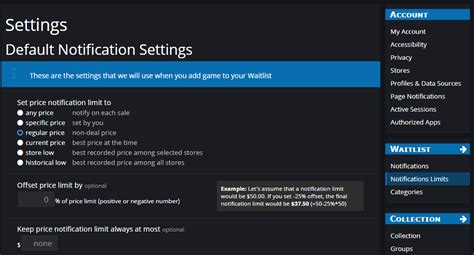
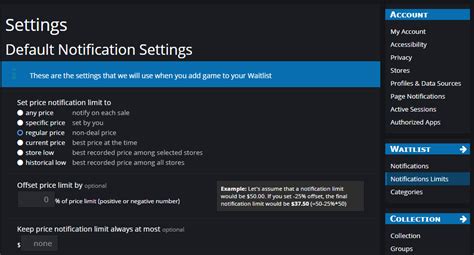
Several websites specialize in tracking prices across multiple storefronts simultaneously. These platforms are often the cornerstone of any serious deal hunter’s arsenal. Sites like IsThereAnyDeal, CheapShark, and DLGamer aggregate data from hundreds of digital stores, allowing you to set up wishlists and price alerts. You can often specify a target price, and receive an email or push notification the moment a game drops below that threshold. Many also provide historical price charts, helping you decide if the current discount is truly the best it’s been.
2. Community-Driven Platforms: Reddit & Discord
The collective power of the gaming community is an invaluable resource. Subreddits like r/GameDeals are constantly updated by users sharing new discoveries, often highlighting obscure sales or regional discounts that might not appear on major aggregators immediately. Similarly, many gaming Discord servers have dedicated channels for deals, where members quickly share links and discuss the validity of sales. Joining these communities can provide real-time updates and offer a space for discussion before making a purchase.
3. Browser Extensions & Mobile Apps
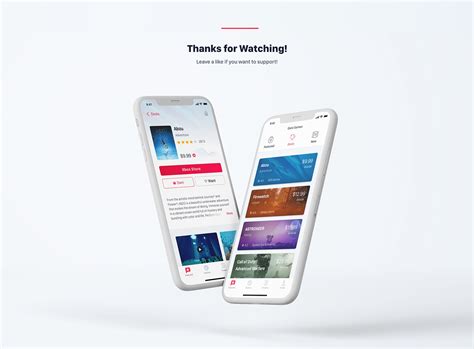
For PC gamers, browser extensions can integrate directly with storefronts like Steam, Epic Games, and GOG, showing price history and wishlist alerts right on the store page. Extensions can even compare prices with other authorized retailers. On the mobile front, dedicated apps exist that function similarly to the aggregator websites, sending push notifications for deals across various platforms, including iOS and Android game sales. These are particularly useful for on-the-go tracking.
4. Store-Specific Wishlists & Email Notifications
Don’t overlook the built-in features of the digital storefronts themselves. Most major platforms – Steam, PlayStation Store, Xbox Store, Nintendo eShop, Epic Games Store, GOG, Google Play, and Apple App Store – allow you to add games to a wishlist. When a game on your wishlist goes on sale, you’ll typically receive an email notification. While not as comprehensive as aggregators for cross-store comparisons, it’s a reliable way to track games directly from their source and ensures you hear about first-party sales.
Tips for Maximizing Your Deal Alert System
- Combine Methods: Don’t rely on just one source. Use a combination of a primary aggregator, a community forum, and store wishlists for comprehensive coverage.
- Set Price Thresholds: Many tools allow you to specify how much of a discount you’re looking for (e.g., alert me only if it’s 50% off or more). This filters out minor sales.
- Be Quick: Flash sales can end rapidly. Have your payment methods ready for immediate purchase if it’s a must-have title.
- Check Reputability: When using third-party key sellers, ensure they are authorized dealers to avoid issues with invalid keys or grey market practices.

Conclusion
Getting instant alerts for game deals is no longer a luxury but a necessity for smart gaming. By leveraging dedicated deal aggregators, engaging with vibrant gaming communities, utilizing browser extensions and mobile apps, and making full use of store-specific features, you can build a robust system that ensures you’re always in the loop. Stop paying full price and start expanding your game library without breaking the bank. Happy hunting!


