





How to discuss in-game purchases and avoid unexpected costs?

The digital world offers endless entertainment for children, but it also introduces new challenges for parents, particularly when it comes to in-game purchases. What starts as a free or low-cost game can quickly escalate into unexpected bills if not properly managed. Understanding how these purchases work and establishing clear communication with your children are crucial steps in protecting your wallet and fostering responsible digital habits.
Understanding In-Game Purchases
In-game purchases, often called microtransactions, are digital items or features bought within a video game using real money. These can range from cosmetic upgrades that change a character’s appearance, to virtual currencies like ‘gems’ or ‘coins’ that speed up progress, unlock content, or offer a competitive edge. They are designed to be appealing, often through limited-time offers or ‘loot boxes’ that offer a chance at rare items, making them highly attractive to young players.
Open Communication is Key
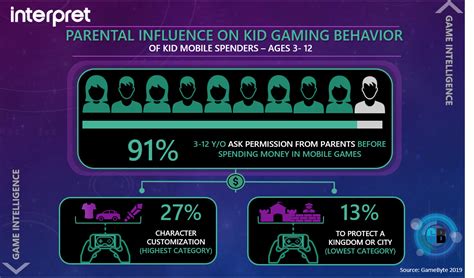
The first and most important step is to talk to your children about in-game purchases. Explain that these digital items cost real money and discuss your family’s financial rules. Help them understand the difference between virtual currency and actual money. Ask them why they want to make a purchase, what they think it’s worth, and whether it aligns with their goals or game enjoyment. Setting clear expectations and boundaries upfront can prevent many future conflicts.
Establish a “no surprises” rule: no purchases without explicit permission. Discuss how much, if anything, is acceptable to spend, and for what types of items. This open dialogue not only manages spending but also teaches valuable lessons about budgeting and financial decision-making.

Implementing Parental Controls
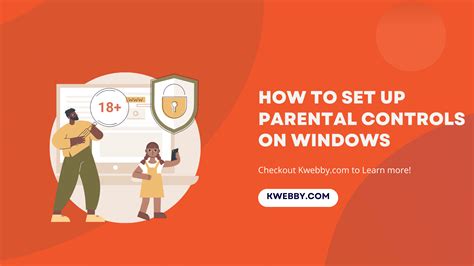
Technology provides powerful tools to help parents manage in-game spending. Most gaming platforms (consoles, PCs, and mobile devices) offer robust parental control settings that allow you to:
- Require a password for every purchase.
- Disable in-app purchases entirely.
- Set monthly or weekly spending limits.
- Block specific content or age-rated games.
Take the time to explore and configure these settings on every device your child uses for gaming. This creates a vital barrier against accidental or unauthorized spending, giving you peace of mind.
Budgeting and Earning Privileges
Beyond simply restricting purchases, consider using in-game spending as an opportunity to teach financial literacy. You could:
- Allocate a small allowance specifically for in-game purchases. This teaches children how to budget and make choices within a limited fund.
- Implement an “earning” system where children can earn money for chores or good grades, which they can then choose to spend on in-game items (with your approval).
- Regularly review game spending together, discussing the value of what was purchased versus its real-world cost.
These strategies help children understand the concept of earning, saving, and making informed financial decisions, rather than just seeing money as an endless resource for digital items.

What to Do If Unexpected Costs Occur
Even with the best precautions, mistakes can happen. If you find an unexpected charge:
- Stay Calm: Reacting with anger can make your child reluctant to discuss future issues.
- Investigate: Determine what was purchased, by whom, and how it happened. This helps identify gaps in your controls or understanding.
- Discuss Consequences: Without shaming, explain the impact of the unexpected cost. Reinforce your family’s rules and the importance of permission.
- Seek Refunds (If Applicable): Many platforms have policies for unauthorized purchases, especially by minors. Contact customer support for the platform (Apple, Google, PlayStation, Xbox, Steam, etc.) to see if a refund is possible.
- Adjust Controls: Use the incident as a learning opportunity to strengthen parental controls and communication strategies.

Conclusion
Navigating in-game purchases requires a proactive approach combining open family discussions with practical technological safeguards. By understanding how these systems work, setting clear expectations, utilizing parental controls, and teaching sound financial habits, parents can empower their children to enjoy gaming responsibly without falling prey to unexpected costs. This not only protects your finances but also helps your children develop essential life skills for a digital future.

