





How to choose age-appropriate video games & ensure online safety for kids?
In today’s digital landscape, video games are an ubiquitous part of childhood. While they offer immense entertainment, educational potential, and social interaction, parents often grapple with choosing suitable titles and protecting their children in online environments. This guide will walk you through making informed decisions about game selection and implementing crucial safety protocols.
Understanding Game Rating Systems
The first step in choosing age-appropriate games is to familiarize yourself with the rating systems. These systems provide a standardized way to inform consumers about the content and suitability of a game for specific age groups.
In North America, the ESRB (Entertainment Software Rating Board) provides ratings like E (Everyone), E10+ (Everyone 10+), T (Teen), M (Mature), and AO (Adults Only). Each rating comes with content descriptors that explain why a game received its rating, such as ‘Fantasy Violence,’ ‘Mild Language,’ or ‘Blood.’ In Europe, the PEGI (Pan European Game Information) system uses age labels (3, 7, 12, 16, 18) and content descriptors for violence, bad language, fear, sex, drugs, discrimination, gambling, and in-game purchases.
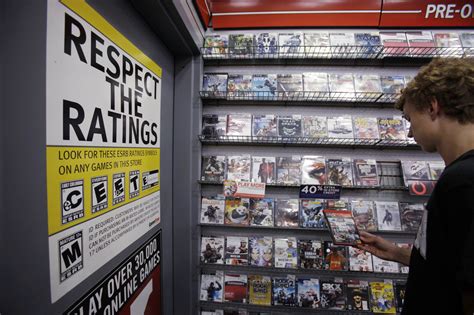
Always check the rating and content descriptors before purchasing or allowing your child to play a new game. These are not merely age suggestions but vital warnings about potentially inappropriate themes, language, or graphic content.
Choosing the Right Games for Your Child
Beyond formal ratings, several factors contribute to a game’s appropriateness for your unique child:
- Know Your Child: Consider their individual maturity level, sensitivities, and interests. A game rated ‘E10+’ might be fine for one 9-year-old but too intense for another.
- Research and Reviews: Don’t just rely on the box. Read online reviews, watch gameplay videos, and consult trusted parent resources. Sites like Common Sense Media offer detailed reviews from a parental perspective.
- Play Together: The best way to understand a game is to experience it. Play alongside your child or at least observe them playing. This also creates shared experiences and opportunities for discussion.
- Trial and Error: It’s okay if a game doesn’t work out. Be prepared to remove a game if it proves to be too challenging, upsetting, or addictive for your child.
Essential Online Safety Measures
Once a game is chosen, ensuring online safety is paramount, especially for games with multiplayer or online interaction features.
Implement Parental Controls
Most modern gaming consoles, PCs, and mobile devices offer robust parental control settings. These allow you to:
- Set time limits for gameplay.
- Restrict access to certain games based on their rating.
- Disable or limit online communication features (e.g., voice chat, direct messaging).
- Control spending on in-game purchases (microtransactions).
- Monitor activity logs.
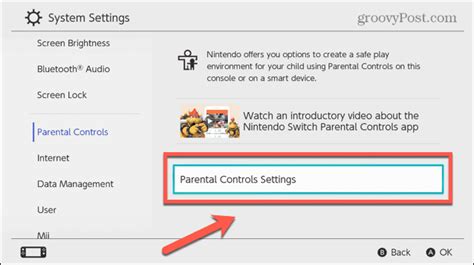
Take the time to understand and configure these settings on every device your child uses to play games. Update them as your child grows and their needs change.
Teach Digital Citizenship and Communication
The most powerful tool for online safety is open communication and education. Talk to your children about:
- Stranger Danger Online: Explain that online ‘friends’ are still strangers and that they should never share personal information (name, address, school, photos) with anyone they don’t know in real life.
- Cyberbullying: Teach them to report any bullying or inappropriate behavior they encounter. Assure them they won’t get in trouble for coming to you.
- Privacy Settings: Show them how to manage their privacy settings within games and on gaming platforms. Emphasize making their profiles private.
- Critical Thinking: Encourage them to question what they see and hear online and to understand that not everything is true or safe.

Fostering a Healthy Gaming Environment
Beyond safety, it’s crucial to cultivate a balanced and healthy relationship with video games.
- Set Clear Rules and Boundaries: Establish clear rules about screen time, when and where games can be played, and the types of games allowed. Consistency is key.
- Encourage Other Activities: Ensure gaming doesn’t overshadow other important activities like schoolwork, physical play, family time, and creative pursuits.
- Lead by Example: Your own screen habits influence your children. Demonstrate balanced technology use.
- Keep Devices in Common Areas: Whenever possible, encourage gaming in shared family spaces rather than isolated bedrooms to allow for easier monitoring and interaction.

Staying Informed and Adaptable
The world of video games is constantly evolving. New games, platforms, and online features emerge regularly. As a parent, commit to staying informed. Regularly review game ratings, explore new parental control options, and continue conversations with your children about their online experiences. Your active involvement is the best safeguard.
By combining an understanding of game content with robust safety measures and open communication, you can empower your children to enjoy video games responsibly and safely, turning potential worries into opportunities for shared fun and learning.

