How to choose age-appropriate games using ratings and parental controls effectively?

Navigating the Digital Playground: A Parent’s Guide to Game Choices
In today’s digital age, video games are a ubiquitous part of childhood. While they offer immense entertainment and even educational benefits, the sheer volume and variety of games can make choosing age-appropriate titles a daunting task for parents. Ensuring your child plays games that align with their developmental stage and your family’s values is paramount. Fortunately, robust rating systems and sophisticated parental controls are powerful tools designed to assist you in this endeavor. Let’s explore how to use them effectively.

Understanding Game Rating Systems
The first line of defense in choosing appropriate games is understanding the various rating systems. The two most prominent in North America and Europe are the Entertainment Software Rating Board (ESRB) and the Pan European Game Information (PEGI) system, respectively.
The ESRB (North America)
- Age Categories: The ESRB assigns ratings like E (Everyone), E10+ (Everyone 10+), T (Teen), M (Mature 17+), and AO (Adults Only 18+). These provide a general age recommendation.
- Content Descriptors: Equally, if not more important, are the content descriptors. These short phrases explain *why* a game received a particular rating. Examples include “Fantasy Violence,” “Crude Humor,” “Language,” “Suggestive Themes,” and “Use of Alcohol.”
- Interactive Elements: Look for symbols indicating online interactions, user-generated content, or in-game purchases.
The PEGI System (Europe)
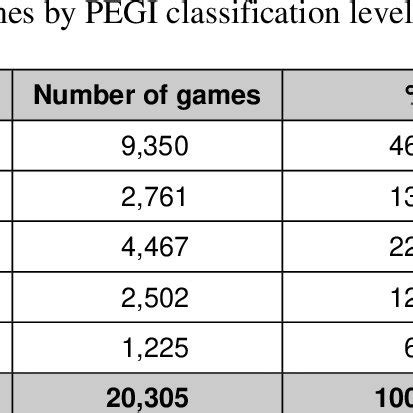
- Age Categories: PEGI uses age labels such as 3, 7, 12, 16, and 18, which directly correspond to recommended minimum ages.
- Content Descriptors: Similar to ESRB, PEGI also features descriptive icons for elements like “Violence,” “Bad Language,” “Fear,” “Sex,” “Drugs,” “Gambling,” “Discrimination,” and “In-Game Purchases.”
Always remember that age ratings are recommendations, not strict rules. A game rated “Teen” might be perfectly fine for one 12-year-old but too intense for another.
Deciphering Content Descriptors: What Do They Really Mean?
While an age rating provides a quick overview, the true insight lies in the content descriptors. These detailed labels give you a clear picture of specific elements within a game that might be a concern. For example:
- “Fantasy Violence” vs. “Realistic Violence”: The former often implies cartoonish or non-graphic combat, while the latter can involve blood, gore, and more lifelike depictions of injury.
- “Mild Language” vs. “Strong Language”: This differentiates between infrequent, minor expletives and frequent, more offensive profanity.
- “Suggestive Themes” vs. “Sexual Content”: Suggestive themes might involve revealing outfits or mild innuendo, whereas sexual content indicates more explicit depictions or references.
Before purchasing or allowing a new game, take a moment to read all the descriptors. They offer a nuanced understanding that a single age number cannot.

Leveraging Parental Controls Effectively
Beyond ratings, parental controls are your practical tool for managing what your children play, when they play, and how they interact online. Nearly all modern gaming platforms—consoles (PlayStation, Xbox, Nintendo Switch), PCs, and mobile devices—offer robust parental control features.
Key Parental Control Features:
- Age Restrictions: Block games above a certain rating automatically.
- Time Limits: Set daily or weekly limits on screen time, ensuring a healthy balance with other activities.
- Communication Restrictions: Control who your child can communicate with online, preventing interactions with strangers.
- Spending Limits/In-App Purchases: Prevent unauthorized purchases within games, which can quickly add up.
- Content Filters: Block access to certain websites or mature content within browsers.
It’s crucial to set up these controls on each device your child uses for gaming. Don’t assume settings on one device apply to another. Regularly review and adjust these settings as your child grows and their needs change.

Beyond Ratings: Communication, Research, and Shared Experiences
While ratings and parental controls are indispensable, they are most effective when coupled with open communication and active parenting.
- Talk to Your Kids: Ask them what games they’re interested in and why. Discuss the content, themes, and online interactions. Empower them to make good choices.
- Do Your Research: Watch gameplay videos on YouTube, read reviews from reputable gaming sites, or even try the game yourself if possible. This gives you first-hand insight.
- Play Together: When appropriate, join your child in their gaming adventures. This offers a valuable opportunity to bond, understand their interests, and monitor content directly.
- Stay Updated: The gaming landscape evolves rapidly. Keep an eye on new trends, popular games, and any emerging concerns.
Conclusion
Choosing age-appropriate games for your children doesn’t have to be a guessing game. By understanding and utilizing game rating systems like ESRB and PEGI, paying close attention to content descriptors, and effectively configuring parental controls across all devices, you can create a safe, enjoyable, and enriching gaming environment. Combine these tools with open dialogue and active participation, and you’ll confidently guide your children through the exciting world of video games.