





How to best track wishlist games & stack discount codes for PC/console deals?

In the vast and ever-expanding world of PC and console gaming, keeping up with the titles you want and snagging them at the best possible price can feel like a game in itself. From blockbuster AAA releases to indie gems, knowing when and where to buy is crucial for any savvy gamer. This guide will walk you through the most effective methods for tracking your wishlist games and reveal the secrets to stacking discount codes, ensuring you never pay full price again.

Mastering Your Wishlist: Tracking Tools & Strategies
The first step to saving money is knowing what you want. Most major digital storefronts offer native wishlist features, which are your primary line of defense against missing out on a sale.
Native Storefront Wishlists
- Steam, PlayStation Store, Xbox Store, Nintendo eShop, Epic Games Store: All these platforms allow you to add games to a personal wishlist. They typically send email notifications when a wishlisted game goes on sale. Make sure your notification settings are turned on!
- Benefits: Direct integration, easy to use, often include exclusive platform sales.
Third-Party Price Trackers
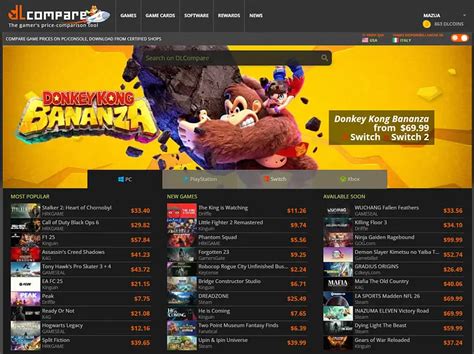
For a more comprehensive approach, third-party aggregators are indispensable. These services track prices across multiple retailers, including official stores, key resellers, and bundle sites, giving you a holistic view of the market.
- IsThereAnyDeal.com: A cornerstone for PC gamers, tracking prices across dozens of reputable PC game stores. It features historical price charts, allows you to create a personalized wishlist by importing from Steam, and sends email alerts when your desired games hit a specific price or discount percentage.
- GG.deals: Similar to IsThereAnyDeal but also includes console deals, making it versatile for multi-platform gamers. It offers price comparisons, historical data, and deal alerts.
- Price-Tracking Browser Extensions: Tools like Honey or enhanced versions of the above trackers can sometimes provide on-page price history and coupon suggestions directly as you browse.
The Art of the Deal: Finding & Stacking Discount Codes
Once you’ve identified a game at a good price, the next step is to see if you can make that deal even sweeter with discount codes. Not all codes can be stacked, but understanding the types and sources can significantly increase your savings.
Sources of Discount Codes
- Retailer Newsletters: Sign up for emails from your favorite game retailers (e.g., Green Man Gaming, Fanatical, Humble Bundle, GOG.com). They frequently send out exclusive coupon codes for subscribers, often tied to specific sales or new releases.
- Publisher Promotions: Follow game publishers on social media and subscribe to their newsletters. They sometimes offer direct codes for their own storefronts or partner retailers.
- Gaming Websites & Forums: Dedicated deal-hunting communities like CheapAssGamer, specific subreddits (e.g., r/GameDeals), or sites like Slickdeals often share newly discovered codes.
- Influencer & Affiliate Codes: Many streamers and content creators have unique discount codes for various retailers. A quick search can sometimes yield a working code.
Understanding Discount Stacking
Stacking discounts means applying multiple promotional offers to a single purchase. While not always possible, it’s a powerful strategy when the stars align.
- Store-Wide Sales + Coupon Codes: This is the most common form of stacking. A retailer might be running a 20% off sale on all titles, and then you might have a separate 10% off coupon code applicable to your entire cart. Check the terms of the coupon code carefully – often, they specify if they are valid on sale items or if they exclude certain products.
- Loyalty Programs + Coupons: If a retailer has a loyalty program that offers points or store credit for purchases, you can often earn these benefits even when using a coupon. Sometimes, you can even redeem loyalty points on top of an existing sale or coupon code.
- Payment Method Discounts: Keep an eye out for promotions tied to specific payment methods (e.g., PayPal offers, specific credit card benefits). These can sometimes be applied at checkout alongside other discounts, as they are often handled by the payment processor rather than the retailer directly.
- Pre-order Bonuses + Discounts: Some retailers offer exclusive pre-order bonuses (e.g., in-game items) that can be combined with a pre-order discount code.

Best Practices for Maximum Savings
- Patience is Key: Almost every game goes on sale eventually. If it’s not urgent, adding it to your wishlist and setting an alert is often the best strategy.
- Read the Fine Print: Always check the terms and conditions of discount codes and sales. Pay attention to expiration dates, exclusions (e.g., new releases, specific publishers), and whether they can be combined with other offers.
- Compare Retailers: Don’t just stick to one store. A game might be cheaper at one retailer, and with a unique discount code, it could become the absolute best deal.
- Consider Regional Pricing: Prices and sales can vary significantly by region. While it’s often against terms of service to bypass regional restrictions, being aware of these differences can help you understand market trends.
- Look Beyond Just Buying: Services like Xbox Game Pass or PlayStation Plus Extra often include popular games, offering a ‘play it for free’ alternative to purchasing, especially if you only plan to play through a game once.

Conclusion
Becoming a master of game deals requires a combination of smart tracking and strategic code application. By leveraging native wishlists, employing powerful third-party aggregators, diligently seeking out discount codes, and understanding when and how to stack them, you can significantly reduce your gaming budget. Happy hunting, and may your library grow as rapidly as your savings!


