How do I maximize Switch storage for more digital games?
Expanding Your Nintendo Switch Storage: A Digital Game Guide
The Nintendo Switch, a marvel of portable gaming, comes with a significant limitation for many avid gamers: its relatively modest internal storage. With only 32GB (for the standard model and Lite) or 64GB (for the OLED model), and a chunk of that reserved for the system itself, it doesn’t take long for digital game downloads to fill up the space. If you’re tired of constantly deleting games to make room for new ones, you’re in the right place. Maximizing your Switch’s storage is straightforward, and largely revolves around one essential accessory.
The Indispensable Solution: High-Capacity MicroSD Cards
The primary and most effective way to expand your Nintendo Switch’s storage for digital games is by investing in a microSD card. The Switch supports microSD, microSDHC, and microSDXC cards, with officially supported capacities currently reaching up to 2TB (though 1TB cards are the most common high-end option available today).
When choosing a card, capacity is key, but speed also matters. Look for cards with a UHS-I (Ultra High Speed Phase I) rating, and ideally a V30 Video Speed Class or U3 Speed Class for optimal read and write speeds. This ensures smoother game loading and faster downloads. While cheaper cards might work, a reputable brand with good speeds will offer a better gaming experience.
Installing Your MicroSD Card and Managing Games
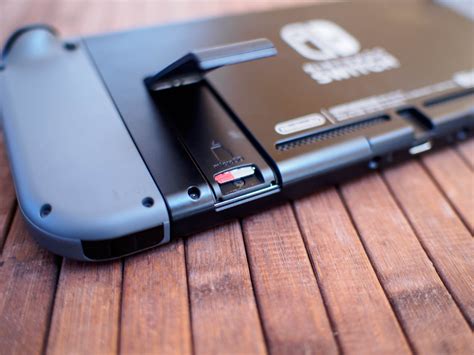
Installing a microSD card is incredibly simple. Power off your Nintendo Switch, lift the kickstand on the back of the console, and you’ll find the microSD card slot. Insert the card face down (label side up) until it clicks into place. Power your Switch back on, and it will automatically detect and format the new card, preparing it for game storage.
Once installed, any new digital games you download from the eShop will automatically be saved to your microSD card, provided there’s enough space. For games you’ve already downloaded to your internal memory, you can’t directly “move” them to the microSD card. Instead, you’ll need to archive the game from the internal memory and then re-download it, at which point it will install onto your newly inserted microSD card.
Smart Storage Management Beyond the Card
Even with a large microSD card, smart management practices can extend your available space and keep your digital library organized.
Archiving vs. Deleting Digital Games
The Nintendo Switch offers two options for removing games: archiving and deleting. Archiving a game removes the game data from your console (freeing up space) but keeps its icon on your Home menu and, crucially, preserves your save data. You can easily redownload an archived game at any time. Deleting a game, however, removes everything – the game data, the icon, and any associated save data (unless you have Nintendo Switch Online cloud saves enabled). Always choose archiving unless you are absolutely certain you’ll never play the game again and don’t care about your progress.
Understanding Save Data: It Stays Internal!
This is a critical point often misunderstood: game save data is always stored on the Nintendo Switch console’s internal memory, not on the microSD card. This means even if you have a massive microSD card, your internal memory can still get tight if you have hundreds of game saves. While you can’t move save data to an SD card, a Nintendo Switch Online subscription provides cloud save backups for most (but not all) games, offering peace of mind and protecting your progress.
Monitoring Your Storage Space
To keep an eye on your storage situation, navigate to System Settings > Data Management. Here, you’ll see a breakdown of your internal memory and your microSD card, showing how much space is used by games, save data, screenshots, and videos. This section also allows you to manage (archive or delete) games and software, helping you identify and clear out the biggest space hogs.
Conclusion: Game On with Ample Space
Don’t let limited storage curb your digital gaming adventures on the Nintendo Switch. A high-capacity, fast microSD card is your best friend, transforming your console’s storage capabilities. Couple this with smart management practices like archiving games and understanding how save data works, and you’ll have more than enough room for an expansive library of digital titles. Enjoy the freedom of downloading new games without the constant worry of running out of space!