





How can parents use game ratings (ESRB/PEGI) to choose safe, fun games?
Navigating the Digital Playground: Understanding Game Ratings
In today’s digital age, video games are a ubiquitous part of many children’s lives. While they offer immense opportunities for fun, learning, and social interaction, parents often grapple with the challenge of ensuring their children are playing games that are safe and appropriate for their age and maturity level. Fortunately, established rating systems like the Entertainment Software Rating Board (ESRB) in North America and the Pan European Game Information (PEGI) across Europe provide invaluable tools to help parents make informed choices.

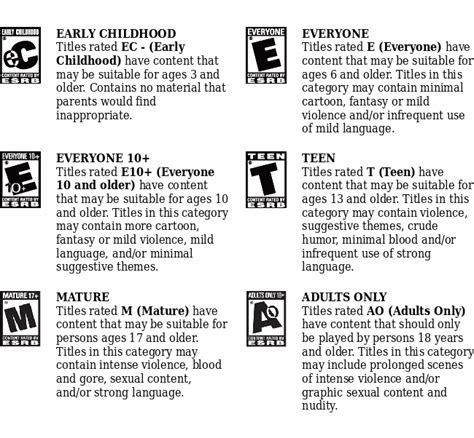
Demystifying ESRB Ratings (North America)
The ESRB system, prevalent in the United States and Canada, assigns age ratings and content descriptors to video games. Understanding these components is crucial:
- Age Categories: These are the most visible part of the rating.
- EC (Early Childhood): Ages 3+ (content generally suitable for young children).
- E (Everyone): Ages 6+ (may contain minimal cartoon, fantasy or mild violence and/or infrequent mild language).
- E10+ (Everyone 10+): Ages 10+ (may contain more cartoon, fantasy or mild violence, mild language, and/or minimal suggestive themes).
- T (Teen): Ages 13+ (may contain violence, suggestive themes, crude humor, minimal blood, simulated gambling, and/or infrequent use of strong language).
- M (Mature): Ages 17+ (may contain intense violence, blood and gore, sexual content, and/or strong language).
- AO (Adults Only 18+): Ages 18+ (content suitable only for adults, often containing prolonged scenes of intense violence, graphic sexual content, and/or gambling with real currency).
- Content Descriptors: These offer specific details about the game’s content that contributed to its age rating. Examples include “Fantasy Violence,” “Mild Language,” “Sexual Themes,” “Blood,” “Use of Alcohol,” “Gambling,” and many more. These descriptors are key to understanding why a game received a particular rating.

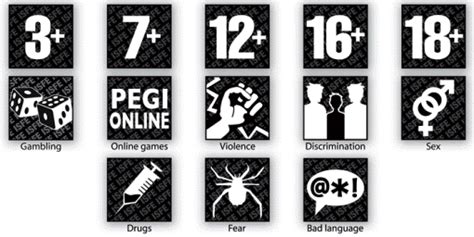
Understanding PEGI Ratings (Europe and Beyond)
PEGI is widely used across Europe and in other countries globally, offering a similar, yet distinct, system for classifying video games:
- Age Categories: PEGI ratings guide parents on the suitability of a game based on the content it contains.
- PEGI 3: Suitable for all age groups.
- PEGI 7: Suitable for ages 7 and over.
- PEGI 12: Suitable for ages 12 and over.
- PEGI 16: Suitable for ages 16 and over.
- PEGI 18: Suitable only for adults.
- Content Descriptors: PEGI also uses specific icons to denote content, which are universally understood symbols. These include: “Violence,” “Bad Language,” “Fear,” “Sex,” “Drugs,” “Discrimination,” “Gambling,” and “In-Game Purchases.” The “In-Game Purchases” descriptor is a particularly useful recent addition, highlighting games that offer optional paid content.
Beyond the Label: How to Effectively Use Ratings
While the ratings themselves are excellent starting points, truly effective use requires a more proactive approach from parents:
- Don’t Just Look at the Number: The age rating is a recommendation, not a strict rule. Always delve into the content descriptors (ESRB) or icons (PEGI) to understand what earns the rating. A “T for Teen” game for ESRB might be mild violence, while another “T” game might involve suggestive themes, which might be a bigger concern for your family.
- Know Your Child: Every child is different. A game rated E10+ might be perfectly fine for one 9-year-old, but too intense for another. Consider your child’s emotional maturity, sensitivity, and their ability to differentiate between game content and reality.
- Watch Gameplay Videos and Read Reviews: The internet is a treasure trove of information. Before purchasing, watch gameplay trailers or let’s-play videos on platforms like YouTube. Read reviews from trusted gaming sites or parent communities to get a real sense of the game’s tone, themes, and mechanics.
- Involve Your Child in the Decision: Engage your child in the process. Discuss why certain games are off-limits or why others are suitable. This teaches critical thinking and helps them understand your values regarding media consumption.
- Play Together: The best way to know what your child is playing is to play with them. This allows you to observe content firsthand, discuss in-game scenarios, and share a fun activity.

Fostering a Healthy Gaming Environment
Game ratings are a powerful tool, but they are just one piece of the puzzle. Creating a healthy gaming environment involves broader parenting strategies:
- Set Clear Boundaries: Establish rules around screen time, game types, and when gaming is appropriate. Consistency is key.
- Open Communication: Encourage your child to talk about the games they play, what they enjoy, and what might be upsetting or confusing.
- Balance: Ensure gaming is balanced with other activities like outdoor play, reading, homework, and family time.

Conclusion
Game rating systems like ESRB and PEGI are designed to empower parents, not replace their judgment. By understanding their nuances, looking beyond mere age numbers, and combining them with your knowledge of your child’s maturity and open communication, you can confidently navigate the vast world of video games. This approach ensures your children engage with content that is not only safe and appropriate but also genuinely fun and enriching, fostering a positive and balanced gaming experience for the whole family.

