





How can I reduce mobile game battery drain on Android/iOS devices?

Understanding Mobile Game Battery Drain
Mobile gaming, while incredibly entertaining, is notoriously demanding on your device’s battery. Games leverage your smartphone’s most power-hungry components: the display, processor (CPU), graphics processing unit (GPU), and network radios for online play. High-resolution graphics, complex physics engines, and constant data communication all contribute to rapid battery depletion. Fortunately, there are several effective strategies you can employ on both Android and iOS devices to extend your playtime and preserve battery life.

Optimize Display and Graphics Settings
Your screen is often the biggest power consumer. Reducing its demands is a primary step.
Lower Screen Brightness
This is perhaps the most straightforward and effective method. Dimming your screen significantly reduces power consumption. While playing, adjust the brightness to the lowest comfortable level, especially if you’re indoors.
Adjust In-Game Graphics Settings
Most modern mobile games offer a range of graphics settings. Dive into the game’s options menu and consider reducing:
- Resolution: Lowering this can have a huge impact.
- Frame Rate: While a higher frame rate (e.g., 60fps) looks smoother, capping it at 30fps can save substantial power.
- Texture Quality: Lowering textures can reduce GPU load.
- Special Effects: Turn off shadows, anti-aliasing, and other visual flair if battery life is a priority.
Manage Background Processes and Connectivity
What your phone is doing when you’re not actively using it, or unnecessary connections, can also drain power.
Close Background Apps
Before launching a demanding game, close all unnecessary apps running in the background. These apps consume RAM and CPU cycles, contributing to overall power use.
Disable Unnecessary Radios
Turn off Bluetooth, GPS, and NFC if the game doesn’t explicitly require them. For instance, if you’re playing an offline single-player game, there’s no need for location services or Bluetooth to be active.
Use Wi-Fi Over Mobile Data
Whenever possible, play online games using a stable Wi-Fi connection. Mobile data (especially 4G/5G) often consumes more power due to the continuous searching for the strongest signal and higher data transfer rates.
Platform-Specific Optimizations
Both Android and iOS offer built-in features to help manage battery life.
Android Devices:
- Battery Saver Mode: Android’s Battery Saver mode restricts background activity, reduces visual effects, and limits app sync. Activate it when you’re gaming to squeeze out more playtime.
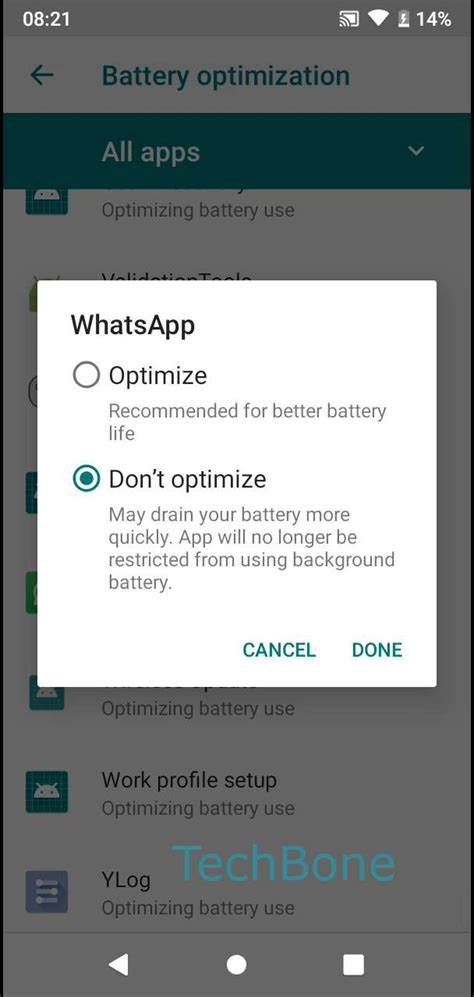
- Adaptive Battery/Battery Optimization: Found in your phone’s settings, these features intelligently learn your usage patterns to optimize battery life by putting less-used apps into a deeper sleep.
- Game Mode/Game Boosters: Many Android manufacturers include dedicated “Game Modes” or “Game Boosters” that can optimize performance and battery life by clearing RAM, blocking notifications, and sometimes even adjusting CPU/GPU allocation for games.
iOS Devices:
- Low Power Mode: Similar to Android’s Battery Saver, Low Power Mode on iOS reduces background app refresh, visual effects, and automatic downloads, significantly preserving battery.
- Background App Refresh: Go to Settings > General > Background App Refresh and disable it for apps that don’t need constant updates, or set it to Wi-Fi only.
- Reduce Motion/Transparency: In Accessibility settings, disabling “Reduce Motion” and “Reduce Transparency” can slightly lessen the GPU load from UI animations.
General Device Health and Software Updates
Keeping your device in good shape and software up-to-date also plays a role.
Keep Your Device and Apps Updated
Software updates often include performance enhancements and bug fixes that can improve power efficiency. Game developers also release updates to optimize their titles.
Avoid Extreme Temperatures
Playing in very hot or cold environments can negatively impact battery performance and longevity. Overheating is particularly detrimental, as it can throttle your device’s performance and accelerate battery degradation.

Consider External Accessories
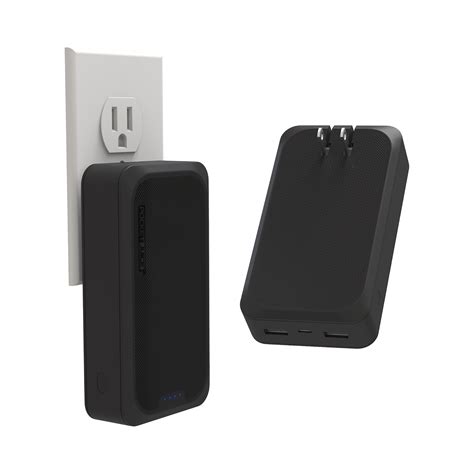
If you’re a frequent mobile gamer and battery life is a constant concern, consider investing in a portable power bank. This allows you to charge your device on the go without interrupting your gaming sessions.
Conclusion
While mobile games are inherently power-intensive, you don’t have to constantly battle a dwindling battery. By proactively managing your display and graphics settings, optimizing background processes and connectivity, and utilizing platform-specific battery-saving features, you can significantly extend your gaming sessions. Implement these tips to enjoy your favorite mobile titles for longer, without constantly searching for an outlet.



