





How can I maximize storage on my Switch and other consoles for more games?

The Ever-Growing Digital Library: Why Console Storage Matters
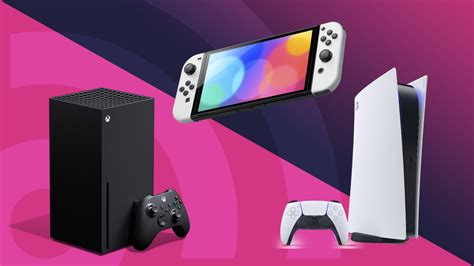
As game file sizes continue to swell and digital downloads become the norm, console storage can quickly become a bottleneck for even the most casual gamer. Whether you’re a proud owner of a Nintendo Switch, PlayStation, Xbox, or another gaming system, running out of space means tough choices: which beloved game gets deleted to make room for a new adventure? Thankfully, there are several effective strategies to maximize your storage, ensuring you can keep more games ready to play at a moment’s notice.
Understanding the native storage limitations of your console is the first step. While some systems offer more generous internal drives than others, almost all will eventually feel cramped if you’re an avid gamer. The good news is that most modern consoles offer robust solutions for expansion.

Nintendo Switch: The MicroSD Solution
The Nintendo Switch is particularly reliant on external storage due to its relatively small internal memory (32GB for the original/Lite, 64GB for the OLED model). For Switch owners, a high-capacity MicroSD card is not just an upgrade, but almost a necessity. Here’s what to consider:
- Capacity: MicroSD cards are available in sizes up to 1TB and beyond. While a 128GB or 256GB card might suffice for many, serious collectors should consider 512GB or 1TB cards.
- Speed: Look for cards with a “UHS-I” speed class (specifically U3 or V30) for optimal game loading times. While the Switch doesn’t fully utilize the fastest speeds, a decent speed rating ensures smooth performance.
- Installation: Simply insert the MicroSD card into the slot under the kickstand (original/OLED) or on the bottom (Lite). The Switch will automatically recognize it and begin using it for new game downloads. You can also transfer existing games from internal memory to the MicroSD card via the system settings.
With a large MicroSD card, you can easily carry dozens of digital games with you, eliminating the need to constantly delete and re-download titles.

PlayStation & Xbox: External Drives to the Rescue
For PlayStation (PS4, PS5) and Xbox (Xbox One, Xbox Series X|S) consoles, external hard drives or SSDs are the go-to solution for storage expansion. These systems typically use standard USB connections for external storage.
- External HDD (Hard Disk Drive): More affordable and offer larger capacities (up to 8TB or more). They are suitable for storing last-gen games (PS4, Xbox One) that can be played directly from the drive. For current-gen games (PS5, Xbox Series X|S), an external HDD can store them, but you’ll usually need to transfer them back to the console’s internal SSD to play them.
- External SSD (Solid State Drive): More expensive but significantly faster. For PS5 and Xbox Series X|S, some specific external SSD solutions (like NVMe SSDs for PS5’s internal expansion slot or Xbox’s proprietary expansion card) allow you to play current-gen games directly from them. Generic external USB SSDs behave similarly to HDDs for current-gen titles but offer faster transfer speeds.
- USB 3.0/3.1: Ensure your external drive uses a USB 3.0 or higher connection for optimal performance and compatibility.
- Installation: Simply plug the drive into a USB port on your console. The system will usually prompt you to format it for game storage.
Using an external drive means you can dramatically increase your game library, allowing you to keep a vast collection installed and ready.

Smart Storage Management: Beyond Hardware
While adding hardware is crucial, smart software management can also free up significant space.
- Archive or Delete Unused Games: Most consoles allow you to “archive” games (delete the main game data but keep save files) or fully delete them. If you haven’t touched a game in months, consider archiving it. You can always re-download digital games from your library.
- Manage Save Data and Screenshots/Videos: While save data is usually small, screenshots and video clips can accumulate. Regularly review and delete unnecessary media, or back up important clips to cloud storage or a USB drive.
- Check for Game Updates and DLC: Sometimes, game updates or large DLC packs can take up substantial space. Be mindful of what you’re downloading. If you no longer play a game that has a massive DLC pack, deleting the entire game might be more effective.
- Cloud Saves: Utilize your console’s cloud save features (e.g., Nintendo Switch Online, PlayStation Plus, Xbox Live Gold/Game Pass Ultimate). This ensures your progress is safe even if you delete a game, making re-downloading less daunting.
Future-Proofing Your Gaming Collection
Maximizing your console storage is an ongoing process. As new games are released and existing titles receive updates, you’ll need to periodically review your storage solutions. Investing in high-quality, high-capacity external storage now will save you headaches in the future.
Remember that physical games on Switch still require some internal or MicroSD card space for updates and save data. For other consoles, disc-based games often install the full game to the hard drive, making external storage equally relevant.
Conclusion
Don’t let limited storage dictate your gaming choices. By strategically using MicroSD cards for your Nintendo Switch and external hard drives or SSDs for your PlayStation and Xbox, combined with smart game management practices, you can dramatically expand your game library. Enjoy the freedom of having more of your favorite titles installed and ready to play whenever the mood strikes, without constantly wrestling with storage dilemmas.


