Cozy: Set up automatic late rent fees?

Understanding Late Rent Fees in Cozy (Apartments.com)
Managing rental properties efficiently often involves setting clear expectations around rent payments, including the consequences of late payments. For landlords using Cozy (now fully integrated with Apartments.com), the ability to define and manage late rent fees is a crucial feature. While the term ‘automatic’ might suggest a completely hands-off process, it’s important to understand how Cozy’s system works to ensure compliance and fairness.
Cozy allows landlords to establish a late fee policy within the lease terms, which then dictates how these fees are applied when a tenant’s rent payment is overdue. This means the system can automatically flag late payments and reflect the predefined fees on the tenant’s ledger, though direct landlord oversight often remains a part of the process for final application or waiver.

Steps to Set Up Late Fees in Cozy
Setting up your late fee policy in Cozy is straightforward, ensuring your tenants are aware of the terms from the start. Here’s a general guide:
- Log In to Your Account: Access your landlord account on Apartments.com (which now hosts Cozy functionalities).
- Navigate to Your Lease: Select the property and the specific lease agreement for which you want to set up late fees.
- Edit Lease Terms: Look for a section related to ‘Rent & Fees’ or ‘Lease Terms.’ This is where you’ll define the financial aspects of your agreement.
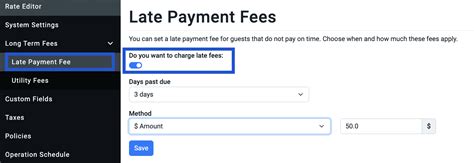
- Define Late Fee Policy: You’ll typically find options to specify:
- Grace Period: The number of days after the due date before a payment is considered late (e.g., 5 days).
- Late Fee Amount: This can be a flat fee (e.g., $50) or a percentage of the monthly rent.
- Recurring Fees: Some jurisdictions allow for daily late fees or additional fees after a certain period of delinquency. Cozy may offer options to define these as well.
It’s crucial that these terms are clearly communicated to your tenants, ideally by including them directly in the lease agreement that they electronically sign through Cozy.

How “Automatic” Do Late Fees Become?
When you’ve set up your late fee policy in Cozy, the system works by monitoring rent payments. If a payment is not received by the end of the grace period, the predefined late fee will typically be added to the tenant’s balance on their ledger. This is where the ‘automatic’ aspect comes in – the system identifies the delinquency and applies the fee according to your settings without requiring you to manually calculate or add it each time.
However, it’s important to note that while the fee is automatically calculated and shown, some landlords prefer to review and explicitly apply or waive it. This is often due to:
- Legal Requirements: Some states have specific rules about when and how late fees can be applied, or require notice.
- Tenant Communication: Landlords might choose to communicate with the tenant before formally applying the fee, especially for first-time offenders.
- Discretion: You always retain the option to waive a late fee if you believe there are extenuating circumstances.
The system automates the calculation and presentation of the fee, streamlining the administrative burden, but still allows landlords the flexibility to exercise judgment.
Best Practices for Late Fee Management
To ensure smooth operations and maintain good tenant relations, consider these best practices when managing late fees through Cozy:
- Clarity is Key: Ensure your lease agreement explicitly details the late fee policy, including the grace period, fee amount, and when it applies. Cozy helps by allowing you to integrate these terms directly.
- Know Your Local Laws: Late fee regulations vary significantly by state and even by city. Always verify that your late fee amounts and application methods comply with local landlord-tenant laws.
- Communicate Proactively: If a tenant is approaching their due date or has just missed it, a friendly reminder from you (which Cozy can facilitate) can sometimes prevent a late payment.
- Consistency: Apply your late fee policy consistently across all tenants and all late payments. Inconsistent application can lead to accusations of discrimination or unfair treatment.
- Document Everything: Cozy automatically maintains a payment ledger, but it’s always good practice to keep your own records of communication regarding late payments and fees.
Conclusion
Cozy (Apartments.com) provides landlords with powerful tools to define and manage late rent fees, making the process more efficient than manual tracking. While the system can automatically apply the predefined fees to a tenant’s ledger when a payment is late, landlords still maintain crucial oversight and discretion. By clearly setting up your policy, understanding the ‘automatic’ nuance, and adhering to best practices and local regulations, you can effectively manage late payments while fostering positive landlord-tenant relationships.