





Best Switch SD card for max digital game storage?
Why Your Nintendo Switch Needs a High-Capacity SD Card
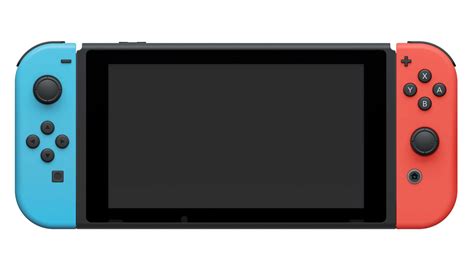
The Nintendo Switch, while a fantastic portable console, comes with a modest 32GB (or 64GB for the OLED model) of internal storage. A significant portion of this is already taken up by the system software, leaving very little room for digital game downloads, updates, and DLC. With many popular titles exceeding 10GB, and some even pushing 20GB or more, this space fills up incredibly fast. Investing in a high-capacity microSD card isn’t just a recommendation; it’s a necessity for any avid digital game collector looking to maximize their Switch experience without constantly deleting and redownloading games.
Understanding Switch SD Card Requirements: Speed and Type
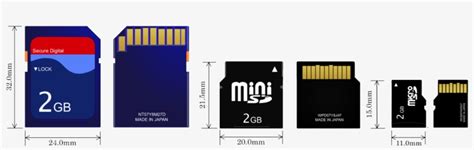
The Nintendo Switch exclusively uses microSDXC cards. While any microSDXC card will technically work, not all are created equal in terms of performance. For optimal game loading times and overall system responsiveness, you’ll want a card that meets certain speed criteria:
- UHS-I (Ultra High Speed-I): This is the standard supported by the Switch. Look for cards with a “U1” or “U3” speed class rating, indicating a minimum write speed of 10MB/s and 30MB/s respectively.
- Video Speed Class (V10, V30): Often seen on higher-end cards, V30 guarantees a minimum sustained write speed of 30MB/s, which is excellent for gaming.
- Application Performance Class (A1, A2): While more critical for smartphone apps, A1 and A2 ratings signify good random read/write performance, which can benefit game loading times. The Switch doesn’t officially support A2’s full potential, but an A1 card is a solid choice.
Prioritize U3 and V30 for the best balance of speed and value.
Recommended SD Card Sizes for Maximum Storage
When it comes to capacity, bigger is almost always better for the Switch. Here’s a breakdown of common large capacities:
- 256GB: A good starting point for casual gamers or those who mostly buy physical cartridges. It offers a noticeable upgrade over internal storage.
- 512GB: This is often considered the sweet spot for many digital-first gamers. It provides ample space for a substantial library of AAA titles, indie games, and DLC without breaking the bank.
- 1TB: For the ultimate digital library, a 1TB card offers virtually limitless storage for the foreseeable future. If you plan to download every game that catches your eye and never want to worry about space, this is your best bet. Keep in mind, 1TB cards are significantly more expensive.
While 2TB microSDXC cards exist, they are very new, extremely expensive, and not widely available. For practical purposes, 1TB is currently the maximum viable option for the vast majority of users.
Top SD Card Brands and Models for Your Switch
Several reputable brands offer high-performance microSDXC cards perfect for the Nintendo Switch. When choosing, look for cards specifically marketed for their speed and reliability.
SanDisk
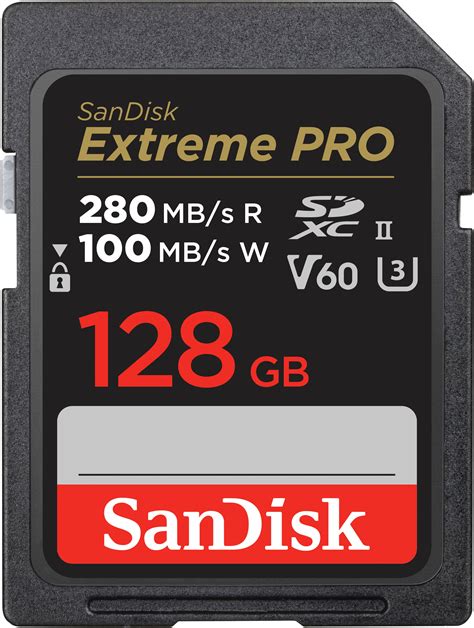
SanDisk is a long-standing leader in flash storage, and their cards are consistently recommended for the Switch. The SanDisk Ultra microSDXC UHS-I card (especially the ‘for Nintendo Switch’ licensed version, though any equivalent Ultra card works) offers a fantastic balance of speed and value. For even better performance, the SanDisk Extreme microSDXC line provides faster read/write speeds, often with U3 and V30 ratings, ensuring super-smooth gameplay and quicker load times.
Samsung
Samsung’s microSDXC cards are also highly regarded for their durability and performance. The Samsung EVO Select and EVO Plus lines are excellent choices, offering U3 speed ratings that meet or exceed the Switch’s requirements. These cards provide robust performance and are known for their reliability, making them a safe bet for your precious game data.

PNY and Lexar
Other reputable brands like PNY and Lexar also offer high-quality microSDXC cards that perform admirably in the Switch. Always ensure they meet the U3 speed class for optimal performance.
Installation and Management Tips
Installing an SD card in your Switch is straightforward: simply turn off your console, open the kickstand, and slide the card into the slot. Once inserted, the Switch will recognize it automatically.
- Data Transfer: If you’re upgrading from a smaller card, you can easily transfer your existing game data by copying the contents of the old card to your computer, then onto the new, larger card.
- Download Prioritization: By default, the Switch will download new games and updates to the microSD card if one is inserted. You can manage data by moving games between internal storage and the SD card via the System Settings.
- Format Wisely: Always allow the Switch to format a new SD card for the best compatibility.
Conclusion: Maximize Your Switch’s Potential
For maximizing digital game storage on your Nintendo Switch, a high-capacity microSDXC card is indispensable. We recommend a SanDisk Ultra or Extreme, or a Samsung EVO Select/Plus, with a capacity of 512GB or 1TB. Ensure it has at least a U3 speed rating for the best performance. By choosing one of these options, you’ll dramatically expand your game library, reduce load times, and enjoy your Nintendo Switch to its fullest without the constant worry of running out of space.


