





Best Switch SD card for game storage and faster load times?

Why an SD Card is Essential for Your Nintendo Switch
The Nintendo Switch, while a revolutionary console, comes with a rather modest 32GB (or 64GB for the OLED model) of internal storage. Given that many digital games can easily consume several gigabytes, and even physical game cartridges often require significant downloads for updates and additional content, this internal space fills up rapidly. Investing in a reliable microSD card isn’t just a luxury; it’s practically a necessity for any serious Switch gamer looking to expand their digital library and keep all their favorite titles readily accessible.
Understanding SD Card Speed: Why It Matters for Gaming
When selecting an SD card, capacity often grabs the most attention, but speed is equally crucial, especially for gaming. The read and write speeds of an SD card directly impact how quickly games load, how smoothly data streams during gameplay, and how long it takes to download or install new titles. A slow card can lead to frustratingly long loading screens and potentially even minor performance hitches in data-intensive games.
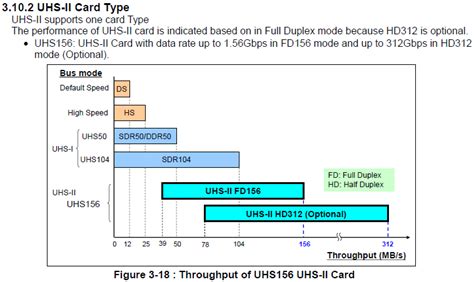
For the Nintendo Switch, the console supports UHS-I (Ultra High Speed-I) microSD cards with a theoretical maximum speed of 104 MB/s. While faster UHS-II cards exist, the Switch does not utilize their advanced speed capabilities, meaning you won’t see any performance benefit from them. Focus on UHS-I cards with a good Class 10 and U1 (or U3 for slightly better sustained write speeds, though U1 is perfectly fine for Switch) rating, and ideally an A1 or A2 app performance class for optimized random read/write operations.
Key Factors to Consider When Choosing Your Switch SD Card
Capacity: How Much Space Do You Really Need?
This is often the first consideration. Game sizes vary wildly, from a few hundred megabytes for indie titles to over 30GB for AAA blockbusters like The Legend of Zelda: Tears of the Kingdom. Common capacities include:
- 128GB: A good starting point for casual gamers or those who mostly buy physical.
- 256GB: A solid balance of price and storage, suitable for most digital libraries.
- 512GB: An excellent choice for avid digital collectors, offering ample room for dozens of large games.
- 1TB: The ultimate option for collectors who want to download everything, future-proofing their storage for years to come.
Remember, it’s generally better to buy slightly more capacity than you think you need, as game sizes tend to increase over time.
Speed Ratings: Decoding UHS and A-Class
As mentioned, the Switch uses UHS-I. Look for cards with:
- Speed Class 10 (C10): Guarantees a minimum sequential write speed of 10 MB/s.
- UHS Speed Class 1 (U1) or 3 (U3): U1 guarantees 10 MB/s, U3 guarantees 30 MB/s. Both are fine for Switch, but U3 offers a slight edge in sustained performance.
- Application Performance Class A1 or A2: These ratings indicate better performance for running applications (like games) directly from the card, specifically for random read/write operations, which are crucial for game loading. A1 is usually sufficient, but A2 offers even better performance.
Top Recommended SD Cards for Nintendo Switch
Several brands consistently deliver high-quality, reliable microSD cards suitable for the Switch. Here are some top contenders:
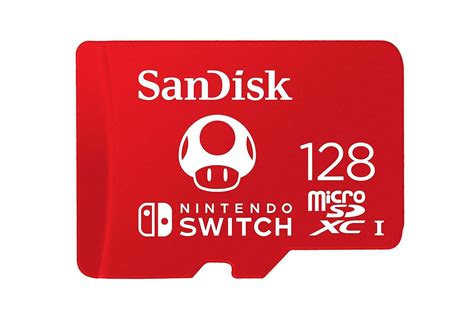
- SanDisk microSDXC for Nintendo Switch: Officially licensed by Nintendo, these cards are specifically designed and tested for the console. They come in various capacities (up to 1TB) and feature the iconic Nintendo branding. They meet all the necessary speed requirements (UHS-I, U3, A1).
- SanDisk Extreme / Extreme Pro: While not Nintendo-branded, these are premium UHS-I cards known for their excellent speeds (U3, A2) and reliability. They often offer some of the fastest read/write performance available in the UHS-I category, making them superb for Switch gaming.
- Samsung EVO Select / EVO Plus: Samsung’s EVO line offers a fantastic balance of performance, reliability, and value. These are typically U3 and A2 rated, providing snappy load times and smooth gameplay.
- Lexar PLAY microSDXC: Designed with gaming in mind, Lexar PLAY cards are U3 and A2 rated, offering strong performance at competitive prices, making them a great alternative.
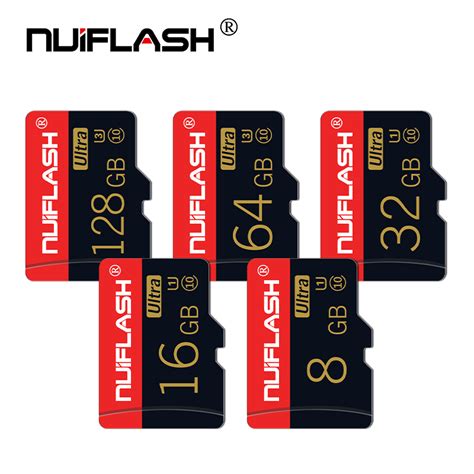
When purchasing, always buy from reputable retailers to avoid counterfeit cards, which can lead to data loss and poor performance.

Installation and Formatting Your New SD Card
Installing a new microSD card into your Nintendo Switch is straightforward:
- Power Off: Ensure your Switch is completely powered off (not just in sleep mode).
- Locate Slot: The microSD card slot is usually found under the kickstand on the back of the console.
- Insert Card: Insert the new microSD card until it clicks into place.
- Power On: Turn your Switch back on.
- Format: The Switch will typically detect the new card and prompt you to format it. If not, go to System Settings > System > Formatting Options > Format microSD Card. This will erase any existing data on the card and prepare it for use with your Switch.

Conclusion
Choosing the right microSD card is a simple yet impactful upgrade for any Nintendo Switch owner. By prioritizing a reputable brand, selecting adequate capacity, and ensuring it meets the UHS-I U1/U3 and A1/A2 speed ratings, you can significantly enhance your gaming experience. Enjoy faster load times, expand your digital library without worry, and make the most of your portable gaming adventures!


