





Best microSD for Switch: Maximize game storage & loading speed?

Unlock Your Nintendo Switch’s Full Potential with the Right microSD Card
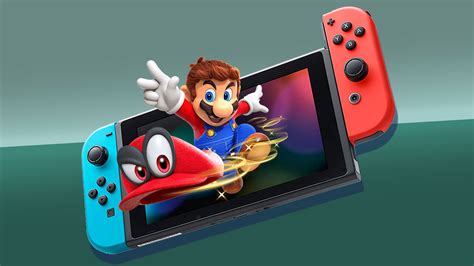
The Nintendo Switch, while revolutionary in its portability and versatility, comes with a rather modest 32GB (or 64GB for the OLED model) of internal storage. For most gamers, especially those who prefer digital downloads, this quickly becomes insufficient. Enter the microSD card – an essential upgrade that dramatically expands your game library and, with the right choice, can even shave seconds off loading screens. But with a plethora of options available, how do you pick the best one?
Choosing the right microSD card isn’t just about capacity; speed plays a crucial role in overall performance. A slow card can lead to frustratingly long loading times, impacting your gaming experience. This guide will help you navigate the specifications and recommend top-tier microSD cards to maximize your Switch’s capabilities.
Understanding microSD Card Specifications for Switch
Before diving into specific recommendations, let’s break down the key factors that differentiate microSD cards:
Capacity: How Much Storage Do You Really Need?
- 64GB-128GB: Suitable for casual gamers with a mix of physical and a few digital titles.
- 256GB-512GB: Ideal for most active gamers who download many digital games or larger titles. This is often the sweet spot for value and ample space.
- 1TB-2TB: For hardcore digital-only collectors or those who want to future-proof their storage. While expensive, it offers virtually limitless space for the foreseeable future of the Switch.
Remember that some games can exceed 10-20GB, and updates/DLC also consume space. It’s always better to get more than you think you need.
Speed Ratings: Crucial for Loading Times
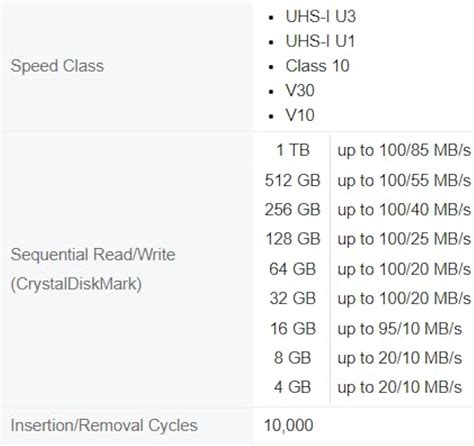
The Nintendo Switch supports UHS-I microSD cards, with a theoretical maximum speed of 104 MB/s. While UHS-II cards exist and are faster, the Switch cannot fully utilize their increased speed, making them an unnecessary expense.
- UHS Speed Class (U1 vs. U3): Look for U3, which guarantees a minimum write speed of 30 MB/s, compared to U1’s 10 MB/s. This impacts how quickly games save data and install.
- Application Performance Class (A1 vs. A2): This rating is specifically designed for running applications (like games) directly from the card. A2 cards offer higher random read/write performance compared to A1, translating to noticeably faster game loading times and smoother gameplay. While A1 is sufficient, A2 is preferred for optimal Switch performance.
Top Picks: Best microSD Cards for Nintendo Switch
Based on performance, reliability, and value, here are our top recommendations:
1. SanDisk microSDXC for Nintendo Switch (Licensed)
- Why it’s great: Officially licensed by Nintendo, these cards come in iconic Switch designs (Mario mushroom, Link Triforce, etc.) and are guaranteed to meet Nintendo’s performance standards. They are U3 and A1 rated, offering reliable speeds.
- Best for: Users who want guaranteed compatibility and reliability, with a touch of Nintendo branding.
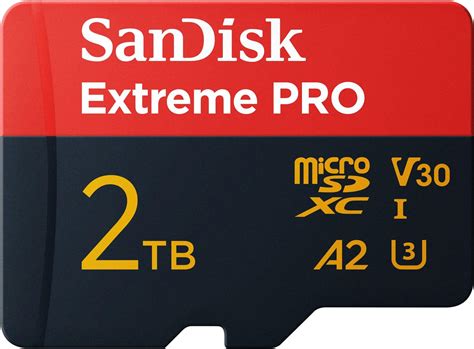
2. SanDisk Extreme / Extreme Pro microSDXC
- Why it’s great: These are among the fastest UHS-I cards available, boasting U3 and A2 ratings. They deliver excellent random read/write speeds, significantly reducing game loading times and improving overall responsiveness.
- Best for: Performance enthusiasts who demand the absolute quickest loading times and are willing to pay a slight premium for it.
3. Samsung EVO Select / EVO Plus microSDXC
- Why it’s great: Samsung EVO cards offer an outstanding balance of performance and value. They are U3 and A2 rated, providing speeds comparable to SanDisk Extreme cards at a slightly more competitive price point. Samsung’s reputation for reliability is also a big plus.
- Best for: Value-conscious gamers seeking excellent performance without breaking the bank.
4. Lexar Play microSDXC
- Why it’s great: Designed specifically for gaming and multimedia, Lexar Play cards offer U3 and A2 performance, ensuring smooth game loading and operation. They often provide great capacity options at attractive prices.
- Best for: Gamers looking for a dedicated gaming-focused card that delivers on speed and capacity.
Installation and Management Tips
Installing a microSD card in your Switch is straightforward:
- Turn off your Nintendo Switch completely.
- Open the kickstand on the back of the console to reveal the microSD card slot.
- Insert the card with the label facing down until it clicks into place.
- Close the kickstand and power on your Switch. The console will automatically recognize the new storage.
You can manage your data (moving games between internal storage and the microSD card) through the System Settings menu under ‘Data Management’.
Conclusion: Make the Smart Choice for Your Switch
Investing in a high-quality microSD card is one of the best upgrades you can make for your Nintendo Switch. It not only expands your game library but also enhances your gaming experience with faster loading times and smoother performance. Prioritize cards with a U3 and A2 rating from reputable brands like SanDisk, Samsung, or Lexar.
While the officially licensed SanDisk cards offer peace of mind, the SanDisk Extreme/Extreme Pro and Samsung EVO Select/Plus series often provide the best balance of speed, capacity, and value. Choose the capacity that best suits your gaming habits, and get ready to enjoy a significantly improved Nintendo Switch experience!


