





Best budget microSD card for Switch game storage expansion?

The Nintendo Switch, with its vast library of digital-only titles and DLC, can quickly fill up its modest internal 32GB (or 64GB for OLED models) storage. For most gamers, expanding this storage with a microSD card isn’t just a luxury – it’s a necessity. But with so many options available, how do you pick a reliable, high-performance card that won’t break the bank?

Why Your Nintendo Switch Needs More Storage
Many popular Switch games, even physical cartridge titles, require significant storage space for updates, DLC, and digital purchases. Games like The Legend of Zelda: Tears of the Kingdom, Pokémon Scarlet and Violet, or Fortnite can easily consume multiple gigabytes. Without a microSD card, you’ll quickly find yourself deleting games to make room for new ones, which is a frustrating experience no one wants.
Key Factors for Choosing a Budget microSD Card
When shopping for a microSD card for your Switch, especially on a budget, keep these factors in mind:
- Capacity: While 32GB or 64GB might seem like an upgrade, we recommend a minimum of 128GB for most users. 256GB is the sweet spot for value and longevity, offering plenty of space for dozens of games. For heavy digital buyers, 400GB or 512GB can be found affordably during sales.
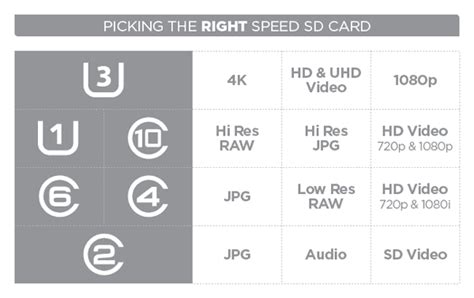
- Speed: Look for cards that are at least UHS-I (Ultra High Speed Phase I) with a Class 10 speed rating. Specifically, look for the ‘U1’ or ‘U3’ symbol. U1 is generally sufficient for the Switch, but U3 offers slightly faster transfer speeds, which can marginally improve game loading times. An ‘A1’ or ‘A2’ app performance rating is also a bonus, indicating good random read/write speeds.
- Brand Reliability: Stick with reputable brands known for quality and reliability. SanDisk and Samsung are consistently top performers and offer excellent budget-friendly options. Other reliable brands include Lexar, PNY, and Crucial.
- Price: The goal here is budget-friendly. Always compare prices across different retailers and look out for sales events (Black Friday, Prime Day, etc.) to snag the best deals.
Top Budget-Friendly microSD Card Recommendations
SanDisk Ultra microSDXC UHS-I Card (A1)
The SanDisk Ultra series is arguably the most popular and widely recommended budget microSD card for the Nintendo Switch. It hits the sweet spot of affordability, decent speed (UHS-I, Class 10, A1), and brand reliability. You can often find 128GB, 256GB, or even 400GB versions at extremely competitive prices. It’s more than adequate for the Switch’s requirements.
Samsung EVO Select/Plus microSDXC UHS-I Card (A2)
Samsung’s EVO Select or EVO Plus series offers a slight step up in performance, often featuring a U3 speed rating and A2 app performance, while remaining highly competitive on price. These cards provide excellent value, delivering slightly faster loading times than U1 cards without a significant price premium. They are also widely available and highly reliable.
Other Considerations: Lexar PLAY, PNY Elite-X
While SanDisk and Samsung dominate the budget category, Lexar PLAY and PNY Elite-X are also worth considering if you find them at a good price. They offer similar specifications (UHS-I, Class 10, often A1 or A2) and provide reliable performance for Switch gaming.
How Much Storage Do You Actually Need?
- Casual Gamer (Mostly physical games, few digital): 128GB is a good start.
- Average Gamer (Mix of physical and digital, some larger titles): 256GB offers the best balance of cost and capacity.
- Digital-Heavy Gamer (Many digital downloads, large library): 400GB or 512GB will provide ample space for years to come.
Remember that you can always upgrade to a larger card later, but transferring data can be a bit of a hassle, so it’s often better to go slightly larger than you think you need from the start.
Installation and Setup Tips
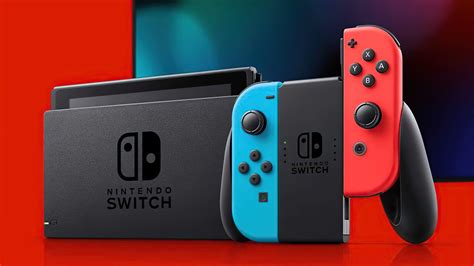
Installing a microSD card in your Switch is straightforward: power off your console, open the kickstand, and slide the card into the slot. The Switch will automatically recognize it. For best practice, format the card through the Switch’s system settings (System > Data Management > Format microSD Card) to ensure optimal compatibility.
Conclusion
Expanding your Nintendo Switch storage doesn’t have to be an expensive endeavor. By focusing on reliable brands like SanDisk and Samsung, opting for a minimum of 128GB (with 256GB being the sweet spot), and ensuring a UHS-I Class 10 (U1 or U3) speed rating, you can find a high-quality, budget-friendly microSD card that will keep your game library growing for years to come. Happy gaming!


