Optimize mobile game settings for better battery life?
Unlock Longer Playtimes: Mastering Battery Optimization for Mobile Games
Mobile gaming offers unparalleled entertainment on the go, but nothing disrupts an epic session quite like a rapidly draining battery. Fortunately, you don’t always need to carry a power bank. By strategically adjusting a few settings, you can significantly extend your device’s battery life without sacrificing too much of your gaming experience. Let’s dive into how you can optimize your setup for maximum playtime.

In-Game Settings: Your First Line of Defense
Many modern mobile games offer a plethora of graphical and performance options. Tweaking these can have the most immediate impact on battery consumption.
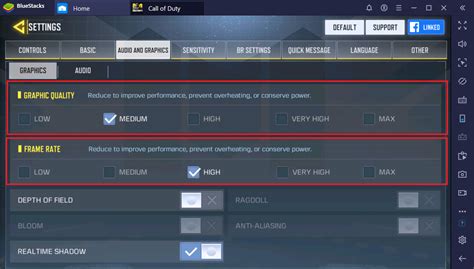
- Graphics Quality: This is the biggest power hog. Reduce settings like texture quality, shadow detail, reflection quality, and anti-aliasing. While high-definition visuals are appealing, a slight downgrade can often be barely noticeable but dramatically beneficial for your battery.
- Resolution: Some games allow you to lower the in-game resolution. A lower resolution means fewer pixels for your GPU to render, translating to less power usage.
- Frame Rate (FPS): While a high frame rate (e.g., 60 FPS) makes games feel smoother, it also demands more processing power. If your game offers the option, capping the FPS at 30 can significantly save battery, especially for less action-intensive titles.
- V-Sync: Vertical Synchronization aims to prevent screen tearing but can sometimes introduce input lag and consume more power. Experiment with turning it off if available.
- Sound and Vibration: While not as impactful as graphics, reducing in-game sound volume or turning off vibration feedback for notifications and haptic responses can offer minor battery savings over long sessions.
Device-Level Optimizations for Sustained Play
Beyond the game itself, your phone’s general settings play a crucial role in overall power consumption. Here’s what to look at:
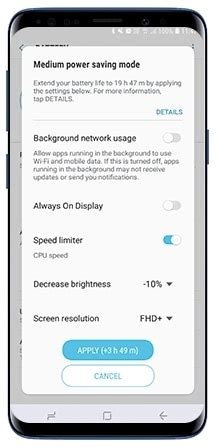
- Screen Brightness: Your display is typically the single biggest battery drain. Lowering screen brightness to a comfortable level, or enabling auto-brightness, can save a lot of power.
- Screen Refresh Rate: Many modern phones boast high refresh rate displays (90Hz, 120Hz, or higher). While great for smoothness, they consume more power. If your device allows, switch to a standard 60Hz refresh rate when gaming for extended periods.
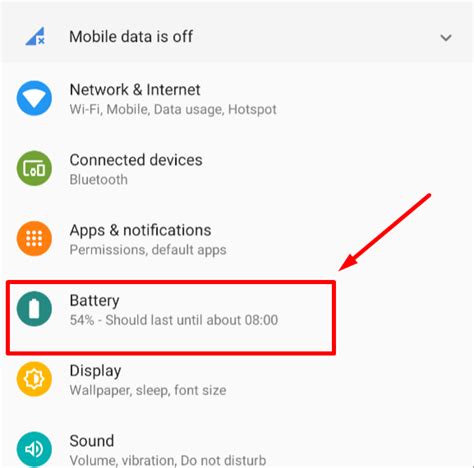
- Power Saving Mode: Activate your phone’s built-in power-saving or battery-saver mode. These modes often automatically reduce CPU performance, dim the screen, and restrict background activity.
- Close Background Apps: Before launching your game, ensure all unnecessary apps running in the background are closed. These apps consume RAM and CPU cycles, indirectly affecting your gaming experience and battery.
- Connectivity: Turn off Wi-Fi, Bluetooth, or GPS if you’re not using them. Mobile data generally consumes more power than Wi-Fi, so if you have access to a stable Wi-Fi connection, prioritize it.
External Factors and Best Practices
Sometimes, it’s not just about the settings, but how you manage your device and environment.
- Manage Heat: Gaming generates heat, and excessive heat can degrade battery health and performance. Avoid playing in direct sunlight or on surfaces that trap heat. If your phone gets noticeably hot, take a break.
- Optimal Charging: While playing, avoid simultaneously charging your phone, especially if it causes the device to heat up significantly. If you must charge, use a quality charger and cable.
- Software Updates: Keep your game and phone’s operating system updated. Developers often include performance and efficiency optimizations in new versions.
Conclusion: Game More, Charge Less
By implementing a combination of these in-game and device-level optimizations, you can significantly prolong your mobile gaming sessions. It’s a balance between visual fidelity and longevity, and finding your sweet spot will allow you to enjoy your favorite titles without constantly searching for an outlet. Experiment with the settings to see what works best for your specific device and gaming habits, and get ready for extended adventures.