What are the best tools to track game deals across Steam, Epic, & consoles for my wishlist?

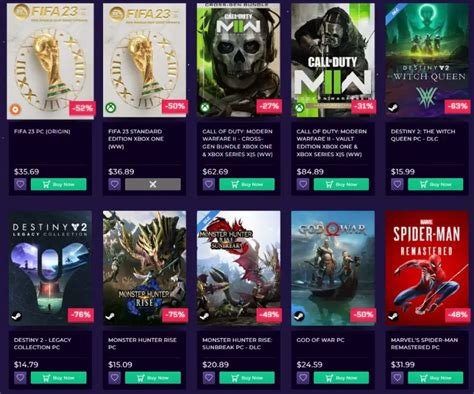
For any avid gamer, the thrill of snagging a highly anticipated title at a significant discount is unmatched. However, with the proliferation of digital storefronts across PC (Steam, Epic Games Store, GOG, Humble Store) and consoles (PlayStation Store, Xbox Store, Nintendo eShop), keeping tabs on price drops for every game on your wishlist can feel like an impossible task. Fortunately, a range of dedicated tools and services exist to simplify this process, ensuring you never miss a golden opportunity.
Comprehensive PC Game Deal Trackers
When it comes to tracking PC game deals, a few platforms stand out for their robust features and wide coverage.

IsThereAnyDeal (ITAD)
Widely regarded as the gold standard for PC game deal aggregation, IsThereAnyDeal (ITAD) pulls pricing data from nearly every major PC storefront. You can import your Steam and Epic Games wishlists, create custom lists, and set up email or browser notifications for price drops. ITAD also offers historical low prices, allowing you to gauge whether a current deal is truly the best it’s ever been.
GG.deals
Similar to ITAD, GG.deals provides extensive coverage of PC game deals, including prices from official stores and authorized key resellers. Its user interface is often praised for being clean and intuitive. Like ITAD, it supports wishlist imports from Steam and Epic, offers price alerts, and displays historical price charts. GG.deals also often includes metacritic scores and game details, making it a comprehensive research tool.
Dedicated Console Deal Trackers
Tracking console deals often requires a slightly different approach, as platform storefronts can be more siloed. However, excellent tools exist for each.

DekuDeals (Nintendo Switch)
For Nintendo Switch owners, DekuDeals is an absolute must-have. It tracks prices for both digital eShop titles and physical cartridge games across various retailers. You can link your Nintendo account to import your eShop wishlist, set up custom alerts, and view comprehensive historical pricing data. DekuDeals also highlights games that are currently at their lowest historical price.
PSPrices (PlayStation) & Xbox Store Tracker
PSPrices is the premier tool for tracking PlayStation game deals across all regions. It allows you to create a wishlist, set up email alerts, and see detailed price history for PS4 and PS5 titles. For Xbox, while there isn’t one single dominant third-party site like DekuDeals or PSPrices, several sites and apps do aggregate Xbox Store deals. Furthermore, the official Xbox website and console store itself offer robust wishlist features with built-in notifications for price drops.

Browser Extensions & Platform Wishlists
Beyond dedicated sites, several browser extensions and the native platform wishlists can also enhance your deal-tracking efforts.
Enhanced Steam & Other Extensions
Browser extensions like ‘Enhanced Steam’ (for Steam) add extra functionality directly to store pages, often including price history and comparisons with other authorized retailers. While not a standalone tracker, they provide context while you browse. General price tracking extensions might also pick up game deals on retail sites.
Native Wishlist Features
Don’t underestimate the power of the built-in wishlist features on Steam, Epic Games, PlayStation, Xbox, and Nintendo eShop. Once you add a game to your official wishlist, these platforms will often send you email notifications when that game goes on sale. While not as comprehensive as third-party tools, they are convenient for basic tracking.

Tips for Optimal Deal Tracking
- Set Up Alerts: Most tools allow you to specify a target price or percentage discount. Use these features to avoid constant manual checking.
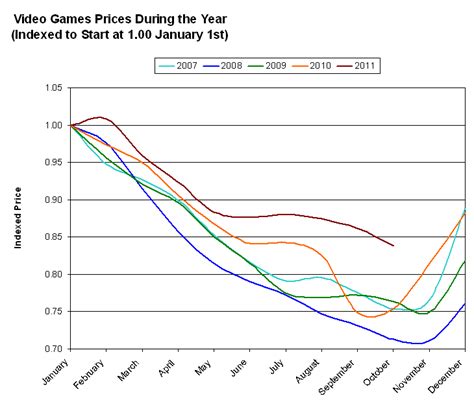
- Understand Historical Prices: Always check a game’s price history. A ‘deal’ might not be a good deal if the game frequently drops even lower.
- Be Patient: Many games go on sale multiple times a year. If a deal isn’t great, chances are a better one will come along.
- Check Multiple Sources: Even with aggregators, it’s sometimes worth a quick cross-reference, especially for physical console games.
Conclusion
Tracking game deals across the fragmented landscape of digital storefronts doesn’t have to be a chore. By leveraging powerful tools like IsThereAnyDeal, GG.deals, DekuDeals, and PSPrices, alongside the native wishlist features of your favorite platforms, you can transform the daunting task into an efficient process. Set up your alerts, import your wishlists, and get ready to save big on your next gaming adventure.