How to best use game ratings for choosing age-appropriate, safe games?

In today’s digital world, video games are an integral part of many children’s lives. While they offer immense entertainment and developmental benefits, ensuring they play age-appropriate and safe content is a top priority for parents. Navigating the vast landscape of games can be daunting, but understanding and utilizing game rating systems is your most powerful tool. This guide will walk you through how to effectively use these ratings to make informed choices, fostering a positive and secure gaming environment for your child.
Understanding the Game Rating Systems
Game rating systems are designed to provide parents with objective information about the content of a game. They act as a universal language, allowing you to quickly assess a game’s suitability for your child’s age and maturity level. The two most prominent systems globally are the Entertainment Software Rating Board (ESRB) in North America and the Pan European Game Information (PEGI) system used across Europe and beyond.
Each system employs a combination of age classifications and content descriptors. Familiarizing yourself with the basics of these systems is the first crucial step in becoming an informed game selector.
Deciphering Age Categories
Age categories provide a general recommendation for the suitable age range of players. While these are guidelines, they offer a strong indication of a game’s overall maturity level:
- ESRB Ratings (North America):
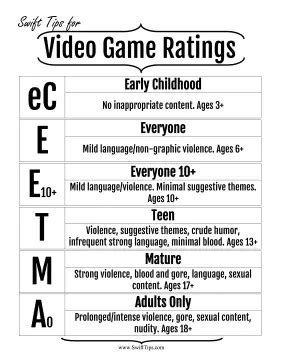
- E (Everyone): Content generally suitable for all ages. May contain minimal cartoon, fantasy or mild violence and/or infrequent use of mild language.
- E10+ (Everyone 10+): Content generally suitable for ages 10 and up. May contain more cartoon, fantasy or mild violence, mild language and/or minimal suggestive themes.
- T (Teen): Content generally suitable for ages 13 and up. May contain violence, suggestive themes, crude humor, minimal blood, simulated gambling and/or infrequent use of strong language.
- M (Mature): Content generally suitable for ages 17 and up. May contain intense violence, blood and gore, sexual content and/or strong language.
- AO (Adults Only): Content suitable only for adults ages 18 and up. May include prolonged scenes of intense violence, graphic sexual content and/or gambling with real currency.
- PEGI Ratings (Europe):
- PEGI 3: Suitable for all age groups.
- PEGI 7: Game content with scenes or sounds that can be frightening to younger children.
- PEGI 12: Games that show violence in a fantasy context or non-realistic violence towards human-like characters.
- PEGI 16: Realistic-looking violence or sexual activity.
- PEGI 18: Games with graphic violence and/or glorification of illegal drugs, or gambling.
Exploring Content Descriptors
While age ratings provide a general overview, content descriptors offer specific insights into the thematic elements that contributed to that rating. These are crucial for understanding why a game received its particular rating and whether specific elements align with your family’s values. Always look for these alongside the age rating on game packaging or digital store pages.
Common descriptors include:
- Violence: Ranges from mild cartoon violence to intense, graphic depictions.
- Language: From mild expletives to strong, pervasive language.
- Sexual Themes: Implied or explicit sexual content, suggestive dialogue.
- Drug/Alcohol Reference: Depictions or references to illegal drugs, tobacco, or alcohol.
- Simulated Gambling: Casino-like activities that do not involve real money.
- In-Game Purchases: Alerts parents to the presence of optional digital purchases.
- Online Interactions: Indicates that the game allows players to interact with others online, which may expose them to user-generated content or communication.

Beyond the Ratings: What Else to Consider
While ratings are an excellent starting point, they don’t cover every aspect of a game that might concern a parent. For a comprehensive assessment, consider these additional factors:
In-App Purchases and Microtransactions
Many modern games, even free-to-play titles, include optional purchases that can quickly add up. Be aware of loot boxes, battle passes, and cosmetic upgrades that might tempt children to spend money without permission. Look for the “In-Game Purchases” content descriptor.
Online Interaction and Multiplayer Features
Games with online multiplayer components introduce interaction with strangers. This can expose children to inappropriate language, cyberbullying, or sharing personal information. Understand the game’s communication features (voice chat, text chat) and whether they can be disabled or moderated.
Reviews and Community Feedback
Supplement official ratings with reviews from trusted gaming critics, parent forums, and common sense media. These sources often provide real-world insights into gameplay, potential issues, and the actual experience of playing the game.
Practical Tips for Parents
Empowering yourself with knowledge is just one part of the equation. Here’s how to put it into practice:
Communicate with Your Child
Involve your children in the game selection process. Discuss why certain games are off-limits and explain the rating system in an age-appropriate way. This helps them understand your decisions and develop their own critical thinking skills.
Play Together and Monitor Gameplay
There’s no better way to understand a game than to play it yourself or observe your child playing. This allows you to assess the content firsthand, discuss in-game scenarios, and address any concerns as they arise.

Utilize Parental Controls
Most gaming consoles, PCs, and mobile devices offer robust parental control settings. These allow you to restrict access based on age ratings, manage screen time, limit purchases, and control online interactions. Learn how to set them up effectively for each platform your child uses.
Trust Your Instincts
Ultimately, you know your child best. A game rated E10+ might still contain themes or scenarios that you feel are too intense for your particularly sensitive 10-year-old. Use ratings as a guide, but always factor in your child’s individual maturity, personality, and sensitivities.
Conclusion
Mastering game ratings is an essential skill for modern parents. By understanding age categories and content descriptors, looking beyond the official ratings to consider online interactions and in-app purchases, and engaging actively with your children’s gaming habits, you can confidently choose games that are not only fun but also safe and truly age-appropriate. This proactive approach ensures a positive, enriching, and secure gaming experience for your entire family.