What’s the best microSD card for Switch game storage expansion?
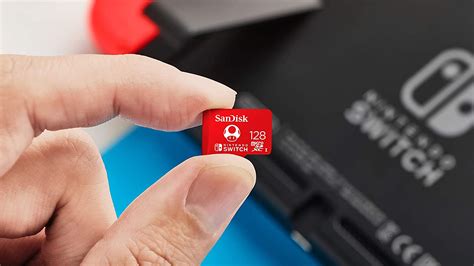
The Nintendo Switch, a marvel of portable gaming, comes with a respectable 32GB (or 64GB for the OLED model) of internal storage. While sufficient for a few small digital titles, avid gamers quickly find themselves running out of space. Downloadable games, patches, DLC, and even game saves can quickly consume your precious storage, leading to frustrating choices about what to keep and what to delete. This is where a microSD card becomes an essential upgrade, transforming your Switch into a vast digital library.
Why You Absolutely Need a microSD Card for Your Switch
Many popular Nintendo Switch games can demand significant storage. Titles like The Legend of Zelda: Tears of the Kingdom or Pokémon Scarlet and Violet can take up over 15GB each, and that’s before any updates or DLC. If you prefer digital downloads over physical game cartridges, a microSD card isn’t just a luxury; it’s a necessity. It ensures you never have to interrupt your gaming to free up space, allowing you to seamlessly download new titles and keep your entire collection at your fingertips.
Key Factors When Choosing a microSD Card
Not all microSD cards are created equal, especially when it comes to gaming. Here are the critical aspects to consider for your Switch:
Capacity: How Much Do You Need?
- 128GB: A good starting point for casual gamers or those who mostly buy physical cartridges.
- 256GB: The sweet spot for most digital-heavy gamers, offering ample space for a significant library.
- 512GB: Recommended for dedicated digital collectors, ensuring virtually limitless space for years of gaming.
- 1TB+: For the most extreme digital hoarder, though diminishing returns may apply as these can be significantly more expensive.
Remember that the Switch itself takes up some space, so a 128GB card will provide slightly less than 128GB of usable storage.
Speed: Understanding UHS-I, U3, and V30
While the Switch doesn’t utilize the absolute fastest microSD card speeds available on the market, choosing a card with adequate speed is crucial for faster game loading times and smoother performance. Look for:
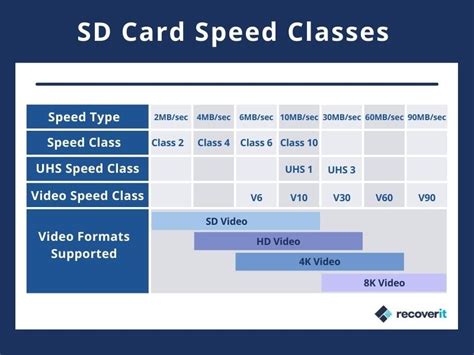
- UHS-I (Ultra High Speed Phase I): This is the maximum bus interface speed the Switch supports. Don’t pay extra for UHS-II or UHS-III cards; the Switch won’t utilize their enhanced speeds.
- Speed Class 10: A basic requirement for HD video recording, meaning a minimum write speed of 10MB/s. Most modern cards exceed this.
- U3 (UHS Speed Class 3) or V30 (Video Speed Class 30): These signify a minimum *write* speed of 30MB/s. While read speeds are more important for loading games, cards rated U3 or V30 typically also offer excellent read speeds (often 90MB/s or higher), which is ideal for the Switch.
Cards with high read speeds will ensure your games load faster, reducing those frustrating wait times.
Brand Reliability and Authenticity
Stick to reputable brands like SanDisk, Samsung, and Lexar. There are many fake or low-quality microSD cards on the market that might misrepresent their capacity or speed. Purchasing from trusted retailers is always recommended to ensure you’re getting a genuine product.
Top microSD Card Recommendations for Nintendo Switch
Based on performance, reliability, and value, here are some of the best microSD cards for your Nintendo Switch:
SanDisk microSDXC for Nintendo Switch (Officially Licensed)
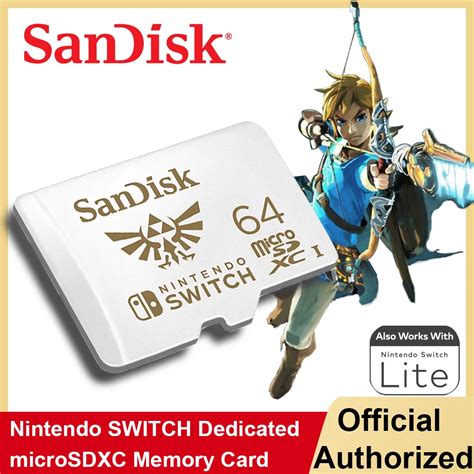
SanDisk offers officially licensed Nintendo Switch microSD cards, featuring iconic branding (like a mushroom or Triforce) and colors. These cards are specifically tested and approved by Nintendo, ensuring perfect compatibility and performance. They are UHS-I U3 rated, providing excellent read speeds up to 100MB/s and write speeds up to 90MB/s, which is more than enough for the Switch. Available in various capacities, they are a hassle-free, premium choice.
Samsung EVO Select/Plus
Samsung’s EVO Select (often sold on Amazon) or EVO Plus lines are fantastic alternatives. These cards offer top-tier performance for their price point, with read speeds often reaching 130MB/s and write speeds up to 120MB/s (depending on capacity). They are UHS-I U3 rated, durable, and reliable, making them a popular choice among Switch owners for their excellent balance of speed and value.
Lexar PLAY microSDXC
The Lexar PLAY series is designed with gaming in mind. These cards boast read speeds up to 150MB/s (for higher capacities) and are A1 or A2 rated for app performance, making them great for any gaming device, including the Switch. They offer reliable performance and are often competitively priced, providing another solid option for expanding your game library.

Installing and Setting Up Your microSD Card
Installing a microSD card in your Nintendo Switch is straightforward:
- Turn off your Switch completely.
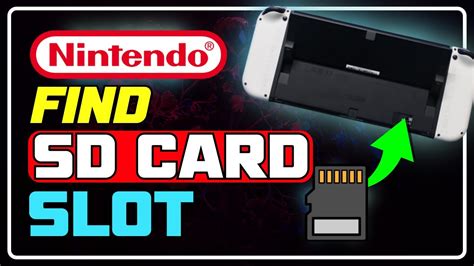
- Locate the microSD card slot, usually behind the kickstand on the back of the console.
- Insert the microSD card face down until it clicks into place.
- Turn your Switch back on. The console will automatically detect the new storage. If it’s a brand new card, the Switch will format it for you.
- You can then go into System Settings > Data Management to see your new storage capacity and manage your games.
Conclusion: Enhance Your Switch Experience
Investing in a high-quality microSD card is one of the best upgrades you can make for your Nintendo Switch. By focusing on adequate capacity (256GB or 512GB being ideal for most), reliable UHS-I U3/V30 speed, and a trusted brand, you’ll ensure a seamless, frustration-free gaming experience. Say goodbye to storage anxiety and hello to an expanded world of digital adventures on your favorite portable console.