





How to pick age-appropriate games and set healthy screen time limits?
In today’s digitally saturated world, navigating screen time and game choices for children can feel like a daunting task for parents. Balancing entertainment with education and healthy development requires thoughtful consideration and consistent strategies. This guide will help you understand how to pick age-appropriate games and set practical, healthy screen time limits that benefit your child’s well-being.
Understanding Age-Appropriate Games
Not all games are created equal, especially when it comes to children. Just as you wouldn’t let a toddler watch a horror movie, allowing a young child to play a mature-rated video game can expose them to content they’re not ready for, leading to anxiety, confusion, or inappropriate behavior.
Why Age Ratings Matter
Age rating systems, such as ESRB in North America or PEGI in Europe, provide valuable guidelines. These ratings consider factors like violence, language, suggestive themes, drug references, and simulated gambling. While not perfect, they serve as an excellent first filter:
- E (Everyone)/3+ (PEGI): Generally suitable for all ages, often educational or family-friendly.
- E10+/7+ (PEGI): May contain mild cartoon violence or minimal suggestive themes.
- T (Teen)/12+ (PEGI): Content may be suitable for persons aged 13 and older. May contain violence, suggestive themes, crude humor, minimal blood, simulated gambling, and/or infrequent use of strong language.
- M (Mature)/16+ or 18+ (PEGI): Intended for mature audiences.
Beyond the Rating: What to Look For
While ratings are crucial, they are just the starting point. Consider these additional factors:
- Content: Even within a rating, evaluate specific game content. Does it align with your family’s values? Does it promote positive messages or skills?
- Complexity: Is the game’s difficulty level and required cognitive skills appropriate for your child’s developmental stage? Overly complex games can lead to frustration.
- Interactivity: Does the game involve online multiplayer features? If so, what kind of communication is involved, and with whom? Monitor online interactions carefully.
- Educational Value: Does the game offer opportunities for learning, problem-solving, creativity, or social interaction in a positive way?
- Your Child’s Temperament: Some children are more sensitive to certain types of content than others. Observe your child’s reactions and preferences.

The Importance of Healthy Screen Time Limits
Screen time, when managed properly, can be a source of learning and entertainment. However, excessive screen time can have negative impacts on a child’s physical health, mental well-being, and social development.
The Benefits of Moderation
- Better Sleep: Exposure to blue light from screens can disrupt melatonin production, affecting sleep quality.
- Physical Activity: Less screen time means more time for active play, crucial for physical health and motor skill development.
- Social Skills: Face-to-face interactions are vital for developing empathy, communication, and social cues.
- Academic Performance: Studies suggest a link between excessive screen time and lower academic achievement, possibly due to reduced focus or displacement of study time.
- Reduced Risk of Digital Addiction: Establishing limits early helps prevent unhealthy reliance on screens.

Setting Effective Screen Time Rules
Implementing screen time limits requires a clear strategy and family cooperation. It’s not about prohibition, but about balance.
Communication is Key
Discuss the ‘why’ behind the rules with your children. Explain the benefits of balanced activities and the potential downsides of too much screen time. Involve them in setting the rules where appropriate, giving them a sense of ownership.
Consistency and Flexibility
Once rules are set, stick to them. Consistency helps children understand expectations and builds routines. However, be prepared for some flexibility on special occasions, like long car trips or family movie nights, which can reinforce that rules are generally important but can adapt for unique situations.
The “Screen-Free Zones” and Times
Designate specific times and places where screens are not allowed:
- Meals: Family mealtimes should be screen-free zones to encourage conversation.
- Bedrooms: Keep screens out of bedrooms, especially at night, to promote better sleep.
- Before Bed: Establish a screen-free wind-down period (e.g., 1 hour) before bedtime.
- Homework/Study Time: Screens can be a major distraction during concentration-heavy tasks.

Balancing Digital Play with Real-World Activities
The goal isn’t just to limit screen time but to encourage enriching alternatives. Help your child discover other passions.
Encourage Other Hobbies
Promote physical activities, reading, creative arts, board games, building blocks, and outdoor play. Offer a variety of options and let them explore what genuinely interests them.
Lead by Example
Children are keen observers. If you’re constantly on your phone or watching TV, they’re likely to emulate that behavior. Be mindful of your own screen habits and model the balance you wish to see in them.

Practical Tips for Parents
- Co-view and Co-play: Engage with your child’s digital world. Play games with them, watch shows together. This gives you insight into the content and creates bonding opportunities.
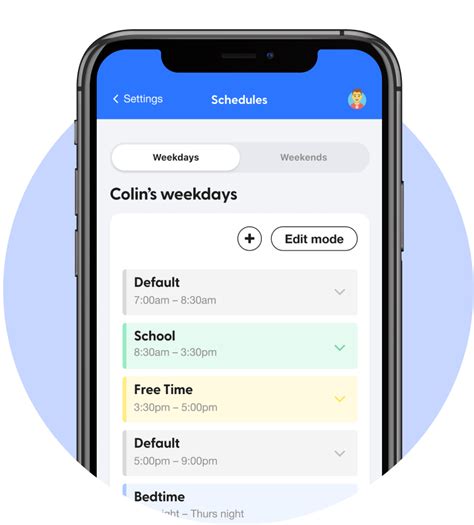
- Use Parental Controls: Most devices and apps offer parental control settings to manage content, screen time, and in-app purchases. Utilize them.
- Create a Media Plan: Work with your family to create a personalized media plan that outlines daily limits, acceptable content, and consequences for breaking rules.
- Set a Timer: For younger children, a visual timer can help them understand when screen time is ending.
- Offer Alternatives: When screen time is over, have appealing alternative activities ready to go to ease the transition.
![[Solved] How to Enable Parental Controls, Family Management, Screen ...](/images/aHR0cHM6Ly90czEubW0uYmluZy5uZXQvdGg/aWQ9T0lQLl93bGNvQlIwT0NIMDFRYmE1R2wxcWdIYUU4JnBpZD0xNS4x.webp)
Conclusion
Navigating the digital landscape with children requires ongoing effort and adaptation. By understanding age-appropriate content, setting clear and consistent screen time limits, and fostering a balance with real-world activities, you can equip your children with the skills to use technology responsibly and healthily. Remember, it’s about guiding them to be mindful digital citizens, not just restricting their access.

