





How to extend Switch battery life for long travel gaming sessions?
Embarking on a long journey often means extended periods of downtime, and for many gamers, that’s prime opportunity for some uninterrupted Nintendo Switch action. However, the Switch’s built-in battery, while decent, can quickly deplete during marathon sessions, leaving you staring at a black screen mid-adventure. Fret not, for with a few smart strategies and essential gear, you can significantly extend your playtime and keep the fun going for the entire duration of your travel.
Optimize Your Switch Settings for Power Efficiency
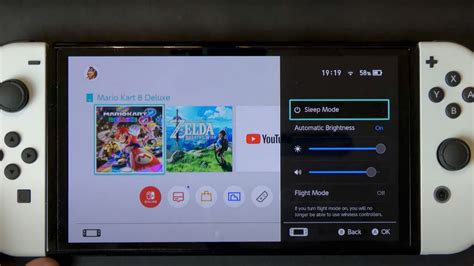
The first line of defense against a draining battery is right within your Switch’s system settings. Tweaking a few options can yield surprising gains in battery life without drastically compromising your gaming experience.
- Lower Screen Brightness: This is arguably the most impactful change. The brighter your screen, the more power it consumes. Turn it down to a comfortable, but not overly vibrant, level, especially in dim environments like planes or cars.
- Enable Airplane Mode: If you’re not planning on playing online or downloading updates, switch on Airplane Mode. This disables Wi-Fi, Bluetooth, and NFC, all of which are constant power drains.
- Disable Joy-Con Rumble: While haptic feedback enhances immersion, it also uses power. Turning off the Joy-Con rumble for games where it’s not essential can save a few precious minutes.
- Shorten Auto-Sleep Time: Set your Switch to go into sleep mode quicker when inactive. This prevents accidental battery drain if you forget to manually put it to sleep.
- Turn Off Auto-Brightness: Manual control over brightness is always more efficient than the auto-brightness feature, which can sometimes overcompensate.

Invest in Essential External Power Solutions
While software optimizations help, for truly extended sessions, you’ll need external power. This is where dedicated accessories become indispensable.
Portable Power Banks: Your Best Friend on the Go
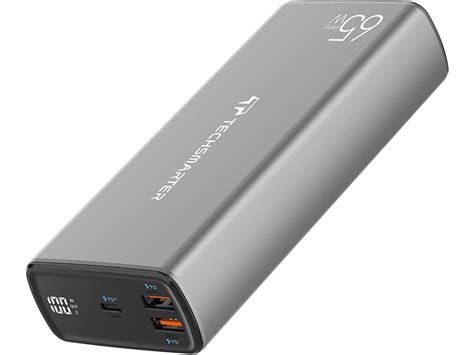
A high-capacity portable power bank (also known as a power brick or external battery) is the single most effective way to extend your Switch’s playtime. Look for these features:
- USB-C Power Delivery (PD): This is crucial. A power bank with USB-C PD can charge your Switch at its optimal speed (up to 18W), even while you’re playing demanding games. Standard USB-A ports or slower USB-C ports might only slow the drain, not actively charge it during intense gameplay.
- High Capacity: Aim for at least 10,000mAh, but 20,000mAh or even 26,800mAh (the airline carry-on limit) is ideal for multiple charges.
- Reputable Brand: Stick to well-known brands like Anker, RAVPower, or PowerCore to ensure safety and reliable performance.
Battery Cases and Grips
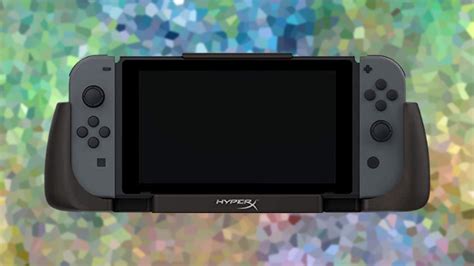
Some third-party manufacturers offer cases or grips that integrate an additional battery directly into the accessory. These are convenient as they keep the power source attached to your Switch, but they often add bulk and might not offer as much capacity as a dedicated power bank.
Car Chargers
If your travel involves a car, a good USB-C car charger with Power Delivery can keep your Switch topped up. Ensure it delivers enough wattage (18W or more) to effectively charge while playing.
Adopt Smart Gaming Habits
Beyond settings and hardware, your actual gaming behavior can also impact battery life.
- Choose Less Demanding Games: Some games are simply more graphically intensive than others, thus drawing more power. Consider playing simpler, less demanding titles during critical battery conservation periods.
- Take Short Breaks: Even a few minutes in sleep mode can help conserve battery. Use travel breaks or pauses in your journey to let your Switch rest.
- Fully Charge Before Departure: This might seem obvious, but always ensure your Switch, Joy-Cons, and any external power banks are fully charged before you leave.
- Avoid Charging While Playing (if using a low-power source): If you’re using a charger that can’t match the Switch’s power draw while playing (e.g., a standard 5W phone charger), you might only be slowing the drain, not actively charging. It’s often better to let it charge in sleep mode for faster results.
![Enjoying some fairytail [game] on my switch with my morning coffee at ...](/images/aHR0cHM6Ly90czQubW0uYmluZy5uZXQvdGg/aWQ9T0lQLmljUk9RLXBUbjQ3RnJ0TUFCdXN5MWdIYUZqJnBpZD0xNS4x.webp)
Conclusion
With a combination of smart in-game settings, essential power accessories like a high-capacity USB-C PD power bank, and disciplined gaming habits, you can dramatically extend your Nintendo Switch’s battery life. Don’t let a dead battery cut short your epic quests or puzzle-solving marathons. Prepare adequately, and your long travel sessions will be filled with uninterrupted gaming joy, making those journeys fly by.



