



Which Switch SD card best expands storage for all your games?
The Nintendo Switch, an incredibly versatile console, offers a fantastic gaming experience both at home and on the go. However, one common challenge for many players is the console’s limited internal storage. With only 32GB (or 64GB for the OLED model), a significant portion of which is reserved for the system, it doesn’t take long for digital game downloads to fill up the space. This is where an SD card becomes not just an accessory, but a necessity for any avid Switch gamer.
Why Expand Your Switch’s Storage?
Most modern Switch games, especially AAA titles, can range from 5GB to over 20GB in size. Even if you primarily buy physical game cartridges, many still require significant digital downloads for updates, DLC, and additional game data. Without sufficient storage, you’ll constantly find yourself deleting and re-downloading games, a time-consuming and frustrating process. An external SD card provides a simple and effective solution, allowing you to carry a vast library of games without worrying about space constraints.
Understanding SD Card Types for Nintendo Switch
The Nintendo Switch exclusively uses microSD cards. Specifically, it supports three types:
- microSD: Older, smaller capacity cards (up to 2GB). Not practical for modern gaming.
- microSDHC (High Capacity): Capacities from 4GB to 32GB. These are more common but still might fill up quickly for serious gamers.
- microSDXC (Extended Capacity): Capacities from 64GB up to 2TB. These are the recommended type for the Nintendo Switch due to their large storage potential.
When purchasing an SD card, always look for “microSDXC” to ensure compatibility and sufficient future-proofing for your game library.
Key Factors When Choosing a Switch SD Card
1. Capacity: How Much Storage Do You Really Need?
This is arguably the most critical decision. Game sizes vary wildly, but a good rule of thumb is to err on the side of more storage than you think you need. Here’s a breakdown:
- 128GB: A good starting point for casual players or those who buy mostly physical games. Can hold around 10-20 large games.
- 256GB: An excellent balance of price and capacity for most gamers. You’ll comfortably store dozens of games.
- 512GB: Ideal for avid digital collectors or those who want to download many large titles without deletion. This provides substantial space for a massive library.
- 1TB: For the ultimate digital game hoarders. While more expensive, it offers virtually limitless space for the foreseeable future.
Consider your gaming habits. Do you buy many digital titles? Do you play a wide variety of games and want them all installed simultaneously? Aim for a capacity that will give you peace of mind for at least a year or two.

2. Speed: Don’t Compromise on Performance
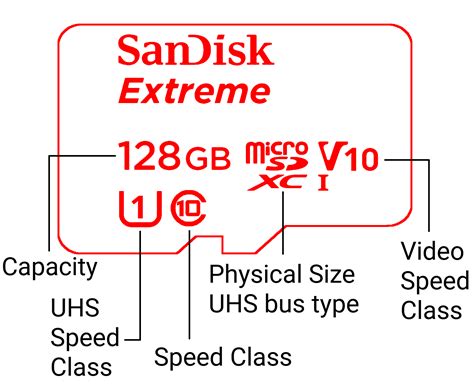
While capacity gets a lot of attention, the speed of your SD card is equally important. A faster card means quicker game loading times, smoother performance for data-intensive games, and faster transfer of files. Look for these indicators:
- UHS Speed Class (U1 or U3): U3 cards offer a minimum write speed of 30MB/s, while U1 offers 10MB/s. For the Switch, U3 is recommended for optimal performance.
- Video Speed Class (V10, V30, etc.): While primarily for video recording, V30 is equivalent to U3 and indicates good sustained write speeds.
- Application Performance Class (A1 or A2): A1 and A2 ratings indicate performance optimized for running applications directly from the card. A2 offers better random read/write speeds, which can translate to slightly faster loading times on the Switch, though the difference might be negligible for many users compared to a U3 card.
Prioritize U3-rated cards, and if your budget allows, an A2-rated U3 card will provide the best possible performance.
3. Brand Reputation and Reliability
Investing in a reputable brand is crucial for reliability and data integrity. While cheaper, off-brand cards might seem appealing, they often come with risks of slower speeds, data corruption, or premature failure. Stick to trusted manufacturers such as:
- SanDisk: Widely regarded as the official choice, SanDisk even produces Nintendo-licensed Switch microSD cards.
- Samsung: Known for their EVO Plus and PRO Plus lines, offering excellent speed and reliability.
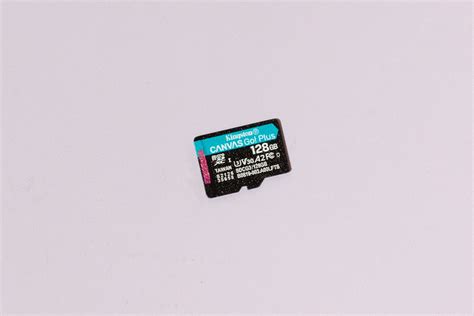
- Kingston: A solid option known for dependable performance.
- Lexar: Another reliable brand offering various speed and capacity options.
These brands offer warranties and have a proven track record of quality.
Installation and Setup
Installing an SD card into your Nintendo Switch is straightforward:
- Turn off your Nintendo Switch completely.
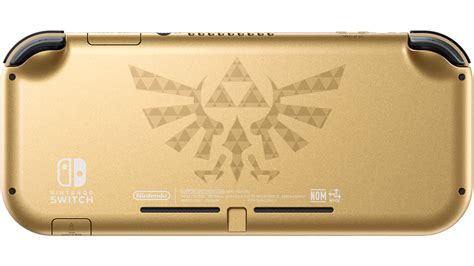
- Open the kickstand on the back of the console to reveal the microSD card slot.
- Insert the microSD card gently, with the label facing down, until it clicks into place.
- Close the kickstand and turn on your Switch.
- The Switch will automatically detect and format the card if it’s new. If not, you might be prompted to format it through System Settings > Data Management.
Once formatted, your Switch will automatically prioritize the SD card for new game downloads and updates.
Managing Your Switch Storage
Even with a large SD card, it’s good practice to manage your storage:
- Archive Software: Instead of deleting games you might play again, use the “Archive Software” option. This deletes the game data but keeps the save data and icon, allowing for quick re-downloading later.
- Check Data Management: Periodically go to System Settings > Data Management to see how your storage is being used and identify large files you no longer need.
- Move Data: While you can’t manually move individual games between internal storage and the SD card, future downloads will automatically go to the larger available space (your SD card).
Conclusion: Invest in Your Gaming Experience
An SD card is an indispensable upgrade for any Nintendo Switch owner looking to maximize their gaming experience. By carefully considering capacity, speed, and brand reputation, you can choose the perfect microSD card to store your entire game library, reduce loading times, and free yourself from constant storage worries. Don’t let limited storage hold you back – unlock the full potential of your Nintendo Switch today!



