





Best Switch SD card for expanding digital game library storage?

The Nintendo Switch, with its incredible library of first-party titles and a growing collection of indie gems, quickly fills its modest 32GB (or 64GB for the OLED model) internal storage. For most gamers, especially those who prefer digital downloads over physical cartridges, expanding storage is not just a luxury but a necessity. The good news is that the Switch supports microSD cards, offering a straightforward and cost-effective solution to keep all your favorite games accessible.
Why Your Switch Needs More Storage
While physical game cartridges save space on your console, many popular games today still require significant downloads for updates, patches, or even the entire game data if you purchase a ‘download code in a box’ edition. Digital-only titles and eShop sales further encourage building a vast digital library, which can quickly consume your internal memory. Running out of space means deleting games, which can be a hassle if you want to replay them later.

A microSD card provides the perfect solution, allowing you to store dozens, if not hundreds, of games, save data, screenshots, and video clips without ever worrying about freeing up space. But with so many options on the market, how do you choose the best one?
Understanding SD Card Types for Nintendo Switch
The Nintendo Switch is compatible with microSD, microSDHC, and microSDXC cards. Here’s a quick breakdown:
- microSD (2GB or less): These are too small for modern gaming needs and are rarely sold anymore.
- microSDHC (4GB – 32GB): While better than standard microSD, 32GB will still fill up quickly. Many older and smaller indie games might fit, but larger titles won’t.
- microSDXC (64GB – 2TB): These are the cards you should be looking at. They offer the large capacities required for today’s digital game libraries. The Switch supports up to 2TB, though 1TB is currently the largest widely available and affordable option.
What Capacity Do You Really Need?
Choosing the right capacity depends on your gaming habits and budget:
- 64GB-128GB: A good starting point for casual gamers or those who mostly buy physical games but need space for updates and a few digital titles. It’s an economical choice.
- 256GB-512GB: The sweet spot for most digital-first gamers. This range offers ample space for a substantial library of AAA titles, indie games, and DLC without constant management. Many popular Switch games range from 5GB to 15GB each, so a 512GB card can hold 30-50 games.
- 1TB: For hardcore digital collectors who want to download everything and never delete a game. While a significant investment, it virtually eliminates storage concerns for the foreseeable future.
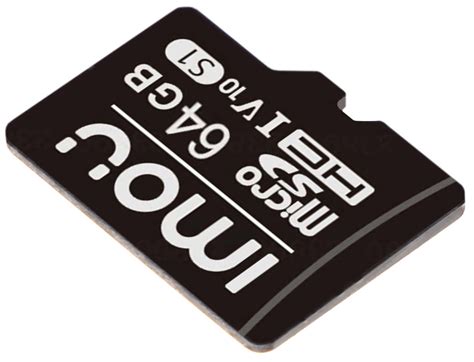
Speed Matters: A1 vs. A2 Ratings and UHS
While capacity is important, speed also plays a role in game loading times and overall performance. You’ll often see terms like UHS (Ultra High Speed) and speed class ratings:
- UHS Speed Class (U1, U3): U1 guarantees a minimum write speed of 10MB/s, while U3 guarantees 30MB/s. Both are more than sufficient for the Switch.
- Video Speed Class (V10, V30, V60, V90): These classes are primarily for video recording but also indicate sustained write speeds. V10 is 10MB/s, V30 is 30MB/s, and so on.
- Application Performance Class (A1, A2): This is perhaps the most relevant for gaming. A1 and A2 ratings indicate a card’s ability to handle random read/write operations efficiently, which is crucial for applications (like games) that frequently access small files. The Switch benefits from at least an A1 rating, which ensures smooth performance when loading games and assets. A2 cards offer even faster random read/write speeds, though the real-world difference on the Switch might be minimal for most users compared to A1.
Look for cards with a minimum of UHS-I (U1) and an A1 rating for optimal performance. Faster cards (UHS-I U3, A2) are excellent if the price difference is negligible.

Top Recommended Brands and Cards
When it comes to microSD cards, reliability and brand reputation are key. Stick to well-known manufacturers to avoid counterfeit or low-quality cards that could corrupt your game data.
- SanDisk: Widely regarded as the top choice for Switch users, especially their ‘SanDisk Ultra’ and ‘SanDisk Extreme’ lines. They even offer officially licensed Nintendo Switch microSD cards, which are essentially re-branded SanDisk Ultra cards with iconic Nintendo designs, but function identically to their non-branded counterparts. Their 512GB and 1TB options are particularly popular.
- Samsung: The Samsung EVO Select and EVO Plus series are excellent alternatives, offering competitive speeds and reliability at a great price.
- Lexar: Known for reliable and often more affordable options, Lexar offers cards that perform well with the Switch.

Installation and Management
Installing an SD card is simple: just open the kickstand on your Switch and slide the card into the slot. The system will automatically detect and format it. If you’re upgrading an existing card, make sure to back up your data to a PC first.
Remember that game save data is always stored on the Switch’s internal memory and cannot be moved to an SD card (unless using Nintendo Switch Online’s cloud saves). However, downloaded game data, updates, and screenshots will automatically save to your microSD card once installed.

Conclusion
Investing in a high-quality microSDXC card is one of the best upgrades you can make for your Nintendo Switch experience. For most users, a 256GB or 512GB card from a reputable brand like SanDisk or Samsung, with at least a UHS-I U1 and A1 rating, will provide the perfect balance of capacity, performance, and value. This upgrade ensures you can carry your entire digital game library wherever you go, truly making your Switch a portable powerhouse.


