





Which microSD card is best for Switch game storage? Maximize your console’s space.
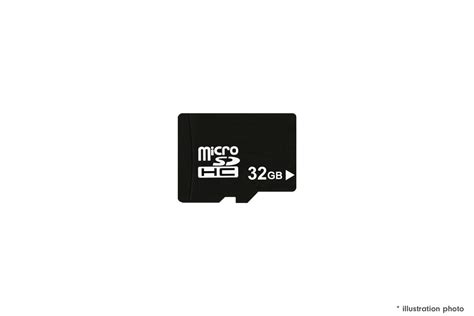
The Nintendo Switch is a fantastic portable and home console, offering a vast library of games from epic first-party adventures to indie gems. However, its greatest limitation for many players is its relatively small internal storage. With only 32GB (or 64GB for the OLED model), which is quickly eaten up by the operating system and essential files, you’ll find yourself running out of space after downloading just a few major digital titles. This is where a microSD card becomes an indispensable accessory.
Choosing the right microSD card isn’t just about adding more gigabytes; it’s about ensuring smooth gameplay, fast loading times, and future-proofing your console. But with so many options available, how do you pick the best one for your Switch?

Understanding Nintendo Switch Storage Needs
Nintendo Switch games, especially digital downloads, can be quite large. Titles like The Legend of Zelda: Tears of the Kingdom or Pokémon Scarlet/Violet can easily exceed 10-15GB each. If you’re someone who prefers digital copies, subscribes to Nintendo Switch Online, or downloads a lot of free-to-play games, your internal storage will fill up alarmingly fast. Even physical game cartridges may require significant downloads for updates and DLC, further consuming precious space.
A microSD card is the only way to significantly expand your Switch’s storage, allowing you to carry your entire game library with you without constantly deleting and re-downloading titles.
Key Factors When Choosing a microSD Card
Not all microSD cards are created equal. When selecting one for your Nintendo Switch, consider these crucial aspects:
Capacity: How Much Do You Really Need?
- 64GB-128GB: A good starting point for casual players or those who primarily buy physical games. It offers a decent boost without a high cost.
- 256GB-512GB: The sweet spot for most digital-heavy users. This range provides ample space for many AAA titles and indie games, offering great value.
- 1TB or more: For the ultimate digital collector. If you plan to download every game you can get your hands on, a 1TB card will give you peace of mind for years to come, though it comes at a higher price.
Remember, it’s often better to buy a slightly larger card than you think you need, as games tend to get bigger, and prices for higher capacities continue to drop.
Speed: Don’t Compromise on Performance
The speed of your microSD card directly impacts game loading times and overall system responsiveness. The Nintendo Switch supports UHS-I (Ultra High Speed Phase I) microSD cards. Here’s what to look for:
- UHS-I (U3) or V30: These are ideal. U3 cards offer a minimum sequential write speed of 30MB/s, while V30 (Video Speed Class 30) also guarantees 30MB/s. Both are excellent for the Switch.
- Read Speed: Aim for a card with a read speed of at least 90MB/s, though 100MB/s or higher is preferable for the best performance.
- Avoid: Slower cards (like Class 4 or Class 6) or basic Class 10/U1 cards might work but will result in noticeably longer loading times.
Brand Reputation: Trust and Reliability
Always stick to reputable brands. They offer better reliability, performance consistency, and come with warranties. Popular and trusted brands include:
- SanDisk
- Samsung
- Lexar
- Kingston
- Crucial
Beware of unusually cheap, no-name cards, as they often have inflated capacities or poor performance, leading to data loss or system errors.
Recommended microSD Card Brands and Models
Based on performance, reliability, and value, here are some top picks for your Nintendo Switch:
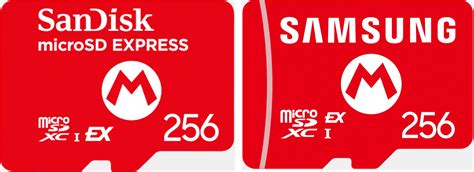
- SanDisk microSDXC for Nintendo Switch: These are officially licensed cards, featuring iconic Nintendo artwork (like a Mushroom or Star). They are specifically optimized for the Switch, offering read speeds up to 100MB/s and write speeds up to 90MB/s (UHS-I U3). They come in various capacities, making them a safe and excellent choice.
- SanDisk Extreme / Extreme Pro microSDXC: While not Nintendo-branded, these cards offer even higher performance (often exceeding the Switch’s requirements) and are incredibly reliable.
- Samsung EVO Select / EVO Plus microSDXC: Excellent value cards known for their strong performance and reliability. They are typically UHS-I U3 with high read/write speeds.
- Samsung PRO Plus microSDXC: A step up in performance from the EVO line, offering top-tier speeds for those who want the absolute best.
- Lexar Play microSDXC: Designed for mobile gaming, these cards offer good speeds (UHS-I U3, up to 150MB/s read) at competitive price points.
Installation and Setup
Installing a microSD card in your Nintendo Switch is incredibly straightforward:
- Power off your Nintendo Switch completely (hold down the power button and select ‘Power Options’ > ‘Turn Off’).
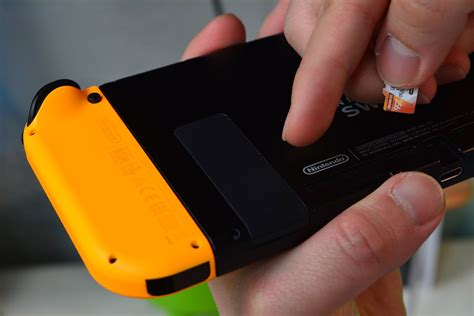
- Open the kickstand on the back of the console to reveal the microSD card slot.
- Insert the microSD card into the slot with the label facing the same direction as the screen, pushing it gently until it clicks into place.
- Close the kickstand and power on your Switch.
The Switch will automatically detect and format the new card. Any new downloads will automatically go to the microSD card first. If you have existing data on the internal storage you wish to move, you’ll need to archive the software and re-download it to the console with the microSD card inserted.
Maximizing Your Storage and Performance
- Choose Wisely from the Start: Investing in a higher capacity card upfront (e.g., 256GB or 512GB) can save you the hassle and cost of upgrading later.
- Archive Unused Games: If you’re tight on space and don’t want to delete save data, you can archive games to free up space while keeping your save files. You can always re-download them later.
- Prioritize Speed: While capacity gets the headlines, the speed class of your card is crucial for a smooth gaming experience. Always opt for a UHS-I U3 card.

Conclusion
A high-quality microSD card is an essential upgrade for any Nintendo Switch owner looking to maximize their console’s potential. By carefully considering capacity, speed, and brand reputation, you can ensure a seamless gaming experience with faster loading times and plenty of space for all your favorite titles. Whether you opt for an official Nintendo-licensed card or a high-performance alternative, upgrading your storage is one of the best ways to enhance your enjoyment of the Nintendo Switch.


