





Maximize Switch storage for digital games: which microSD card is best?
The Growing Need for Nintendo Switch Storage
The Nintendo Switch has revolutionized portable gaming, offering a vast library of titles ranging from epic AAA adventures to charming indie gems. While the console’s 32GB (or 64GB for OLED models) internal storage is sufficient for a few small games, it quickly fills up, especially if you prefer digital downloads. Many popular titles, such as The Legend of Zelda: Tears of the Kingdom or Pokémon Scarlet and Violet, can consume over 10-15GB each, making external storage an absolute necessity for any serious digital gamer.
Running out of space means you’ll constantly be deleting and redownloading games, which is a significant inconvenience. Investing in a quality microSD card not only provides ample room for your entire digital collection but can also slightly improve game loading times compared to relying solely on internal memory.

Understanding MicroSD Card Specifications for Switch
Choosing the right microSD card isn’t just about capacity; speed and reliability are equally crucial for a smooth gaming experience. Here’s what to look for:
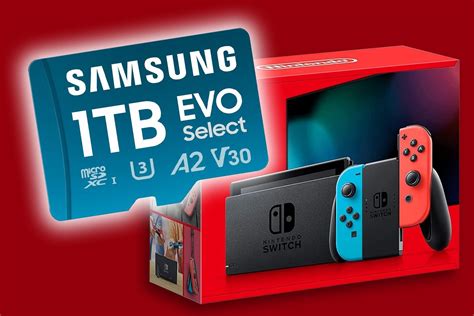
- Capacity (GB/TB): This is the most straightforward factor. While 64GB might offer temporary relief, most users will find 128GB, 256GB, or even 512GB to be more practical long-term. For extensive digital libraries, 1TB cards are now readily available and increasingly affordable.
- Speed Class (C2, C4, C6, C10): This indicates minimum sequential write speed. For the Switch, a Class 10 card (minimum 10MB/s write speed) is the baseline requirement.
- UHS Speed Class (U1, U3): UHS (Ultra High Speed) cards offer faster transfer rates. U1 cards have a minimum write speed of 10MB/s, while U3 cards guarantee at least 30MB/s. The Switch supports U1 and U3, with U3 generally providing a marginal improvement in loading times for larger games.
- Video Speed Class (V6, V10, V30, V60, V90): Less relevant for gaming, but V30 corresponds to U3.
- Application Performance Class (A1, A2): These classes are optimized for running apps from the card, improving random read/write operations. A1 cards offer better performance than non-A1 cards for apps, and A2 cards are even better. While the Switch doesn’t explicitly require A1 or A2, cards with these ratings often perform well with games due to their optimized random access speeds.
Key Factors for Choosing the Best Card
1. Capacity: How Much is Enough?
Consider your gaming habits. If you primarily buy physical game cartridges but want to download a few eShop exclusives or DLC, a 128GB or 256GB card might suffice. However, if you’re a digital-first gamer, a 512GB or 1TB card will save you from future headaches. Remember, game sizes are only increasing. A 512GB card can typically hold 20-40 large titles, while 1TB can double that.
2. Speed: U1 vs. U3, A1 vs. A2
The Nintendo Switch’s maximum theoretical read speed for microSD cards is 100MB/s. While a faster card might not exceed this limit, a U3 (or V30) card with A1 or A2 rating ensures consistent performance, especially for games with large assets that need to be loaded quickly. While the difference between U1 and U3 might not be dramatically noticeable in every game, U3 cards often offer better overall random read/write performance, which translates to smoother gameplay and slightly reduced loading screens.
3. Brand Reputation and Reliability
Always opt for reputable brands to avoid counterfeit cards or those with unreliable performance. Established manufacturers like SanDisk, Samsung, Lexar, and Kingston are known for producing high-quality, durable microSD cards with good warranty support.

Top Recommended MicroSD Cards for Nintendo Switch
Based on performance, reliability, and value, here are some of the best choices for your Nintendo Switch:
- SanDisk MicroSDXC for Nintendo Switch: These officially licensed cards are specifically designed and tested for the Switch. They come in various capacities (64GB to 1TB) and offer U3/A1 speeds (up to 100MB/s read, 90MB/s write), making them an excellent, worry-free choice.
- SanDisk Extreme/Extreme PRO MicroSDXC: These non-licensed SanDisk cards often offer even higher speeds (U3/A2, up to 160-190MB/s read, 90-130MB/s write). While the Switch won’t fully utilize the peak speeds, their superior random access performance and robust build quality make them a fantastic premium option.
- Samsung EVO Select/EVO Plus MicroSDXC: Samsung’s EVO line provides excellent value. These U3/A2 cards deliver consistent performance (up to 100-130MB/s read, 60-90MB/s write) and are highly reliable, making them a popular choice for Switch owners.
- Lexar PLAY MicroSDXC: Designed for gaming and entertainment, Lexar PLAY cards offer U3/A1 performance with speeds up to 150MB/s read. They are a solid, budget-friendly option, especially in higher capacities.

Installation and Management Tips
- Insert the Card: Power off your Switch completely. Open the kickstand on the back of the console to reveal the microSD card slot. Insert the card with the label facing down until it clicks into place.
- Format if Prompted: The Switch will likely prompt you to format the card. Follow the on-screen instructions. This prepares the card for use with your console.
- Transferring Games: New downloads will automatically go to the microSD card if there’s space. To move existing games from internal memory to the card (or vice-versa), go to System Settings > Data Management > Move Data Between System / microSD Card.
- Archiving vs. Deleting: If you need to free up space temporarily, ‘Archive’ a game. This deletes the game data but keeps its icon and save data, allowing for quick redownload. ‘Delete’ removes everything.

Conclusion
For any Nintendo Switch owner who enjoys digital games, a high-quality microSD card is an essential upgrade. Prioritize a card with ample capacity (256GB, 512GB, or 1TB are recommended for most users) and a good speed rating (U3/A1 or U3/A2 from a reputable brand like SanDisk or Samsung). This investment will ensure you have plenty of room for your ever-growing digital library, reduce frustrating loading times, and keep you immersed in the magical world of Nintendo gaming without interruption.


