





What practical parental controls help manage kids’ gaming time and age-appropriate content?

Navigating the Digital Playground: Essential Parental Controls for Gaming
In today’s digital age, video games are an integral part of many children’s lives, offering entertainment, social connection, and even educational benefits. However, with the vast array of games available, parents often face the challenge of managing screen time and ensuring their children access age-appropriate content. Fortunately, a combination of technological tools and open communication can create a balanced and safe gaming environment.

Leveraging Built-In Console and PC Controls
Most modern gaming platforms and operating systems come equipped with robust parental control features. These are often the first and most effective line of defense for managing gaming habits.
- Console-Specific Settings (PlayStation, Xbox, Nintendo Switch): Each major console offers comprehensive parental controls that can be set up directly on the device or through a companion mobile app. These typically allow parents to:
- Set daily or weekly time limits for gameplay.
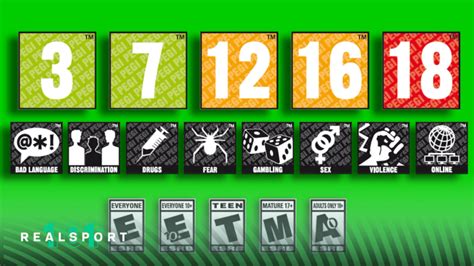
- Restrict access to games based on age ratings (ESRB, PEGI, CERO, etc.).
- Control online communication features, such as chat and voice messaging.
- Manage purchases and spending limits on digital storefronts.
- Monitor play activity and game history.
- PC Operating System Controls (Windows, macOS): Both Windows and macOS offer family safety features that extend beyond gaming, managing overall device usage. Parents can create child accounts with specific permissions, control app access (including games), set screen time limits, and filter web content. Steam also has its own Family View feature for managing game access within its platform.
Content Filtering and Age-Appropriateness
Understanding game ratings is crucial for ensuring children play age-appropriate titles. Organizations like the Entertainment Software Rating Board (ESRB) in North America, PEGI in Europe, and CERO in Japan provide clear age recommendations and content descriptors (e.g., violence, language, drug reference).
- Platform-Specific Filters: Use the parental control settings on consoles and PCs to automatically block games that exceed a chosen age rating. This prevents children from even seeing or downloading inappropriate titles.
- Game Store Filters: When purchasing or browsing games, utilize filters on digital storefronts (like PlayStation Store, Xbox Games Store, Nintendo eShop, Steam) to only display games suitable for your child’s age group.
- Review and Research: Don’t rely solely on age ratings. Read game reviews, watch gameplay videos, or even try games yourself to get a better sense of their content and ensure they align with your family’s values.
Network-Level and Third-Party Solutions
Beyond individual devices, some parental controls can be implemented at a broader network level.
- Router-Based Controls: Many modern home routers include built-in parental control features, allowing you to filter websites, block specific applications (including game servers), and schedule internet access for connected devices. This can be a powerful tool for enforcing ‘lights out’ for all screens.
- Third-Party Apps and Devices: Various third-party applications and dedicated devices (e.g., Circle by Disney, Bark, Qustodio) offer comprehensive family safety solutions that monitor and control screen time, app usage, and content across multiple devices, including phones, tablets, and gaming consoles. These often provide more detailed reporting and flexibility than built-in options.

The Importance of Communication and Collaboration
While technology provides robust tools, the most effective parental control is an engaged parent. Open communication fosters trust and helps children develop self-regulation skills.
- Set Clear Expectations: Discuss house rules for gaming, including daily limits, acceptable games, and when gaming is off-limits (e.g., before homework, during family meals). Write them down if it helps.
- Involve Your Kids: Let them participate in setting some of the rules. When children have a say, they are more likely to adhere to the agreements.
- Explain the ‘Why’: Instead of just enforcing rules, explain the reasons behind them, such as the importance of balancing screen time with other activities like school, exercise, and sleep.
- Play Together: Show interest in their gaming world. Play games with them, ask about their favorite titles, and understand the content they are engaging with. This also provides an opportunity to model good gaming habits.
- Lead by Example: Be mindful of your own screen time and digital habits. Children often mirror their parents’ behavior.

Conclusion: A Balanced Approach for Digital Well-being
Managing kids’ gaming time and content is an ongoing process that requires a multi-faceted approach. By effectively utilizing built-in console/PC controls, understanding age ratings, exploring network-level solutions, and most importantly, maintaining open and honest communication, parents can empower their children to enjoy the digital world responsibly. The goal is not to eliminate gaming, but to cultivate a healthy, balanced relationship with technology that supports overall well-being and development.