





Practical tips for choosing age-appropriate, safe games & managing screen time limits?

In today’s digital age, video games and screens are an undeniable part of children’s lives. While they offer entertainment, educational opportunities, and social connections, navigating the vast world of digital content can be daunting for parents. The key lies in striking a balance: choosing games that are not only fun but also suitable for your child’s age and safe, while simultaneously setting healthy boundaries for screen time.
Decoding Age-Appropriateness and Safety in Games
The sheer volume of games available can be overwhelming. Knowing what’s right for your child requires a bit of research and understanding of available tools.

Understand Rating Systems
- ESRB (Entertainment Software Rating Board) / PEGI (Pan European Game Information): These systems provide age recommendations and content descriptors (e.g., violence, language, suggestive themes). Always check these ratings before allowing your child to play a new game.
- App Store Ratings: Beyond age, look at user reviews and developer information in app stores for additional insights into content and potential issues like in-app purchases.
Research Game Content
Don’t just rely on the label. Watch gameplay videos on platforms like YouTube, read professional reviews, and even try playing the game yourself if possible. This hands-on approach gives you a true sense of the game’s mechanics, themes, and overall suitability.
Consider Your Child’s Developmental Stage
An “age-appropriate” rating is a guideline, not a strict rule. Consider your child’s individual maturity, sensitivity, and understanding. Some children might be ready for certain themes earlier or later than others. Openly discuss game content with them.
Prioritize Privacy and In-App Purchases
Many games, especially free-to-play mobile games, contain in-app purchases or collect user data. Be vigilant about privacy settings and ensure your payment methods are password-protected to prevent unauthorized spending. Discuss the concept of microtransactions with older children.
Mastering Screen Time Limits and Healthy Habits
Once you’ve chosen suitable games, the next challenge is managing how much time your child spends on screens. This is crucial for their physical health, academic performance, and social development.

Establish Clear Rules and Boundaries
Set specific, consistent limits for screen time each day or week. This could involve time limits, designated screen-free zones (e.g., bedrooms, dinner table), or specific times of day when screens are allowed. Involve your children in creating these rules, making them more likely to adhere to them.
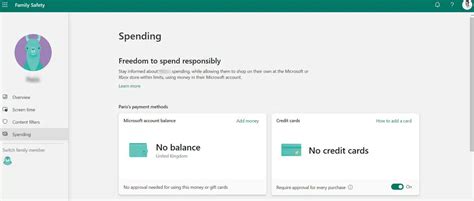
Utilize Parental Control Tools
Most devices and operating systems offer robust parental control features. These can help enforce time limits, restrict access to certain apps or content, and monitor usage. Explore options on consoles, tablets, smartphones, and even your home Wi-Fi router.
Encourage Diverse Activities
Screen time should be just one part of a balanced daily routine. Actively encourage and facilitate alternative activities such as outdoor play, reading, creative arts, sports, and face-to-face social interactions. The more engaging alternatives they have, the less they’ll rely on screens.

Lead by Example
Children are keen observers. If you’re constantly on your phone or tablet, they’re likely to emulate that behavior. Model healthy screen habits yourself, demonstrating when it’s appropriate to put devices away and engage with the real world.
Foster Open Communication
Regularly talk to your children about their gaming experiences. Ask them what they enjoy, what challenges they face, and how they feel about the games they play. This open dialogue builds trust and allows you to address concerns proactively, making adjustments to rules and game choices as needed.

Finding the Sweet Spot: Balance and Well-being
Choosing age-appropriate, safe games and managing screen time isn’t about complete prohibition; it’s about fostering a healthy relationship with technology. By staying informed, setting clear boundaries, offering alternatives, and maintaining open communication, parents can empower their children to enjoy the digital world responsibly, ensuring it enhances rather than detracts from their overall well-being. Remember, balance is key, and every family’s “sweet spot” will look a little different.


