





Which MicroSD for Switch? Optimize game storage & load times.
The Nintendo Switch, an incredibly versatile console, offers a fantastic gaming experience both on the go and at home. However, its internal storage of 32GB (or 64GB for the OLED model) fills up rapidly, especially with large digital titles and game updates. To truly unleash your Switch’s potential and avoid constant game management headaches, a MicroSD card is an absolute necessity. But with so many options available, how do you choose the best one?
Why a MicroSD Card is Essential for Your Switch
While physical game cartridges save some space, many games require significant downloads for updates, patches, and DLC. Digital-only titles can consume several gigabytes each. Without a MicroSD card, you’ll quickly find yourself deleting games to make room for new ones, leading to frustrating re-downloads. A high-quality MicroSD card not only provides ample space but can also significantly impact game load times, offering a smoother, more enjoyable gaming experience.

Key Factors When Choosing a Switch MicroSD Card
Selecting the right MicroSD card for your Switch boils down to three primary considerations: speed, capacity, and reliability.
Speed: Understanding UHS-I, U3, and V30
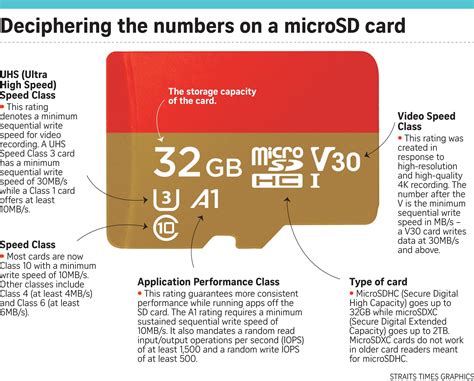
The speed of your MicroSD card directly affects how quickly games load, save data, and updates are processed. The Switch supports UHS-I (Ultra High Speed-I) cards, which are common and offer a good balance of performance and cost. You’ll want to look for specific ratings:
- UHS Speed Class 3 (U3): This rating indicates a minimum sequential write speed of 30MB/s. This is crucial for smooth game performance.
- Video Speed Class 30 (V30): Often found alongside U3, V30 also guarantees a minimum sequential write speed of 30MB/s, designed for video recording but beneficial for games.
- Application Performance Class (A1 or A2): While A1 and A2 are primarily for mobile app performance, they indicate good random read/write speeds, which can subtly benefit game loading, though U3/V30 is more critical for overall Switch performance.
Recommendation: Always aim for a UHS-I card with a U3 and/or V30 rating. This ensures optimal loading times and smooth gameplay.
Capacity: How Much Space Do You Really Need?
Game sizes on the Switch vary widely, from a few hundred megabytes to over 20-30GB. Consider your gaming habits:
- 128GB: A good starting point if you mostly play physical cartridges or only a few digital titles.
- 256GB: An excellent balance for most gamers, allowing for a substantial library of digital games and updates without worrying about space too often.
- 512GB: Ideal for avid digital gamers, especially if you subscribe to Nintendo Switch Online + Expansion Pack and download N64/Sega Genesis games, or plan to acquire many large titles.
- 1TB or more: For the ultimate digital collector. While more expensive, it offers peace of mind for years to come.
Remember, it’s generally better to buy a slightly larger card than you think you need, as game sizes tend to grow over time with updates and new releases.

Top MicroSD Card Brands and What to Look For
Stick with reputable brands to ensure reliability and avoid counterfeits. Brands like SanDisk, Samsung, Lexar, and Kingston are generally trusted. Purchase from authorized retailers to guarantee authenticity and warranty support.
Installation and Optimization Tips
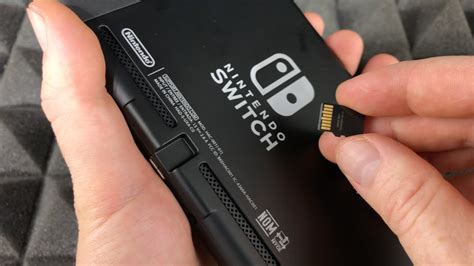
Installing your MicroSD card is straightforward: simply insert it into the slot under the kickstand on the back of your Switch. The console will prompt you to format it if necessary. Once formatted, your Switch will automatically prioritize the MicroSD card for new downloads. You can also manually move existing game data from internal storage to the MicroSD card via the System Settings.
Recommended MicroSD Cards for Nintendo Switch
While specific models change, look for cards from the reputable brands mentioned above that meet the UHS-I U3/V30 speed criteria. SanDisk’s ‘Nintendo-licensed’ MicroSD cards are popular and guaranteed to work, but any U3/V30 UHS-I card from a quality brand will perform just as well and often at a better price point.
Conclusion: Enhance Your Switch Experience
Investing in the right MicroSD card is one of the best upgrades you can make for your Nintendo Switch. It frees you from constant storage worries, ensures quicker load times, and ultimately allows you to spend more time playing and less time managing. By focusing on UHS-I U3/V30 speeds and choosing a capacity that suits your gaming habits from a trusted brand, you’ll optimize your Switch experience for years to come.




