





How to quickly check if a game is age-appropriate and set healthy play limits for kids?
Understanding Game Ratings: Your First Line of Defense
In today’s digital landscape, video games are an integral part of many children’s lives. However, ensuring that the games your kids play are suitable for their age and that their screen time remains balanced can feel like a constant battle. The good news is that there are effective strategies parents can employ to quickly assess game content and establish healthy boundaries.
The fastest way to gauge a game’s suitability is by checking its official rating. Organizations like the Entertainment Software Rating Board (ESRB) in North America, PEGI (Pan European Game Information) in Europe, and CERO in Japan provide clear age classifications and content descriptors. These ratings are prominently displayed on game boxes, digital storefronts, and official websites.

Decoding the Ratings and Content Descriptors
- ESRB (North America): Look for ratings like E (Everyone), E10+ (Everyone 10+), T (Teen), and M (Mature). Crucially, also check the content descriptors below the main rating. These explain *why* a game received its rating, listing elements like “Fantasy Violence,” “Mild Language,” “Blood,” or “Sexual Themes.”
- PEGI (Europe): Uses age ratings like 3, 7, 12, 16, and 18, often with symbols indicating content such as violence, bad language, fear, gambling, drugs, sex, discrimination, and in-game purchases.
A quick glance at these ratings and descriptors will give you an immediate idea of whether the game aligns with your family’s values and your child’s maturity level. Don’t just rely on the age number; the descriptors provide essential context.
Beyond the Ratings: Quick Checks and Resources
While ratings are an excellent starting point, they don’t always tell the whole story. Sometimes, a game might have a suitable age rating but still contain elements you’d prefer your child avoid, or the themes might be too complex for a younger child. Here are some quick additional checks:
- Watch Gameplay Videos: A brief search on platforms like YouTube for “[Game Title] gameplay” can provide a visual overview of the game’s actual content, tone, and complexity. Even a 2-3 minute clip can be incredibly informative.
- Read Parent Reviews: Websites like Common Sense Media offer comprehensive reviews specifically from a parental perspective, often including detailed insights into educational value, violence, language, and potential discussion points.
- Ask Other Parents: Word-of-mouth from trusted friends or family members who have experience with the game can be invaluable.

Setting Healthy Play Limits: A Collaborative Approach
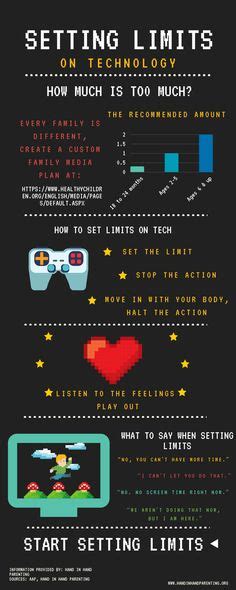
Once you’re comfortable with a game’s content, the next crucial step is establishing healthy boundaries around play time. This isn’t just about limiting screen time; it’s about integrating gaming responsibly into your child’s overall life.
Key Strategies for Play Limits:
- Discuss and Agree: Involve your children in the conversation. Explain *why* limits are important (e.g., for homework, outdoor play, family time, sleep). Collaboratively decide on daily or weekly time limits. This fosters understanding and compliance.
- Use Timers and Alarms: Set physical timers or use built-in parental control features on consoles, PCs, and mobile devices to automatically enforce time limits. This helps prevent arguments when it’s time to stop.
- Designate Play Zones: Encourage gaming in common areas of the house, like the living room, rather than isolated bedrooms. This makes it easier to monitor content and interaction.

- Prioritize Other Activities: Ensure gaming doesn’t overshadow schoolwork, physical activity, creative play, or social interaction with friends and family. A balanced lifestyle is key.
- Set “No-Gaming” Times: Establish rules like no gaming during meals, before homework is done, or an hour before bedtime. This promotes routines and better sleep hygiene.
- Lead by Example: Your own screen habits are a powerful influence. Demonstrate responsible tech use and engage in other activities.

Leveraging Parental Control Tools
Most modern gaming consoles (PlayStation, Xbox, Nintendo Switch), PCs, and mobile devices offer robust parental control settings. These tools allow you to:
- Set specific time limits for gameplay.
- Restrict access to games based on their age rating.
- Manage online interactions, friend requests, and in-game purchases.
- Monitor activity and reports.
Take the time to explore and set up these controls on all devices your child uses for gaming. They provide an automated layer of enforcement for the limits you’ve established.

Conclusion: Consistency and Communication are Key
Effectively managing your children’s gaming habits boils down to two core principles: consistent enforcement of rules and open communication. Regularly review game content, adjust limits as your child grows, and maintain an ongoing dialogue about responsible digital citizenship. By doing so, you can ensure that video games remain a source of enjoyment and learning, rather than a point of contention, within your family.



