





What’s the ideal microSD card for Nintendo Switch game storage to avoid slow loading?

The Need for Speed: Why Your Switch Needs a Good MicroSD
The Nintendo Switch has revolutionized portable gaming, but its internal storage of just 32GB (or 64GB for the OLED model) quickly fills up, especially with larger digital titles. While expanding storage with a microSD card is straightforward, simply picking up any card won’t guarantee optimal performance. To avoid frustratingly slow loading times, understanding the key specifications of microSD cards is crucial for Switch owners.
Understanding MicroSD Card Specifications: Decode the Jargon
When shopping for a microSD card, you’ll encounter several terms and symbols. Here’s what they mean and why they matter for your Switch:
- UHS (Ultra High Speed) Interface: The Switch supports UHS-I, which has a theoretical maximum speed of 104 MB/s. While faster UHS-II or UHS-III cards exist, the Switch cannot utilize their higher speeds, so paying extra for them is unnecessary.
- Speed Class (U1, U3): This indicates the minimum sustained write speed. U1 guarantees 10 MB/s, while U3 guarantees 30 MB/s. While U1 is technically sufficient for most game downloads, U3 offers a more robust performance for larger files and ensures smoother operation.
- Video Speed Class (V10, V30, V60, V90): These classes are primarily for video recording and generally align with U-class ratings (e.g., V30 is equivalent to U3).
- Application Performance Class (A1, A2): This is perhaps the most important specification for gaming. A-ratings denote a card’s ability to handle random read/write operations, which directly impacts how quickly games load assets, textures, and save files.
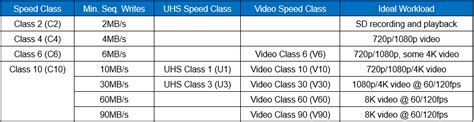
The Nintendo Switch benefits significantly from higher random read/write speeds, making the Application Performance Class a critical factor in preventing slow loading screens. An A1 card offers a minimum of 1500 IOPS (Input/Output Operations Per Second) for random read and 500 IOPS for random write. An A2 card drastically improves this, providing 4000 IOPS for random read and 2000 IOPS for random write, leading to noticeably snappier game performance.
The Sweet Spot: What to Look For
Given the Switch’s capabilities and the demands of modern games, the ideal microSD card should have the following characteristics:
- UHS-I Compatible: As the Switch doesn’t support faster interfaces, stick to UHS-I.
- Speed Class U3 (or V30): This ensures consistent and reliable write speeds for large game installations and updates.
- Application Performance Class A2: This is the most crucial spec for reducing loading times. An A2-rated card will provide the best random read/write performance the Switch can utilize, directly translating to faster game startup, level loading, and overall responsiveness.
- Read Speeds: While not a formal class, aim for cards with advertised read speeds close to the UHS-I maximum (e.g., 90-100 MB/s).
Capacity Considerations: How Much Storage Do You Need?
The amount of storage you need depends on your gaming habits. Digital-only players or those with extensive libraries will need more capacity. Nintendo Switch games can range from a few gigabytes to over 20GB (e.g., The Legend of Zelda: Tears of the Kingdom is around 18GB).
- 128GB: A good starting point for casual digital gamers.
- 256GB: A popular choice, offering a healthy balance of cost and capacity for most players.
- 512GB: Recommended for avid digital collectors or those who don’t want to worry about managing space for a long time.
- 1TB: While available, these are often quite expensive and might be overkill for many users.

Consider your current game collection and anticipated future purchases when deciding on capacity. It’s often better to get a slightly larger card than you think you need to future-proof your storage.
Top Recommendations and Brands: Proven Performers
Several brands consistently deliver high-quality microSD cards that meet the Switch’s requirements:
- SanDisk: Widely recognized, their ‘SanDisk Extreme’ or ‘SanDisk Ultra’ cards often feature A2 ratings and high read/write speeds. SanDisk also offers officially licensed Nintendo Switch microSD cards, which are essentially re-branded versions of their high-performance cards, guaranteed to work well.
- Samsung: The ‘Samsung EVO Select’ or ‘EVO Plus’ lines are excellent choices, frequently offering A2 ratings and robust performance.
- Lexar: Known for reliable memory solutions, their higher-end microSD cards can also be a good fit.
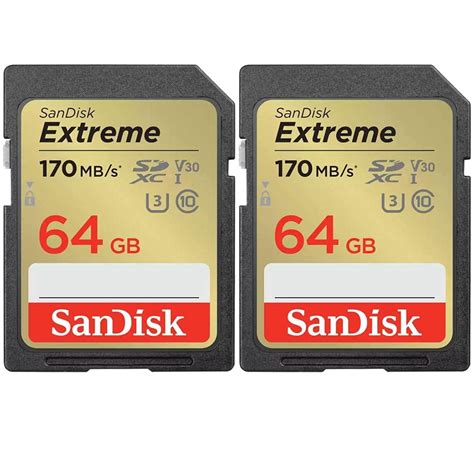
When purchasing, always buy from reputable retailers to avoid counterfeit cards, which often have inflated advertised capacities and poor performance.
Avoiding Pitfalls: What Not to Do
To ensure you get the best experience and avoid wasting money:
- Don’t Overspend on UHS-II/III: As mentioned, the Switch won’t utilize these faster interfaces. You’ll pay a premium for speeds you can’t access.
- Avoid Unknown Brands: Stick to established, reputable brands. Generic or off-brand cards might be cheaper but are often unreliable and can lead to data corruption or extremely slow performance.
- Beware of Too-Good-To-Be-True Deals: If a high-capacity card from a top brand is drastically cheaper than market price, it’s likely a fake.

Conclusion: Game On with Optimal Performance
For the ideal Nintendo Switch game storage solution that minimizes slow loading times, your best bet is a UHS-I, Speed Class U3, A2-rated microSD card from a reputable brand like SanDisk or Samsung. Prioritizing the A2 rating ensures superior random read/write performance, directly translating to a smoother and faster gaming experience. Choose a capacity that suits your gaming habits, and you’ll be ready to expand your digital library without a hitch.



