





Which MicroSD for Switch? Top tips for managing digital game storage.
Why Your Nintendo Switch Needs a MicroSD Card
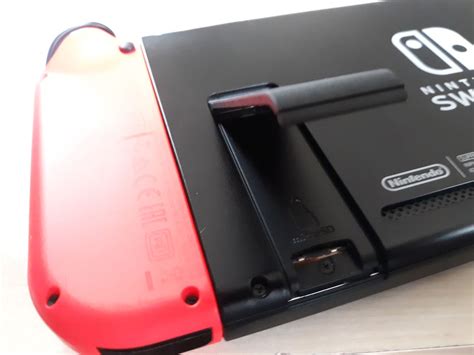
The Nintendo Switch, an incredibly popular hybrid console, comes with a modest 32GB (or 64GB for the OLED model) of internal storage. While this might seem sufficient for a few games, modern titles often consume significant space, with some blockbuster games exceeding 10-15GB each. If you’re primarily a digital game buyer, or even if you download many updates and DLC for physical games, that internal storage will fill up fast. This is where a MicroSD card becomes not just an accessory, but a necessity.
Expanding your Switch’s storage is a straightforward process, but choosing the right card can seem daunting with various specifications and brands on the market. This guide will help you understand what to look for and how to effectively manage your growing digital game library.
Understanding MicroSD Card Specifications for Switch
When shopping for a MicroSD card for your Switch, you’ll encounter several technical terms. Here’s what you need to know:
Card Type: MicroSDXC is Key
- The Nintendo Switch supports MicroSDHC (High Capacity) and MicroSDXC (eXtended Capacity) cards.
- MicroSDHC cards typically range from 4GB to 32GB.
- MicroSDXC cards range from 64GB up to 2TB (though 1TB is currently the practical maximum widely available and affordable). For maximum flexibility and future-proofing, you’ll want a MicroSDXC card.
Speed Class: UHS-I is What You Need
- The Switch supports UHS-I (Ultra High Speed Phase I) compliant MicroSD cards.
- It does NOT support the faster UHS-II standard. While UHS-II cards will work, they will only operate at UHS-I speeds, meaning you’d be paying extra for performance you can’t utilize. Stick with UHS-I.
- Look for a U3 or Class 10 speed rating. More specifically, look for the V30 (Video Speed Class 30) or A1/A2 (Application Performance Class) ratings.
- A1 (Application Performance Class 1) cards are optimized for running apps, which makes them ideal for game loading on the Switch. A2 is even better, offering higher random read/write speeds, though the difference might be negligible on the Switch itself compared to A1.
Recommended Brands
Stick to reputable brands for reliability and performance. SanDisk, Samsung, PNY, and Kingston are all excellent choices. Avoid unbranded or suspiciously cheap cards, as they often have slower speeds or false capacities.
How Much Storage Do You Really Need?
The ideal capacity depends heavily on your gaming habits:
- 64GB: A minimal upgrade. Will fill up quickly if you buy many digital games.
- 128GB: A good starting point for casual digital gamers. Can hold a decent library of smaller indie titles and a few larger AAA games.
- 256GB: Highly recommended for most digital-first gamers. Offers a comfortable balance of capacity and cost. You can store numerous large games without constant management.
- 512GB: An excellent choice for avid digital collectors or those who want to download many games without worry. This provides ample space for most users for a long time.
- 1TB: For the ultimate digital library. If you plan to own virtually every major digital release and never want to delete anything, this is your go-to. However, the price jump is significant.
Remember that physical game cartridges still use internal or SD card storage for updates, DLC, and save data, so even physical game collectors will benefit from expanded storage.
Top Tips for Managing Your Switch Digital Game Library
Even with a large MicroSD card, smart management can save you headaches and ensure your favorite games are always ready to play.
1. Archive, Don’t Just Delete
The Switch offers two options when removing software: ‘Archive Software’ and ‘Delete Software’.
- Archive Software: This removes the game data but keeps the icon on your Home menu. It also retains your save data. If you want to play it again, you can redownload it directly from the icon. This is generally the best option for games you might play again.
- Delete Software: This removes both the game data and the icon from your Home menu. Your save data is retained, but you’ll have to find the game in the eShop or your redownload list to get it back. Use this for games you are absolutely sure you won’t play again, or to clear up Home screen clutter.
2. Prioritize & Rotate
Keep your most frequently played games installed. For games you only play occasionally or have finished, consider archiving them. You can always redownload them when the mood strikes, provided you have an internet connection.
3. Utilize Cloud Saves (Nintendo Switch Online)
While not storage management in the traditional sense, having a Nintendo Switch Online subscription backs up most of your game save data to the cloud. This means even if you delete a game or your console is lost/damaged, your progress is safe and can be restored. Always ensure this feature is enabled for your games.
4. Check Storage Usage Regularly
Go to System Settings > Data Management to see a clear breakdown of how your storage is being used across internal memory and your MicroSD card. This helps identify which games are consuming the most space.
5. Don’t Overbuy (Initially)
While a 512GB or 1TB card is appealing, consider starting with a 256GB card. If you find yourself consistently running out of space, you can always upgrade later. MicroSD card prices have steadily decreased, so waiting can sometimes mean better value.
Conclusion: Maximize Your Switch Experience
Choosing the right MicroSD card for your Nintendo Switch involves understanding a few key specifications like MicroSDXC and UHS-I (A1/A2 rated) and then deciding on a capacity that fits your personal gaming habits. Combined with smart data management practices like archiving games and leveraging cloud saves, you can ensure your Switch always has room for new adventures without the frustration of constant storage warnings. Invest in a reliable card, manage your library thoughtfully, and enjoy your vast collection of digital games seamlessly.


