What’s the best way to structure a ‘first steps’ guide for a complex new game?
Navigating the Labyrinth: Why First Steps Guides Matter
Launching a complex new game is an exciting endeavor, but for new players, it can feel like being dropped into a labyrinth without a map. A well-structured ‘first steps’ guide isn’t just a nicety; it’s a critical tool for player retention, engagement, and ultimately, the game’s success. The challenge lies in providing enough information to empower without overwhelming.
The goal is to gently onboard players, familiarizing them with core mechanics, crucial UI elements, and initial objectives. This introductory experience sets the tone for their entire journey, transforming potential frustration into curiosity and enjoyment.
Key Principles for Effective Onboarding
Before diving into specific sections, consider these guiding principles:
- Chunking Information: Break down complex concepts into small, digestible pieces. Avoid dense paragraphs of text.
- Prioritization: Focus only on what’s absolutely essential for the first 1-2 hours of gameplay. Leave advanced strategies for later.
- Learn by Doing: Integrate practical examples and encourage players to try things themselves. Abstract explanations are often less effective.
- Contextual Relevance: Explain concepts when they become relevant to the player’s immediate situation.
- Visual Aids: Emphasize the importance of in-game visual cues, highlighted UI, and simple diagrams within the actual game guide itself.
Structuring Your ‘First Steps’ Guide: A Section-by-Section Breakdown
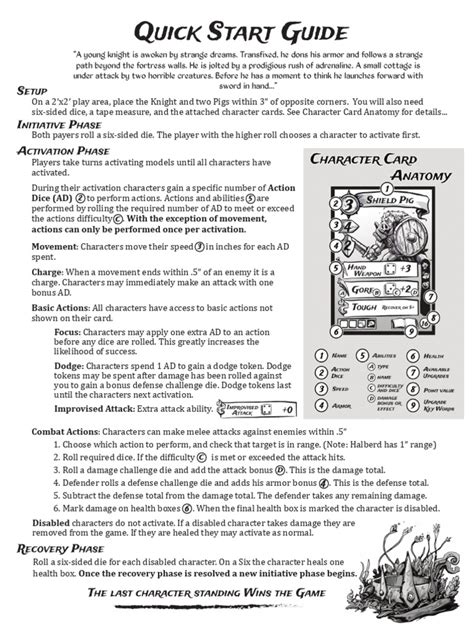
1. The Absolute Basics: Setup and UI Tour
Start with the very foundations. How do they move? How do they interact? What are the key elements on their screen? This section should be concise and focused.
- Game Installation/Launch: (If relevant) Any specific setup steps.
- Basic Controls: Movement, camera, primary interaction (e.g., left-click to select).
- UI Overview: Briefly explain the most critical UI elements (e.g., health bar, resource display, mini-map, inventory access). Don’t explain every icon, just the essentials for immediate survival/progress.
2. Core Mechanics: The ‘Must-Know’ Concepts
Once players can move and understand basic screen elements, introduce the absolute core loop of your game. This is what differentiates it and what they’ll be doing most often.
- Primary Objective: What’s the main goal in the early game? (e.g., gather resources, complete a quest, defeat a specific enemy).
- Fundamental Systems: Explain 1-3 core systems. For an RPG, this might be combat basics and quest acceptance. For a strategy game, unit production and basic resource management. Keep it high-level.
- How to Save/Load: Crucial for complex games.
3. Your First Goal: Practical Application
After explaining the core mechanics, give players a concrete, achievable goal. This provides immediate purpose and allows them to apply what they’ve learned.
- Guided Quest/Scenario: Design a very simple, short task. “Build your first shelter,” “Find the first NPC,” “Defeat 3 weak enemies.”
- Expected Outcome: Clearly state what they should achieve by completing this first goal.

4. Looking Ahead: Next Steps and Resources
Once they’ve completed their first goal, briefly point them towards what’s next and where to find more information.
- Early Progression Path: Hint at the next logical steps or early game content. “Now you can start exploring the forest,” or “Look for the town elder for your next quest.”
- Where to Find Help: Link to more in-depth guides, forums, wikis, or the game’s official support channels. This empowers players to seek further knowledge without cluttering the ‘first steps’ guide.

Tips for Crafting the Guide Itself
- Use Clear, Simple Language: Avoid jargon where possible, or explain it immediately.
- Short Paragraphs and Bullet Points: Enhance readability.
- Interactive Elements (if possible in-game): If the guide is in-game, integrate interactive tutorials. For external guides, use clear screenshots and video links.
- Empower, Don’t Dictate: Frame the guide as a helpful companion, not a rigid set of rules. Encourage experimentation within safe boundaries.
Conclusion: Building a Bridge, Not a Wall
A well-structured ‘first steps’ guide acts as a crucial bridge, helping new players cross the intimidating chasm of complexity and dive into the richness of your game. By focusing on essential information, chunking content, and providing immediate application, you can transform potential frustration into lasting engagement, ensuring your complex new game finds the dedicated audience it deserves.