





What’s the best SD card to expand Switch game storage capacity?

Why Your Nintendo Switch Needs More Storage
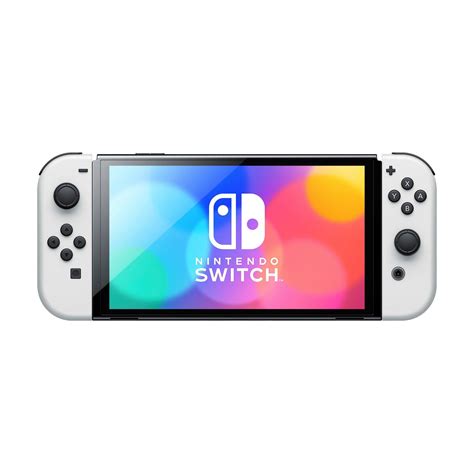
The Nintendo Switch, an incredibly popular portable console, comes with a rather modest 32GB (or 64GB for the OLED model) of internal storage. While this might seem sufficient at first glance, digital game downloads and even physical cartridge updates can quickly eat into this space. Many modern Switch games easily surpass 10GB, making additional storage an absolute necessity for anyone building a decent game library.
Running out of storage means you can’t download new games, updates, or DLC, forcing you to constantly delete and redownload titles. This is where a high-quality microSD card becomes indispensable, providing ample room for your ever-growing collection without compromising performance.
Understanding SD Card Types and Speed for the Switch
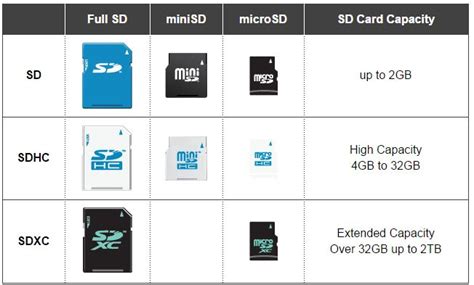
Not all microSD cards are created equal, and understanding the specifications is key to making an informed decision. The Nintendo Switch supports microSD, microSDHC, and microSDXC cards.
- microSD: Older, smaller capacities (up to 2GB). Not suitable for modern gaming.
- microSDHC (High Capacity): Capacities from 4GB to 32GB. Decent for smaller collections, but still limited.
- microSDXC (eXtended Capacity): Capacities from 64GB up to 2TB. These are the cards you should be looking at for serious storage expansion.
Decoding Speed Ratings: What Matters for Games
Beyond capacity, speed is critical. Games need to load quickly, and slow read speeds can lead to longer loading times and even performance issues. Look for these indicators:
- UHS Speed Class (U1 or U3): U3 (UHS Speed Class 3) is faster, indicating a minimum write speed of 30MB/s, compared to U1’s 10MB/s. For games, U3 is preferable.
- Video Speed Class (V10, V30, V60, V90): Similar to UHS, V30 indicates a minimum sequential write speed of 30MB/s. Many good gaming cards will have V30.
- Application Performance Class (A1 or A2): This is perhaps the most crucial for gaming. A1 and A2 cards are optimized for random read/write operations, which is how games access small bits of data frequently. A2 cards offer even better performance than A1, significantly improving game loading and overall responsiveness. Aim for A2 if possible.
Key Factors When Choosing Your Switch SD Card
1. Capacity: How Much Space Do You Really Need?
This is often the first consideration. While 128GB might seem like a good starting point, many users quickly outgrow it. With game sizes ranging from a few gigabytes to over 20GB for titles like The Legend of Zelda: Tears of the Kingdom, a larger card offers future-proofing.
- 256GB: A solid entry-level choice for moderate digital game buyers.
- 512GB: An excellent sweet spot for most avid gamers, balancing cost and extensive storage.
- 1TB: For collectors who want to download almost everything or have a massive digital library. Prices are higher, but it offers ultimate peace of mind.
Consider your gaming habits: do you buy many digital games, or mostly physical cartridges (which still require some update data)?
2. Speed: Prioritizing A1/A2 and UHS-I
The Switch console itself has a maximum theoretical read speed of 100MB/s via its UHS-I interface. This means that while UHS-II cards exist and are faster, the Switch cannot fully utilize their increased speed. Therefore, investing in an expensive UHS-II card for the Switch is generally not necessary.
Focus on a good UHS-I card with a high read speed (close to 100MB/s) and, crucially, an A1 or A2 rating for optimal application performance. Most reputable brands will clearly list these specifications.
3. Brand Reputation and Reliability
Stick to well-known and trusted brands to avoid counterfeit cards or those with unreliable performance. Major players like SanDisk, Samsung, Kingston, and Lexar consistently produce high-quality microSD cards. These brands typically offer good warranties and customer support.
4. Price vs. Performance
While tempting to go for the cheapest option, a severely underperforming card can negatively impact your gaming experience. Balance your budget with the need for decent speed and sufficient capacity. Often, waiting for sales can provide significant savings on top-tier cards.
Recommended SD Cards for Nintendo Switch
Based on the factors above, here are general recommendations:
- SanDisk microSDXC for Nintendo Switch: Officially licensed, these cards come in various capacities (64GB to 1TB) and are specifically optimized for the Switch. They offer reliable performance and often feature fun Nintendo branding.
- SanDisk Extreme / Extreme Pro: These are high-performance cards known for excellent read/write speeds and A2 ratings. They are a fantastic, albeit slightly pricier, choice for demanding users.
- Samsung EVO Select / EVO Plus: Samsung’s EVO line offers a great balance of performance, reliability, and value. They consistently rank well for Switch compatibility and speed.
- Lexar PLAY microSDXC: Designed for portable gaming, these cards offer good speeds and are often competitively priced.

Installing and Managing Your New SD Card
Installing a microSD card in your Switch is straightforward:
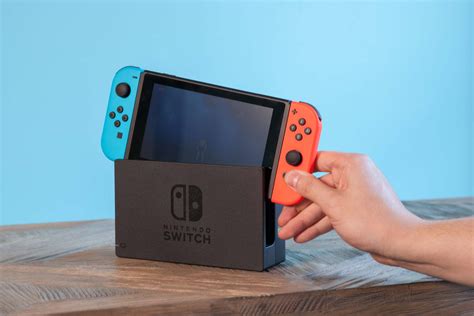
- Turn off your Nintendo Switch console completely.
- Open the kickstand on the back of the console to reveal the microSD card slot.
- Insert the microSD card into the slot until it clicks into place.
- Close the kickstand and power on your Switch.
The Switch will automatically detect and format the new card. New game downloads and screenshots will automatically save to the microSD card. You can check your storage status in System Settings > Data Management.
Conclusion
Choosing the best microSD card for your Nintendo Switch boils down to prioritizing capacity, speed (especially A1/A2 and UHS-I), and brand reliability within your budget. While a 512GB microSDXC card with an A2 rating from a reputable brand like SanDisk or Samsung offers an ideal balance for most gamers, always assess your personal needs and gaming habits. Expanding your storage is a simple yet effective way to significantly enhance your Switch gaming experience, ensuring you always have room for the next big adventure.


