What’s the best SD card for Switch game storage & optimal performance?

The Nintendo Switch, with its expansive library of digital titles, DLCs, and game updates, quickly fills up its modest internal storage. To truly unleash your console’s potential for extensive gaming, investing in a quality microSD card is not just an option—it’s a necessity. But with countless options on the market, how do you pick the one that offers the best balance of storage, speed, and reliability for your beloved Switch?
Why an SD Card is Essential for Your Switch
While the Nintendo Switch comes with 32GB (or 64GB for the OLED model) of internal storage, a significant portion of this is reserved for the system itself. This leaves surprisingly little space for downloadable games, which can range from a few gigabytes to over 20GB each. Without an external storage solution, you’ll quickly find yourself deleting games to make room for new ones, which is a frustrating experience.
Beyond just capacity, the right SD card can also contribute to a smoother gaming experience. Faster read speeds mean quicker game loading times, reduced wait times during intense gameplay, and snappier menu navigation. While the Switch’s maximum performance isn’t limitless, optimizing where you can makes a noticeable difference.
Understanding SD Card Basics for Nintendo Switch
First, it’s important to clarify that the Nintendo Switch only accepts microSD cards (microSD, microSDHC, and microSDXC). Standard SD cards are too large and incompatible. When choosing, you’ll encounter various classifications and speed ratings:
- UHS-I (Ultra High Speed Phase I): This is the most common standard for Switch-compatible cards, offering theoretical maximum speeds of up to 104 MB/s. The Switch itself supports UHS-I cards, making them the ideal choice.
- Speed Class: Indicated by a number inside a ‘C’ (e.g., C10), this denotes minimum sequential write speed. Class 10 (C10) means a minimum of 10 MB/s.
- UHS Speed Class: Indicated by a number inside a ‘U’ (e.g., U1, U3). U1 guarantees a minimum write speed of 10 MB/s, while U3 guarantees 30 MB/s.
Nintendo officially recommends using UHS-I (Ultra High Speed Phase I) compatible microSD cards with a read speed between 60 to 95 MB/s for optimal performance. While UHS-II cards exist and are much faster, the Switch does not support their higher speeds, so paying extra for a UHS-II card provides no benefit.
Key Factors When Choosing Your Switch SD Card
Storage Capacity: How Much Do You Really Need?
This is often the first consideration. Digital game sizes vary wildly. Titles like The Legend of Zelda: Tears of the Kingdom can be over 18GB, while smaller indie games might be less than 1GB. Add in DLC, updates, and potential screenshots/videos, and storage disappears fast.
- 128GB: A good starting point for casual gamers or those who buy mostly physical cartridges.
- 256GB: A popular sweet spot, offering ample space for a significant digital library without breaking the bank.
- 512GB: Ideal for avid digital collectors who download many AAA titles.
- 1TB: The maximum currently supported by the Switch. A premium choice for the ultimate digital library, ensuring you won’t need to worry about storage for years.
Speed Class: Performance You Can Feel
While the Switch’s internal hardware limits how fast it can access data from an SD card, opting for a faster card within the compatible range still makes a difference. The key metrics are read and write speeds.
For the best experience, look for cards with a UHS Speed Class 3 (U3) rating. These cards guarantee a minimum sequential write speed of 30 MB/s, which translates to faster game loading and smoother performance compared to U1 cards (10 MB/s minimum write speed). Although the Switch’s peak read speed from an SD card hovers around 60-100 MB/s, a U3 card will consistently deliver strong performance within that range.

Reliability and Brand Reputation
With electronic storage, reliability is paramount. You don’t want your game data corrupted due to a faulty card. Stick to reputable brands known for quality and durability. They often offer warranties and better customer support.
Top Recommended SD Cards for Nintendo Switch
Based on Nintendo’s recommendations and real-world performance tests, cards that are UHS-I, U3, and Class 10 offer the best balance of speed and compatibility. Here are some consistent top performers:
SanDisk microSD Cards
SanDisk is almost synonymous with storage, and for good reason. Their cards are reliable and readily available. Both the SanDisk Ultra and SanDisk Extreme lines (specifically the UHS-I versions) are excellent choices. The Extreme series often boasts slightly higher speeds and durability, making it a premium pick, but the Ultra series provides fantastic value.
Samsung EVO Select/Plus microSD Cards
Samsung’s EVO line, particularly the EVO Select (Amazon exclusive) and EVO Plus, are fantastic alternatives. They offer competitive speeds (often U3) and robust reliability at a very attractive price point. They are consistently praised for their value and performance in Switch testing.
Lexar and Kingston Options
Other reputable brands like Lexar and Kingston also produce high-quality microSD cards suitable for the Switch. Look for their high-end models that specify U3 speeds and UHS-I compatibility for optimal results.
Installation, Formatting, and Troubleshooting Tips
Inserting and Formatting Your New SD Card
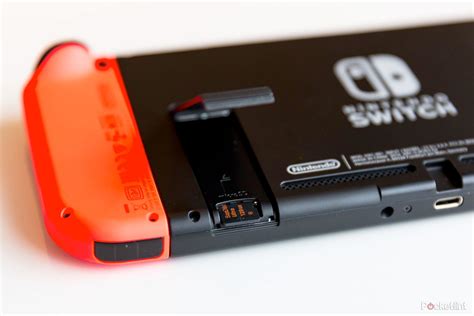
To insert the microSD card, power off your Switch completely. Open the kickstand on the back of the console to reveal the microSD card slot. Insert the card face down until it clicks into place. Power on your Switch, and it will automatically detect and prompt you to format the new card. Always let the Switch format the card itself for guaranteed compatibility.
Transferring Games and Data
You can easily move games and data between your Switch’s internal storage and the microSD card. Go to System Settings > Data Management > Move Data Between System / microSD Card. This is useful for optimizing where your most frequently played games reside.
Spotting Fake SD Cards
Beware of suspiciously cheap SD cards, especially from unknown sellers. Fake cards often claim high capacities and speeds but deliver poor performance or even corrupt data. Always purchase from reputable retailers and check reviews. If a deal seems too good to be true, it probably is.
Conclusion: Making Your Best Choice
For the best overall experience with your Nintendo Switch, prioritize a UHS-I, U3 Class 10 microSDXC card from a reputable brand like SanDisk or Samsung. Regarding capacity, 256GB to 512GB provides an excellent balance for most gamers, allowing for a substantial digital library without excessive cost.
While a U3 card offers superior performance, if your budget is tight, a quality U1 card will still provide ample storage and a perfectly playable experience. The key is to avoid generic or unknown brands and ensure you’re getting a genuine product. With the right microSD card, you can stop worrying about storage limits and focus purely on enjoying the incredible world of Nintendo Switch gaming.