





What’s the best microSD for Switch game storage, balancing speed & value?

Unlocking Your Nintendo Switch’s Full Potential with the Right microSD
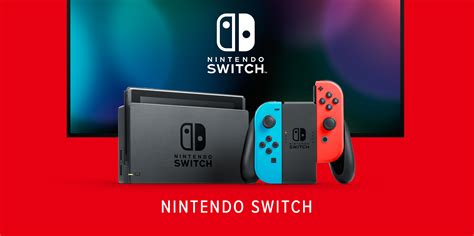
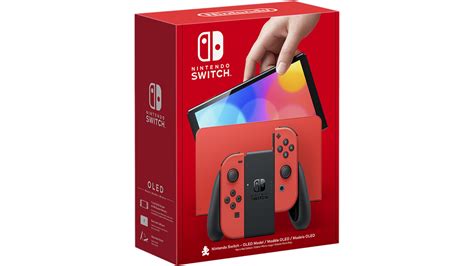
The Nintendo Switch, an incredible hybrid console, offers unparalleled gaming flexibility. However, its internal storage of 32GB (or 64GB for the OLED model) quickly becomes a bottleneck for even a modest digital game library. From hefty AAA titles like The Legend of Zelda: Tears of the Kingdom to numerous indie gems, games rapidly consume space. This is where a microSD card becomes not just an accessory, but an essential upgrade for any serious Switch owner.
Understanding the Switch’s microSD Requirements
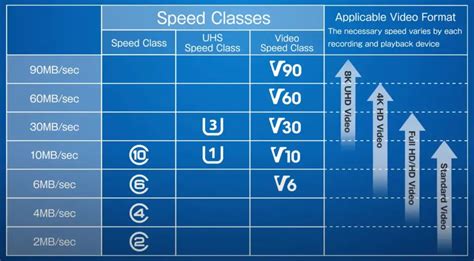
Before diving into specific recommendations, it’s crucial to understand what the Nintendo Switch actually needs from a microSD card. The console supports UHS-I (Ultra High Speed Phase I) cards, with a theoretical maximum speed of 104 MB/s. While faster UHS-II cards exist, the Switch does not utilize their enhanced speeds, making them an unnecessary expense.
Beyond sequential read/write speeds, you’ll also see A1 and A2 ratings. These refer to ‘App Performance Class’ and indicate a card’s ability to handle random read/write operations, which are critical for smooth game loading and operation. While A2 offers better random performance, the Switch benefits perfectly well from A1-rated cards, as the console itself can sometimes be the limiting factor.
Key Factors for Balancing Speed and Value
To find the best microSD card without overspending or underperforming, consider these factors:
- Speed (UHS-I, Class 10, A1): Look for cards with “UHS-I” and “Class 10” markings. Many cards boast “up to 100MB/s read speed,” which is ideal for the Switch. An A1 rating is a good bonus for overall game performance.
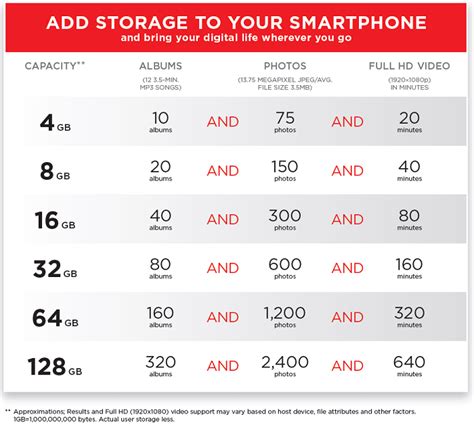
- Capacity: This is where value really comes into play. While 128GB is a good starting point, 256GB offers a sweet spot for many, and 512GB provides ample room for a large library. 1TB cards are available but often carry a significant premium per GB. Consider your current game library size and future download plans.
- Reliability & Brand Reputation: Stick to well-known, reputable brands. Counterfeit microSD cards are unfortunately common and can lead to data loss and poor performance. Brands like SanDisk, Samsung, and Lexar are generally trustworthy.
Top MicroSD Card Recommendations for Nintendo Switch
Based on balancing performance, reliability, and cost-effectiveness, here are some of the best options:
SanDisk for Nintendo Switch microSDXC
SanDisk offers officially licensed Nintendo Switch microSD cards. These cards are specifically designed and tested for the console, ensuring perfect compatibility and reliable performance. They typically come with fun Nintendo branding and deliver solid UHS-I, Class 10, A1 performance (up to 100MB/s read, 90MB/s write). While sometimes slightly pricier than non-licensed equivalents, the peace of mind and branding can be appealing.
SanDisk Extreme / Ultra Series
The standard SanDisk Extreme or Ultra series microSD cards are fantastic alternatives. They offer similar or even slightly better performance than the licensed versions at a potentially lower price point. Look for cards rated UHS-I, Class 10, and A1. The ‘Extreme’ series often boasts faster write speeds, which can be beneficial for transferring games.
Samsung EVO Select / EVO Plus
Samsung’s EVO Select and EVO Plus lines are highly regarded for their consistent performance, excellent reliability, and competitive pricing. These cards are typically UHS-I, Class 10, and A1 or A2 rated, providing speeds well within the Switch’s capabilities. They are a strong contender for overall value, often available in various capacities from 128GB to 512GB and beyond.
Lexar PLAY / HIGH-PERFORMANCE 633x
Lexar is another trusted brand offering robust microSD solutions. Their PLAY series is designed for gaming and mobile devices, providing excellent A1 or A2 performance. The HIGH-PERFORMANCE 633x series also delivers reliable UHS-I speeds, making them a solid choice for Switch storage expansion.

Installation and Management Tips
Once you’ve chosen your microSD card, installation is straightforward. Simply insert it into the slot beneath the kickstand on the back of your Switch. The console will prompt you to format it if necessary. To move existing downloaded games from internal storage to the microSD card, navigate to System Settings > Data Management > Move Data Between System / microSD Card.
Remember, while bigger is often better for storage, consider your budget and actual usage. A 256GB or 512GB card from a reputable brand offering UHS-I, Class 10, and A1 performance strikes the perfect balance for most Switch gamers, providing ample space and smooth gameplay without breaking the bank.
Conclusion: The Sweet Spot for Switch Storage
Ultimately, the “best” microSD card for your Nintendo Switch isn’t necessarily the fastest or the largest, but rather the one that provides reliable performance and sufficient capacity at a reasonable price. Focus on UHS-I (Class 10) cards with an A1 rating from reputable brands like SanDisk or Samsung. For most users, a 256GB or 512GB card hits the sweet spot for balancing speed, value, and future-proofing your game library. Invest wisely, and enjoy an uninterrupted, expansive gaming experience on your Nintendo Switch.


