What’s the best microSD card for Switch storage to play more games?
The Never-Ending Quest for Switch Storage
The Nintendo Switch, a marvel of portable gaming, comes with a significant caveat for avid gamers: its limited internal storage. With only 32GB (or 64GB for the OLED model) of built-in memory, a substantial portion of which is reserved for the system, it doesn’t take long for even a modest digital game library, system updates, and DLC to fill up. This quickly leads to the dreaded ‘storage full’ message, forcing tough choices about which beloved titles to uninstall. Fortunately, the solution is simple and readily available: a microSD card.
Adding a microSD card is the easiest and most cost-effective way to significantly expand your Switch’s storage, allowing you to keep a vast collection of games ready to play at a moment’s notice. But with a myriad of options on the market, how do you choose the best one?

Key Factors When Choosing a microSD Card for Your Switch
Not all microSD cards are created equal, especially when it comes to the demands of gaming. Here’s what to consider:
1. Capacity: How Much Storage Do You Need?
This is arguably the most critical decision. While microSD cards range from 32GB to 2TB, the sweet spot for most Switch gamers lies between 128GB and 512GB, with 1TB becoming increasingly popular for digital-only players. Keep in mind:
- 32GB-64GB: Only for very light users or those who primarily buy physical game cartridges.
- 128GB: A good starting point for casual gamers with a mix of physical and digital titles.
- 256GB: Ideal for most gamers, offering plenty of space for several large digital games and numerous smaller ones.
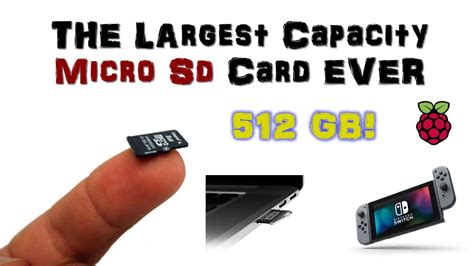
- 512GB: Excellent for dedicated digital gamers, allowing for a substantial library without much worry.
- 1TB+: The ultimate choice for those who download almost all their games or have an exceptionally large collection.
2. Speed: Why It Matters for Gaming
Beyond capacity, the speed of your microSD card directly impacts game loading times, installation speed, and even how smoothly certain titles run. Nintendo recommends using a UHS-I (Ultra High Speed Phase I) compatible card with a reading speed of 60-95 MB/s. Look for these speed indicators:
- UHS-I: Standard for Switch compatibility.
- Speed Class 10 (C10): Minimum recommended for HD video recording and generally good for gaming.
- UHS Speed Class 1 (U1) or 3 (U3): U3 offers faster minimum write speeds, which can be beneficial but U1 is usually sufficient for Switch gaming.
Faster read speeds (e.g., 100MB/s+) are always better for loading games quickly. Avoid generic or unbranded cards, as their advertised speeds are often unreliable.
3. Brand Reliability: Stick to the Known Names
When it comes to something as crucial as game storage, it’s best to invest in reputable brands. They offer consistent performance, better longevity, and reliable warranties. Leading brands include:
- SanDisk: Often considered the gold standard, especially their official Nintendo-licensed cards, which are optimized for the Switch.
- Samsung: Known for excellent performance and reliability with their EVO Select and PRO Plus lines.
- Lexar: Another strong contender offering good value and performance.
Recommended microSD Cards for Nintendo Switch
Based on capacity, speed, and brand reliability, here are some top recommendations:
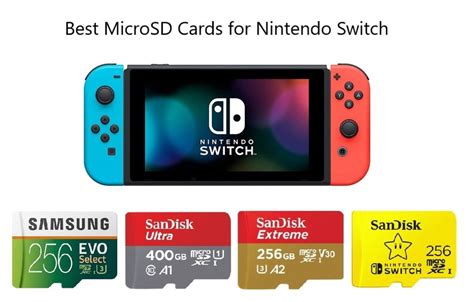
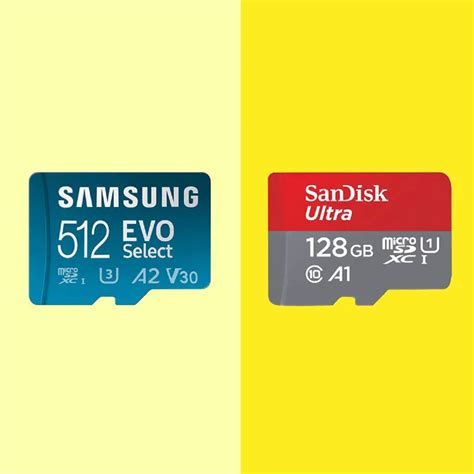
- SanDisk Ultra microSDXC UHS-I Card: A fantastic all-rounder, widely available, and offers excellent value. Available in capacities up to 1TB.
- SanDisk Extreme microSDXC UHS-I Card: For those seeking slightly faster performance, the Extreme series provides even quicker read/write speeds, though the difference might be negligible for most Switch games compared to the Ultra.
- SanDisk Nintendo-Licensed microSDXC Card: These cards feature iconic Nintendo designs (like Mario or Zelda) and are guaranteed to meet Nintendo’s specifications. While often a bit pricier, they offer peace of mind.
- Samsung EVO Select microSDXC UHS-I Card: A highly-rated alternative to SanDisk, offering similar performance and reliability at competitive prices.
- Samsung PRO Plus microSDXC UHS-I Card: Samsung’s premium offering, delivering top-tier speeds for demanding users.
Installation and Setup Tips
Installing your new microSD card is straightforward:
- Power Off: Completely power down your Nintendo Switch (hold the power button for a few seconds and select ‘Power Options’ > ‘Turn Off’).
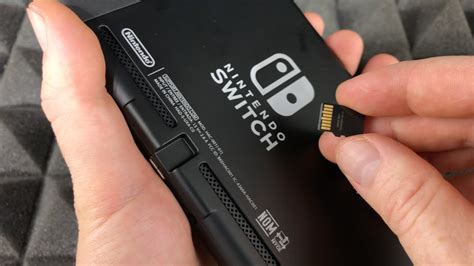
- Insert Card: Locate the microSD card slot on the bottom right of the kickstand (for original and OLED models) or the bottom edge (for Switch Lite). Insert the card face down until it clicks into place.
- Power On & Format: Turn your Switch back on. It will automatically detect the new card and prompt you to format it if necessary. Follow the on-screen instructions. Formatting will erase any data on the card, so ensure it’s empty if it’s not new.
- Transfer Data (Optional): If you’re upgrading from an old card, you’ll need to transfer your game data. This usually involves copying the contents of the old card to a computer, then to the new card, or re-downloading games directly to the new card.
Avoiding Counterfeit Cards
Be wary of suspiciously low prices, especially from unverified sellers. Counterfeit cards often have fake capacities or abysmal speeds. Always purchase from reputable retailers or official brand stores to ensure you get a genuine product.
Expanding Your Nintendo Switch Horizon
Choosing the right microSD card is an essential upgrade for any Nintendo Switch owner looking to maximize their gaming experience. By prioritizing a reputable brand, sufficient capacity, and appropriate speed, you can significantly expand your game library, reduce loading times, and spend more time playing and less time managing storage. With a well-chosen microSD card, your Switch will truly become a portable powerhouse, ready for any adventure you throw its way.