





What’s the best microSD card for Switch storage and game loading speed?

Why a MicroSD Card is Essential for Your Nintendo Switch
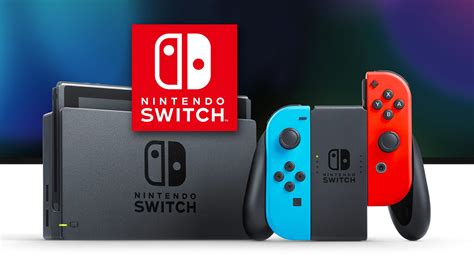
The Nintendo Switch, while brilliant for portable gaming, comes with a significant limitation: its internal storage. With only 32GB (or 64GB for the OLED model), a large portion of which is reserved for the system, digital game downloads and updates quickly fill up the available space. This is where a good microSD card becomes not just an accessory, but a necessity for any avid Switch gamer.
Beyond simply expanding storage, the speed of your microSD card can directly impact your gaming experience, influencing everything from game loading times to patch installations. Choosing the right card means less waiting and more playing.
Understanding MicroSD Card Specifications for Optimal Switch Performance
When shopping for a microSD card, you’ll encounter a bewildering array of numbers and symbols. For the Nintendo Switch, specific metrics are more important than others.
Capacity: How Much Storage Do You Really Need?
This is straightforward: more is generally better. Digital-only games can range from a few gigabytes to over 50GB (e.g., The Legend of Zelda: Tears of the Kingdom). Consider your gaming habits:
- 64GB-128GB: Good for physical game collectors or casual digital buyers.
- 256GB-512GB: Ideal for most digital-first gamers, offering ample space for a sizable library.
- 1TB+: For hardcore digital collectors or those who want to future-proof their console for years to come.
Speed: The Key to Faster Loading Times
This is where performance truly comes into play. The Nintendo Switch supports UHS-I microSD cards, with a maximum theoretical speed of 104 MB/s. While UHS-II cards exist and are faster, the Switch does not utilize their additional pins, so investing in one would be a waste.
Look for these indicators:
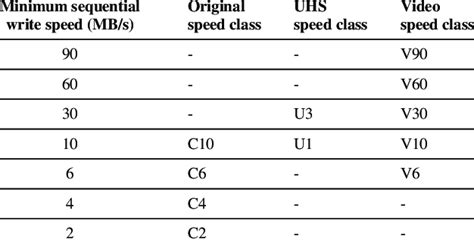
- UHS Speed Class 3 (U3): This is the minimum recommended speed for the Switch. It guarantees a sustained write speed of at least 30 MB/s, crucial for large game files and updates.
- Video Speed Class V30: Often paired with U3, also indicating a sustained write speed of 30 MB/s.
- Application Performance Class A1 or A2: These classes are designed for faster app loading and performance on Android devices, but they also translate to better random read/write performance beneficial for games on the Switch. A2 is technically faster than A1 but both provide excellent performance for the Switch.
In summary, aim for a UHS-I card with U3 and ideally A1 or A2 ratings for the best balance of speed and compatibility with your Switch.
Top MicroSD Card Recommendations for Nintendo Switch
While many brands offer suitable microSD cards, some consistently stand out for their reliability and performance on the Switch. It’s always best to purchase from reputable retailers to avoid counterfeits.
- SanDisk Ultra (UHS-I, A1/A2, U1/U3): A very popular and reliable choice. The official Nintendo-licensed SanDisk cards are essentially rebranded Ultra cards, optimized for the Switch (and often feature Nintendo characters). They offer excellent read and write speeds for gaming.
- SanDisk Extreme / Extreme Pro (UHS-I, A2, U3): These are premium options offering even faster read/write speeds, which can marginally improve loading times further. They are excellent if you want the absolute best performance within the Switch’s limitations.
- Samsung EVO Select / EVO Plus (UHS-I, A2, U3): Samsung’s EVO line is another strong contender, known for its consistent performance and value. They are often a slightly more budget-friendly alternative to SanDisk while maintaining high quality.
Focus on cards that boast high read speeds (often up to 100MB/s) and U3 / A1 or A2 ratings. These will provide a noticeable boost over slower, generic cards.
The Impact of MicroSD Card Speed on Game Loading Times
While a faster microSD card won’t magically make your games run at a higher frame rate, it can significantly reduce the time you spend staring at loading screens. Tests often show that a high-quality A2/U3 card can shave off several seconds from game loading times compared to a basic U1 card or even the Switch’s internal storage for certain games.
For example, a game that takes 30 seconds to load from a slow card might load in 20-25 seconds from a premium one. This might seem minor, but it adds up over countless game sessions, quick travels, and level transitions. More importantly, it ensures smooth operation when installing updates or transferring large data files.

Installation and Maintenance Tips
Installing a microSD card into your Switch is straightforward:
- Power off your Switch completely (hold the power button, then select Power Options > Turn Off).
- Open the kickstand on the back of the console to reveal the microSD card slot.
- Insert the microSD card with the label facing down, pushing it in until it clicks.
- Close the kickstand and power on your Switch.
The Switch will automatically detect and format the card if it hasn’t been used before. You can then manage your data in the System Settings under “Data Management.”

Conclusion: The Best Choice for Your Switch
For the optimal balance of storage, speed, and value, we recommend a UHS-I microSD card with a U3 speed class and an A1 or A2 rating, with a capacity of 256GB or 512GB. Brands like SanDisk (especially the Nintendo-licensed ones or Extreme/Extreme Pro) and Samsung EVO Select/Plus consistently deliver excellent performance for the Nintendo Switch.
Investing in a high-quality microSD card will not only expand your game library significantly but also ensure a smoother, more enjoyable gaming experience with faster loading times and seamless data management.


