





What’s the best microSD card for Switch gaming to expand storage efficiently?

Why Your Nintendo Switch Needs a Storage Upgrade
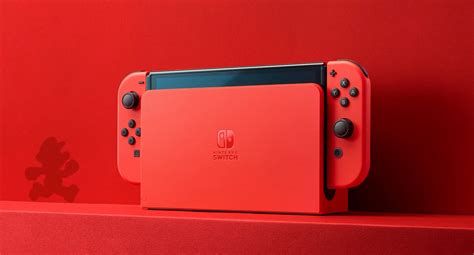
The Nintendo Switch, with its modest 32GB (or 64GB for the OLED model) of internal storage, quickly fills up, especially if you prefer digital downloads. Many popular games, like The Legend of Zelda: Tears of the Kingdom or Pokémon Scarlet/Violet, can individually consume a significant chunk of that space. To avoid constant archiving and re-downloading, investing in a high-quality microSD card is essential for expanding your game library efficiently and ensuring smooth gameplay.
Key Factors When Choosing a microSD Card for Switch
Not all microSD cards are created equal, and some are better suited for the demands of gaming than others. Here’s what to look for:
1. Speed: UHS-I is Your Standard
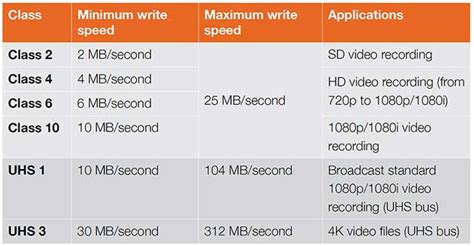
The Nintendo Switch supports the UHS-I (Ultra High Speed Phase I) interface. While faster UHS-II cards exist, the Switch cannot take advantage of their increased speeds, making them an unnecessary expense. Instead, focus on UHS-I cards with a good speed rating:
- UHS Speed Class 3 (U3) or V30 (Video Speed Class 30): These classifications indicate a minimum sustained write speed of 30 MB/s, which is ideal for game downloads, updates, and overall performance on the Switch. Most reputable gaming-focused microSD cards will meet or exceed these specifications.
Look for cards labeled with a ‘U3’ symbol or ‘V30’ symbol on the packaging. While the Switch doesn’t require extreme speeds, a faster card can slightly reduce game load times and make transferring data quicker.
2. Capacity: How Much Do You Really Need?
The ideal capacity depends heavily on your gaming habits. Nintendo Switch games vary widely in size, from a few hundred megabytes to over 20GB for AAA titles. Consider these common capacities:
- 128GB – 256GB: Good for casual gamers or those who mostly buy physical cartridges. Will hold a decent collection of digital indies and a few larger titles.
- 400GB – 512GB: An excellent sweet spot for most digital-heavy gamers. Provides ample space for a substantial library without breaking the bank.
- 1TB: For hardcore digital collectors who want to download everything. This offers maximum peace of mind but comes at a higher price point.
Remember, it’s always better to slightly overestimate your needs, as games and updates tend to grow over time.
3. Brand Reliability and Durability
Stick with reputable brands known for quality and reliability. SanDisk and Samsung are consistently top performers in the microSD card market, offering excellent performance, durability, and warranty support. Lesser-known brands might offer cheaper alternatives, but the risk of data corruption or early failure isn’t worth saving a few dollars.

Top Recommended microSD Cards for Nintendo Switch
Based on speed, reliability, and value, these cards consistently rank as the best choices for Switch gamers:
1. SanDisk microSDXC for Nintendo Switch
This officially licensed card is a no-brainer. It’s specifically designed and tested for the Switch, ensuring optimal compatibility and performance. Available in various capacities (64GB to 1TB), it typically features U3 speeds and iconic Nintendo branding. It offers excellent read speeds for quick game loading.
2. SanDisk Extreme / Extreme Pro
While not officially licensed, the SanDisk Extreme series offers fantastic performance (UHS-I, U3, V30) and durability. It’s often available at competitive prices, especially during sales, making it a great value alternative to the official card. The Extreme Pro offers even slightly higher peak speeds, though the difference on Switch is negligible.
3. Samsung EVO Select / EVO Plus
Samsung’s EVO series cards are also excellent performers. The EVO Select (often Amazon-exclusive) and EVO Plus lines offer strong read and write speeds (UHS-I, U3, V30) at very competitive price points. They are known for their reliability and are a popular choice among Switch users looking for a high-quality, cost-effective solution.
Installing and Formatting Your New microSD Card
Adding a microSD card to your Switch is straightforward:
- Power Off: Completely power down your Nintendo Switch.
- Insert Card: Locate the microSD card slot on the bottom of the kickstand (for standard Switch) or under the console itself (for Switch Lite/OLED). Insert the card until it clicks into place.
- Power On: Turn your Switch back on.
- Format (if prompted): The Switch will detect the new card and might prompt you to format it. Follow the on-screen instructions. This process is quick and prepares the card for game storage.
Once formatted, your Switch will automatically prioritize the microSD card for new game downloads and updates. You can also transfer existing game data from internal storage to the card via the System Settings.
Conclusion: Make the Smart Choice for Seamless Gaming
Expanding your Nintendo Switch storage with a quality microSD card is perhaps the most impactful accessory purchase you can make as a Switch owner. By prioritizing UHS-I U3/V30 speed ratings, selecting a capacity that fits your gaming habits, and sticking to trusted brands like SanDisk or Samsung, you’ll ensure a smooth, frustration-free gaming experience for years to come. Don’t let limited storage hold back your digital library – upgrade today and keep all your favorite titles at your fingertips.


